


|
|

This chapter describes the preinstallation guidelines and some configurations for FastHub 116T. These guidelines and configurations can help you determine how FastHub 116T fits into your network.
FastHub 116T can be installed in the same locations as your other Ethernet hubs, bridges, routers, and servers. By following these simple guidelines, FastHub 116T will be easy to install and maintain.
The FastHub can be table, shelf, or rack mounted. The FastHub will typically be located in a wiring closet or data center, although it can also be located in an office environment. The key requirement is that FastHub 116T be located within 100 meters of its attached servers and workstations.
The FastHub 116T LEDs and cable connectors are located on the front panel, so make sure you can see and access the FastHub 116T from the front after mounting.
The UTP cables used for the Fast Ethernet ports are sensitive to noise, so make sure the cable routing is not near electrical noise, power lines, or fluorescent lights. See the "Technical Specifications" appendix for more information.
The Fast Ethernet ports are compatible with the 100Base-TX specification and will connect to any 100Base-TX device.
There are simple guidelines for cabling the FastHub 116T. The following figures show some common configurations and the guidelines that would apply. In general, workstations and servers can be connected to the FastHub 116T by cables 100 meters long or less. Two FastHub 116Ts can be connected together as long as the total length of the cable from node to node through the repeaters is less than 210 meters.
This "210-meter rule" can be derived from Fast Ethernet topology requirements. The maximum distance, including the equivalent "distance" associated with the repeater, between any two nodes on a repeated Fast Ethernet network, is 400 meters. Since the FastHub 116T is equivalent to 95 meters of cable, the maximum length from node to node through two repeaters is the following:
400 -- 95 -- 95 = 210 meters
Fast Ethernet ports require Category 5 UTP cabling. The cable connecting to the attached server, workstation, or hub must be less than 100 meters long. The server or workstation must have a 100Base-TX compatible adapter installed.
Figure 2-1 The FastHub 116T Interconnecting 16 Workstations or Servers
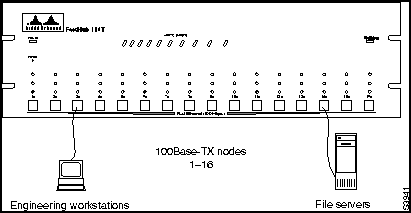
The FastHub 116T can be used to interconnect up to 16 workstations or servers. The only rule that applies to this configuration is that the cable connecting the workstations and servers to the FastHub 116T can be no longer than 100 meters.
Figure 2-2 Power Workgroups
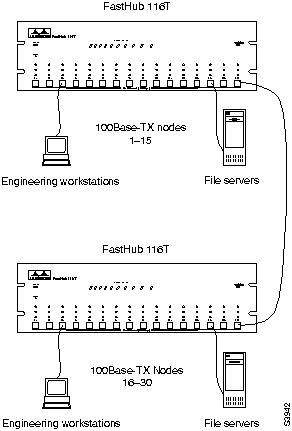
You can build 100Base-TX power workgroups of up to 30 nodes using two daisy-chained FastHub 116Ts. The workgroup can consist of both workstations and servers, which in each case require a 100Base-TX adapter.
Only two FastHub 116Ts can be daisy-chained in this manner, and the total length of the cable from node to node through the repeaters must not exceed 210 meters.
This "210-meter rule" can be applied to any configuration including two FastHub 116Ts, or a FastHub 116T and a Catalyst 1700. If the length of cable between the two FastHub 116Ts is 10 meters, then each workstation or server can be connected to its FastHub 116T by a cable of no more than 100 meters long.
If the length of cable between the two repeaters is 50 meters, then each workstation or server can be connected to its FastHub 116T by a cable of no more than 80 meters long. (50 + 80 + 80 = 210 meters.)
Or, one cable could be 60 meters long and the other cable 100 meters long, since
50 + 60 +100 = 210 meters.
Figure 2-3 High-Density Catalyst 1700 Aggregation
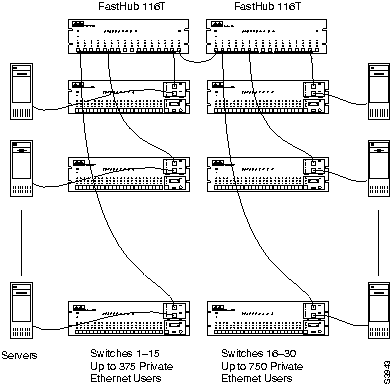
You can use two FastHub 116Ts to aggregate up to 30 Catalyst 1700s. All interswitch traffic would use the 100Base TX local backbone provided by the FastHub 116Ts. This configuration supports up to 750 private Ethernet nodes and 30 switched Fast Ethernet servers, each conected to a FastHub 116T.
Only two FastHub 116Ts can be connected in this manner, and the 210 meter rule shown above applies to any two Catalyst 1700s connected through the repeaters. The cable from each server to its Catalyst 1700 can be up to 100 meters long, outside the application of the 210-meter rule.
The maximum cable distance between server 1 and server 30 can be tabulated as follows:
Figure 2-4 Server Farms
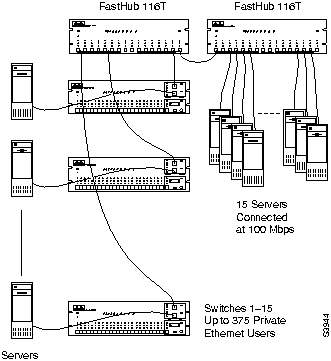
Two FastHub 116Ts can be used to interconnect up to 30 100Base-TX equipped, high performance servers. This server farm could then be connected to users via Catalyst 1700s or via router software in the server. Only two FastHub 116Ts can be connected in this manner, and the 210-meter rule from the configuration shown above applies.
Figure 2-5 FastHub 116T Connected to a Catalyst 1700
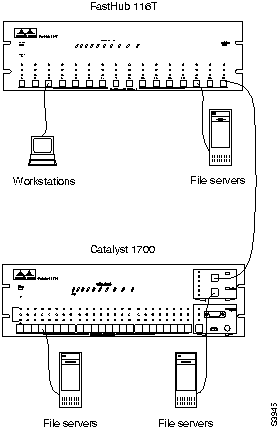
A FastHub 116T can be connected to a Catalyst 1700 by cabling between one of the ports on the FastHub 116T and one of the two shared ports on the Catalyst 1700. The shared ports on the Catalyst 1700 serve as a repeater with the same configuration requirements as the FastHub 116T.
Again, the 210-meter rule applies to any two nodes connected through the Catalyst 1700 shared ports and the FastHub 116T. A workstation or server connected to the Catalyst 1700 switched port may use a cable up to 100 meters long without regard to the cabling between the Catalyst 1700 shared ports and the FastHub 116T.

|
Copyright 1988-1996 © Cisco Systems Inc.