


|
|

Upgrading the Serial Port Communications Interface (SCI) Card to Microcode Version 5.1
Product Numbers: MC-SCI-V5.1= and MC-SCI-V5.1A=
This configuration note describes the maintenance upgrade procedures for the serial port communications interface (SCI) cards to Microcode Version 5.1. To complete the upgrade, you will replace twelve integrated circuit components. The new components are shipped as part of the SCI Version 5.1 upgrade kit, which you will use to upgrade your system software version. This upgrade is for SCI cards currently at Revision 2.
Microcode Version 5.1 supportsonly three serial ports, but each of the ports can be configured for either full- or half-duplex operation. (Half-duplex operation requires the V2 NRZI applique, which is identified by the letters "NRZI/H" on the label on the outside of the applique plate.)
Electrostatic discharge damage (ESD) occurs when electronic printed circuit cards are improperly handled and can result in complete or intermittent failures. ESD can impair electronic circuitry and equipment. Always follow ESD prevention procedures when removing and replacing cards. Following are steps for handling printed circuit cards:

Verify that your current SCI card is marked Rev. /2. Then use the EXEC command show controller mci to confirm the current microcode version. The first line displayed on the screen contains the controller type and the microcode version. Verify that it displays the following:
MCI X, controller type 2.0, microcode version 1.3 (or 5.0)
Verify that the microcode version shown is correct for your upgrade kit. For upgrade kit
MC-SCI-V5.1=, the microcode should be version 1.0. For upgrade kit MC-SCI-V5.1A=, the microcode should be Version 1.1 or later. If you have the incorrect upgrade kit, contact a service representative.

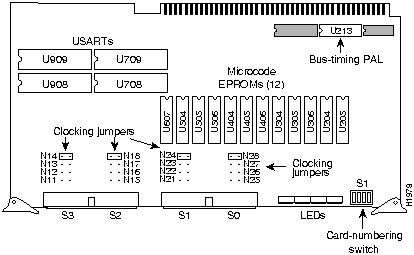
Figure 1 SCI Card---Component-Side View
Follow this procedure to upgrade the SCI card. Before beginning, refer to Figure 1 and locate the components you will replace. The labels of the sockets and the part numbers of both the new (replacement) components are listed in Table 1. Note that some components can be supplied in one of several part numbers.
Table 1 Revision 2 SCI Card Microcode Component Numbers
| Socket Location | Old Component Numbers |
New Component Numbers(1) |
|---|---|---|
| U607 | 17-1624-01 U607 | 17-1624-02 U607 |
| U504 | 17-1623-01 U504 | 17-1623-02 U504 |
| U505 | 17-1622-01 U505 | 17-1622-02 U505 |
| U506 | 17-1619-01 U506 | 17-1619-02 U506 |
| U404 | 17-1618-01 U404 | 17-1618-02 U404 |
| U405 | 17-1614-01 U405 | 17-1614-02 U405 |
| U406 | 17-1613-01 U406 | 17-1613-02 U406 |
| U304 | 17-1621-01 U304 | 17-1621-02 U304 |
| U305 | 17-1620-01 U305 | 17-1620-02 U305 |
| U306 | 17-1617-01 U306 | 17-1617-02 U306 |
| U204 | 17-1616-01 U204 | 17-1616-02 U204 |
| U205 | 17-1615-01 U205 | 17-1615-02 U205 |
| U213(2) | 17/0675-01 U213 or 17/0675B-01 U213 or 13/107B-01 U213 | 17/0675-01 U213 or 17/0675B-01 U213 or 13/107B-01 U213 |
| U7082 | R68561AP-01 U708 | R68561AP-01 U708 |
| U7092 | R68561AP-01 U709 | R68561AP-01 U709 |
| U9082 | R68561AP-01 U908 | R68561AP-01 U908 |
| U9092 | R68561AP-01 U909 | R68561AP-01 U909 |
This completes the upgrade procedure.



|
Copyright 1988-1995 © Cisco Systems Inc.