
Table of Contents
Preparing for Installation
Preparing for Installation
Before installing the CDDI/FDDI SBus adapter, please read this chapter carefully.
Safety Recommendations
Follow these guidelines to ensure general safety:
- Keep the equipment area clear and dust-free during and after installation.
- When you remove the SPARCstation or SPARCserver cover, put it in a safe place.
- Keep tools away from walk areas where you and others could trip over them.
- Do not wear loose clothing that could get caught in the equipment. Fasten your tie or scarf and sleeves.
- Wear safety glasses when working under any conditions that might be hazardous to your eyes.
- Do not perform any action that creates a potential hazard to people or makes the equipment unsafe.
Safety with Electricity
Follow these guidelines when working on equipment powered by electricity.
 Warning Before working on equipment that is connected to power lines, remove jewelry (including rings, necklaces, and watches). Metal objects will heat up when connected to power and ground and can cause serious burns or weld the metal object to the terminals.
- Locate the emergency power-off switch for the room in which you are working. Then, if an electrical accident occurs, you can act quickly to turn off the power.
- Before working on the system, turn off the power and unplug the power cord.
- Disconnect all power before doing the following:
- Installing or removing an adapter
- Working near power supplies
- Do not work alone when potentially hazardous conditions exist.

Warning Do not work on the system or connect or disconnect cables during periods of lightning activity. (To see translated versions of this warning, refer to the section "Lightning Activity Warning" in the appendix "Translated Safety Warnings.")
- Never assume that power has been disconnected from a circuit. Always check.
- Look carefully for possible hazards in your work area, such as moist floors, ungrounded power extension cables, and missing safety grounds.
- If an electrical accident occurs, proceed as follows:
- Use caution; do not become a victim yourself.
- Turn off power to the system.
- If possible, send another person to get medical aid. Otherwise, assess the condition of the victim and then call for help.
- Determine if the person needs rescue breathing or external cardiac compressions, then take appropriate action.

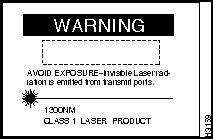
Warning Invisible laser radiation may be emitted from the aperture ports of the single-mode FDDI card when no cable is connected. Avoid exposure and do not stare into open apertures. Following is an example of the warning label that appears on the product. (To see translated versions of this warning, refer to the section "Invisible Laser Radiation Warning" in the appendix "Translated Safety Warnings.")
Preventing Electrostatic Discharge Damage
Electrostatic discharge (ESD) can damage equipment and impair electrical circuitry. It occurs when electronic components are improperly handled and can result in complete or intermittent failures.
Always follow ESD-prevention procedures when removing and replacing components. Ensure that the chassis is electrically connected to earth ground. Wear an ESD-preventive wrist strap, ensuring that it makes good skin contact. Connect the clip to an unpainted chassis frame surface to safely channel unwanted ESD voltages to ground. To properly guard against ESD damage and shocks, the wrist strap and cord must operate effectively. If no wrist strap is available, ground yourself by touching the metal part of the chassis.
 Caution For safety, periodically check the resistance value of the antistatic strap, which should be between 1 and 10 Mohms.
Site Requirements
Following are the site requirements for installation.
Environment
Choose a clean, dust free, (preferably) air-conditioned location. Avoid direct sunlight, heat sources, or areas with high levels of electromagnetic interference (EMI).
Adapter Accessibility
Because the adapter faceplate status indicators provide information that you may need to monitor, make the rear of the SPARCstation or SPARCserver accessible. Leave sufficient clearance at the rear of the SPARCstation or SPARCserver for cabling and service.
Power
The source electrical outlet should be installed near the SPARCstation or SPARCserver, easily accessible, and properly grounded. Power should come from a building branch circuit. Use a maximum breaker current rating of 20A for 110V or 8A for 230V. Note the power consumption ratings of each unit before you connect to a power source.
 Warning Before working on a system that has an on/off switch, turn OFF the power and unplug the power cord. (To see translated versions of this warning, refer to the section "Power Disconnection Warning" in the appendix "Translated Safety Warnings.")
 Warning Do not touch the power supply when the power cord is connected. For systems with a power switch, line voltages are present within the power supply even when the power switch is off and the power cord is connected. For systems without a power switch, line voltages are present within the power supply when the power cord is connected. (To see translated versions of this warning, refer to the section "Power Supply Warning" in the appendix "Translated Safety Warnings.")
 Warning Before you work on a system that does not have an ON/OFF switch, unplug the power cord. (To see translated versions of this warning, refer to the section "No On/Off Switch Warning" in the appendix "Translated Safety Warnings.")
Cabling Requirements
Following are the cabling requirements for installation. For pinouts of the following cable types, refer to the appendix "Cabling and Pinout Information."
FDDI
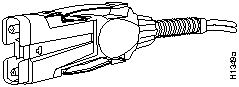
The multimode FDDI connectors on the CDDI/FDDI SBus adapter accept 50/125-micron multimode fiber, with standard FDDI media interface connector (MIC)--type connectors. (See Figure 2-1.) The maximum transmission distance between stations must not exceed 1.2 miles (2 km).
Figure 2-1 : Multimode FDDI Interface Connector---MIC Type
CDDI
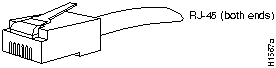
Check all existing cables for conformance with CDDI/multilevel transmission (MLT)-3 distance requirements and to ensure that you have the proper connectors (modular RJ-45). (See Figure 2-2.)
Figure 2-2 : CDDI Interface Connector---RJ-45 Type
Following are cable and distance specifications:
- Data-grade unshielded twisted-pair (UTP)
- Electronics Industries Association/Telecommunications Industries Association (EIA/TIA) 568 Category 5, data-grade cable is recommended for CDDI installations. The total length of data-grade UTP cable from the adapter or media attachment unit (MAU) to the switch must not exceed 330 feet (100 m), including patch cords and cross-connect jumpers.
- You can use IBM Type 1 shielded twisted-pair (STP) wiring for your CDDI installation. The total length of STP cable measured from the adapter or MAU to the switch must not exceed 330 feet (100 meters).
Note You must use high-performance, Category 5, data-grade, modular cables for external connections.
When you plan your CDDI installation, remember the following:
- Do not use bridge taps.
- Do not use protection coils.
- Do not share services (such as voice and data) on the same cable. CDDI uses two of the four pairs in the twisted-pair cable. The remaining two pairs cannot be used for other applications.
- Do not exceed the maximum cable length for CDDI UTP and STP of 330 feet (100 meters).
Tools and Materials Required
To install the CDDI/FDDI SBus adapter, you need the following tools and supplies:
- Phillips screwdrivers: No. 0 and No. 2
- Flat-blade screwdriver (600MP series only)
- Small Allen wrench (600MP series only)
- ESD-preventive wrist strap (recommended)
- SunOS driver diskette
- Solaris driver diskette
Copyright 1988-1996 © Cisco Systems Inc.



