


|
|

This chapter gives an overview of the CDDI and FDDI SBus adapters. It contains information about the hardware and software required to run the SBus adapters, as well as important unpacking and registration information.
CDDI/FDDI SBus adapters are high-performance cards that connect a SPARCstation or SPARCserver to a CDDI or FDDI ring. The adapter provides a single attachment station (SAS) or dual attachment station (DAS) connection that is compliant with Station Management (SMT) 7.3, including a Simple Network Management Protocol (SNMP) agent for network management.
CDDI/FDDI SBus adapters ensure high performance by maximizing data throughput and minimizing network overhead on the host processor. Downloadable firmware permits convenient upgrades and eliminates the need to swap programmable read-only memory (PROM) chips.
The SBus adapters feature a highly integrated design. They contain several high-performance features to ease internal data flow and minimize overhead on the host processor. To maximize throughput, the adapters support 32-bit-wide SBus data transfers and data bursts of up to 64 bytes. Bus mastering via two specially designed direct memory access (DMA) channels and an onboard SMT processor minimize host processor intervention.
SBus adapters incorporate the current SMT revision (the FDDI Station Management specification). Each adapter includes an SNMP agent, which allows it to be monitored by any SNMP network management station, such as SunNet Manager. The adapter firmware can be downloaded to enable you to easily update SMT versions.
Single Attachment SBus Adapters
Single attachment SBus adapters (shown in Figure 1-1 and Figure 1-2) are designed for a single SBus master (M) slot. The adapter has two LED indicators on the faceplate so that you can easily monitor the adapter's internal status and the CDDI/FDDI link.
Figure 1-1 : FDDI Single Attachment SBus Adapter

Figure 1-2 : CDDI Single Attachment SBus Adapter

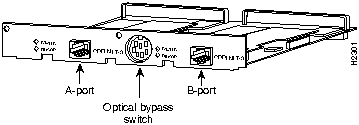
Dual attachment SBus adapters are single-board, dual-slot adapters. The adapter has two sets of LED indicators on the faceplate so that you can easily monitor its internal status and the CDDI/FDDI link. There is also a connector for an optical bypass switch. The CDDI version is shown in Figure 1-3.
Figure 1-3 : CDDI Dual Attachment SBus Adapter
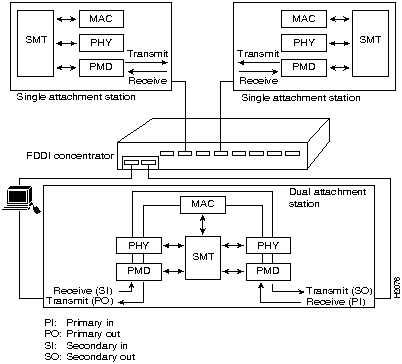
A workstation with a dual attachment adapter can connect directly to the primary and secondary FDDI rings, or be connected to M ports on two concentrators in a dual homed configuration. The adapter has two PHYs (physical), two PMDs (physical medium dependent), one MAC (media access control) sublayer, and one SMT controller. (See Figure 1-4.)
Figure 1-4 : Single Attachment and Dual Attachment Stations
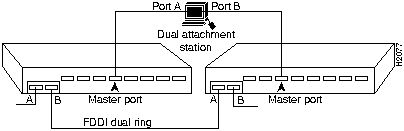
You can also connect a dual attachment station in the redundant configuration called dual homing. In Figure 1-5, a dual attachment station is connected to two concentrators that are connected to the dual ring. Port A on the station is the backup connection and becomes active only if the primary connection (port B) fails.
Each CDDI/FDDI adapter has two LED indicators on the faceplate so that you can easily monitor the adapter's internal status and the CDDI/FDDI link. Figure 1-6 and Figure 1-7 show the LEDs on both the single and dual attachment adapters. See Figure 1-1 and Figure 1-2 for the locations of the LEDs on the single attachment adapters.
Figure 1-6 : FDDI Dual Attachment Adapter

Figure 1-7 : CDDI Dual Attachment Adapter

The status LED monitors the adapter's status. If this LED is on, the adapter has passed its internal diagnostics test.
The ringop LED monitors ring operation. If this LED is on, the adapter is connected to the CDDI/FDDI ring. See the section "Checking the Adapter LEDs" in Chapter 4 for a complete description of the ringop LED.
This section describes the hardware and software requirements of host systems in which CDDI/FDDI SBus adapters can be installed.
The CDDI/FDDI SBus adapters are designed to be installed in any available SBus M slot in a SPARCstation or SPARCserver. Examples of compatible systems include:
The SPARCstation must be running SunOS Version 4.1.x or Solaris Version 2.x.
Please check your CDDI/FDDI SBus adapter and all package contents carefully to make sure that no damage occurred during shipping.
The CDDI/FDDI SBus adapter package contains the following items:
Before you open the package, inspect it for damage that might have occurred during shipping. If you notice damage, notify your carrier immediately. Unpack your SBus adapter to ensure that it has arrived in good working order.
Copyright 1988-1996 © Cisco Systems Inc.
