


|
|

Cisco Product Numbers
APP-JG71 Applique with one connector (A-type Chassis)
APP-LG72 Applique with two connectors (A-type Chassis)
APP-LG74 Applique with four connectors (A-type Chassis)
APP-LG76 Applique with six connectors (A-type Chassis)
APP-LG78 Applique with eight connectors (A-type Chassis)
APP-IG71 Applique with one connector (M and C-type Chassis)
APP-SG72 Applique with two connectors (M and C-typeChassis)
APP-SG74 Applique with four connectors (M-type Chassis)
Cisco Systems uses the term applique for any hardware unit that provides the external interface connections from a router to the network. This publication contains instructions for installing the G.703 applique into a Cisco router. The G.703 applique is a single-port device designed for direct connection to G.703 Service Category type 5C operating at 2 Mbps over digital private circuits (as described in the OFTEL standard, OTR 001, "Technical Requirements for Private Branch Exchanges with Telecommunications Ports"). The G.703 applique is available as a data terminal equipment (DTE) interface only.
This publication covers the following:
Before beginning installation, read this entire publication to ensure that you have all the necessary tools and equipment, and that you have the correct modules for your system configuration.
The G.703 network interface is the output port, consisting of two bayonet (BNC) connectors, adjacent to the approval symbol. The input port is connected by a ribbon cable to either a CSC-MCI or CSC-SCI interface card.
Clock (timing) for the G.703 applique is derived from the network input at approximately 2048 Kbps.
The G.703 applique is designed to operate under the following conditions (see Table 1).
Table 1 G.703 Applique Hardware Specifications
| Specification | Description |
|---|---|
| Environment | 5 to 40 degrees Celsius (41 to 104 degrees Fahrenheit) |
| Humidity | 10--90 % (noncondensing) |
| Power | 5V (+/- 5%), 150mA |
The G.703 applique can come mounted on individual, dual, or ladder connector plates, which are then installed in the rear of the Cisco chassis, component side up. Figure 1 shows the G.703 applique individual connector plate.
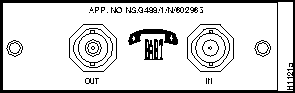
Figure 1 G.703 Applique Individual Connector Plate
Figure 2 shows the G.703 ladder plate option.
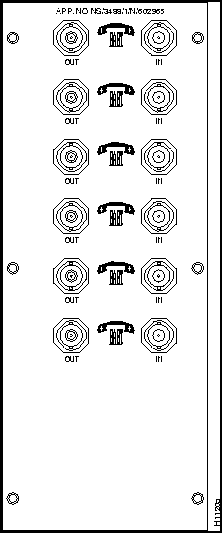
Figure 2 G.703 Ladder Plate Option
Figure 3 shows an example of an individual-size connector plate positioned as it is installed in an A chassis. You must use a BNC transition cable to provide a standard G.703 external connection.
A ribbon cable connects each port on the applique internally to a serial network interface card in the system card cage. For further information on connector plates and how they are installed in the chassis, refer to the Cisco Systems installation and maintenance publication you received with your system.
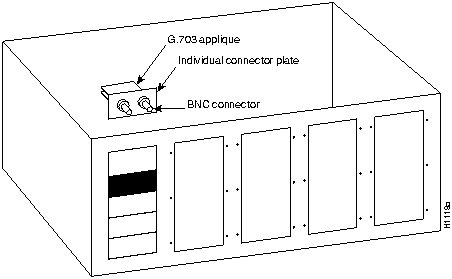
Figure 3 G.703 Applique on an Individual Connector Plate
The serial interface controller card can be a Serial-Port Communications Interface (CSC-SCI) Card that provides up to four serial ports or a Multiport Communications Interface (CSC-MCI) Card that provides up to two serial ports.
Before installing the applique, ensure that your system meets the following prerequisites:
If your current system configuration does not meet all of the above requirements, contact your service representative for information on hardware upgrades.
Before beginning this procedure, ensure that you have the following parts:
If any of these parts appear damaged, contact your service representative for a replacement.
You will need some or all of the following tools to perform the installation procedures. Before you begin, read through the procedure to determine which tools you need for your chassis and task.
These warning notices apply to the Input Port, the port marked "SAFETY WARNING: see instructions for use."

Interconnection of the applique Input Port (the port marked "SAFETY WARNING: see instructions for use), directly, or by way of any other apparatus, with ports on other apparatus (marked or not so marked) may produce hazardous conditions on the network. Users should seek advice from a competent engineer before making such a connection.
The applique is approved as Independent of Host. As such, the applique is only approved for use with a host and with host attachments that are either type approved in their own right, or, if supplied after 1st March 1989, are covered by the terms of the General Approval number NS/G/1234/J/100003. A Host supplied under the terms of the General Approval number NS/G/1234/J/100003 satisfies the conditions of the paragraphs above.
The applique must not be modified in any way. Any form of modification invalidates the approval for connection, and the Cisco warranty of the unit. The applique approval label must be visible externally. The approval label must not be detached from the applique, nor attached to the host.
The terms of the approval require that there must be a minimum distance (5mm) between the applique and any other part of the host, including other Cisco appliques. This condition is met by default when the applique is installed in a Cisco enclosure in accordance with the instructions. If voltages greater than 250V are present in the host, users should refer to a competent safety engineer for advice.
It is a condition of the approval that a copy of these user instructions and safety warnings must be supplied with the host. Failure to provide the applique user instructions with the host will invalidate the applique approval.
Failure to install the applique in accordance with these instructions will invalidate the approval. If you experience difficulties, or are in any doubt, contact your Cisco representative.
Electrostatic Discharge (ESD) is a discharge of stored static electricity that can damage equipment and impair electrical circuitry. It occurs when electronic printed circuit cards are improperly handled and can result in complete or intermittent failures.
Whenever you install or remove an applique, follow these steps:
Cisco makes three modular chassis styles: A, M, and C. The applique mounting brackets vary by system type. Each applique is supplied with a single small mounting bracket. The applique can also be used with larger mounting brackets, where multiple G.703 appliques are required in a single system.
External connection to the G.703 network interface must be made by using cables of the correct specification. The BNC cables required have the following characteristics.
Following are procedures for installing the G.703 applique in your chassis. The applique is mounted on a connector plate, which you will install in the rear of the chassis. Before proceeding, ensure that your system meets the requirements listed in "Installation Prerequisites."
If you are adding a CSC-SCI or CSC-MCI card to your system in addition to the G.703 applique, then it will be necessary to set the unit number as described in "Unit Numbering." If you are not adding an additional CSC-SCI or CSC-MCI card, then proceed to "Opening the Chassis."
The unit numbers of the CSC-SCI and CSC-MCI cards must be unique. Unit numbers are assigned by setting a dip switch (S1) which is located in the upper left corner of the CSC-SCI card, next to the bank of LEDs, as shown in Figure 4 (the switch is actually on the front edge of the card when viewed with the card installed in the card cage).
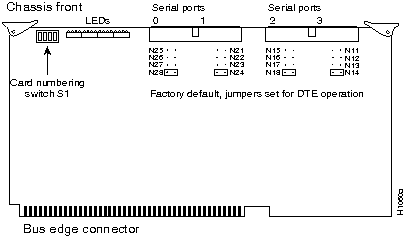
Figure 4 CSC-SCI Card and Jumpers Set for DTE Operation
Table 2 lists the CSC-SCI switch S1 settings for unit numbering.
Table 2 CSC-SCI Switch S1 Settings for Unit Numbering
| Unit | S1-1 | S1-2 | S1-3 | S1-4 |
|---|---|---|---|---|
| 0 | Off | Off | Off | Off |
| 1 | Off | Off | Off | On |
| 2 | Off | Off | On | Off |
| 3 | Off | Off | On | On |
| 4 | Off | On | Off | Off |
| 5 | Off | On | Off | On |
| 6 | Off | On | On | Off |
| 7 | Off | On | On | On |
Figure 5 shows the CSC-MCI card jumpered for DTE operation.
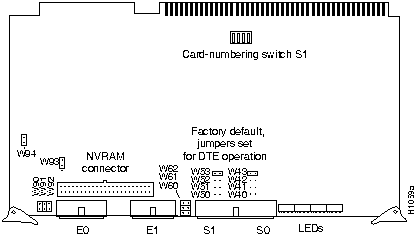
Figure 5 CSC-MCI Card and Jumpers Set For DTE Operation
Following are the steps for opening the chassis to access the connector plates in each of the three types of Cisco modular chassis: A, M, and C. Refer to the related illustration as you perform the installation.
You must remove the top panel to gain access to the back panel connector plates and make internal cable connections. (Refer to Figure 6 when removing the chassis cover) To remove the chassis cover, proceed as follows:
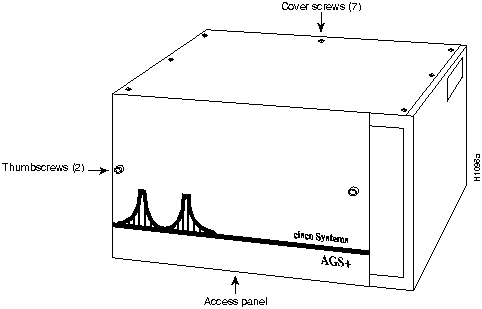
Figure 6 A Chassis Cover and Front Access Panel Fasteners
You must remove the top panel to gain access to the back panel connector plates and make internal cable connections. Refer to Figure 7 when performing the following steps.
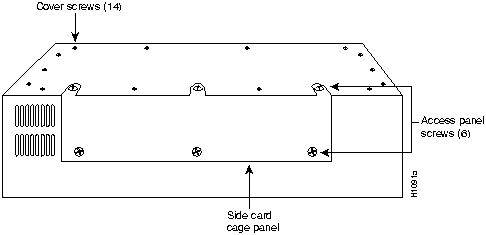
Figure 7 M Chassis Cover Fasteners
To gain access to the system card cage, you must remove the chassis cover. The cover on a C chassis system envelopes the chassis and is secured by ten screw: six on the bottom and two on each side. Refer to Figure 8 when removing the chassis cover.
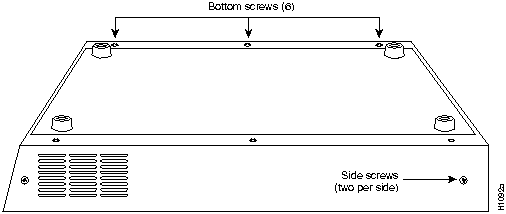
Figure 8 C Chassis Cover---Bottom View
Following is the procedure for accessing the C chassis interior:
Follow this procedure to install the applique in the rear of the chassis and route the attached ribbon cable to an available port on the SCI or MCI card in the system card cage.
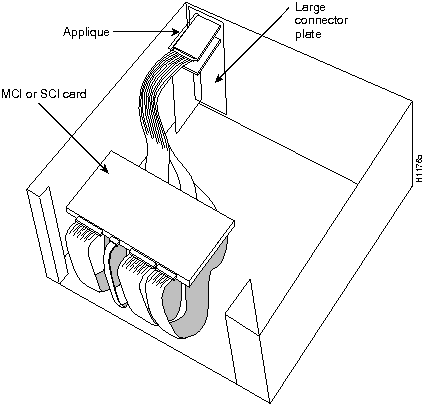
Figure 9 Typical Installation, A Chassis
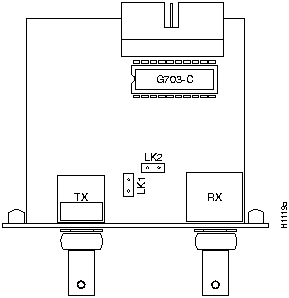
Figure 10 G.703 Applique (Component-Side View)
The connector labeled TX on the G.703 applique is the transmitting port (see Figure 10); the connector labelled RX on the card is the receiving port. Externally the BNC connectors are labelled OUT for transmit and IN for receive.
The following procedure tests the G.703 applique installation:
The following is a sample of output from the show controller mci command (Serial 0 and DTE mode are used in the examples):
Router#show controller mci
MCI 0, controller type 1.1, microcode version 1.9
  128 Kbytes of main memory, 4 Kbytes cache memory
22 system TX buffers, largest buffer size 1520
  Restarts: 0 line down, 0 hung output, 0 controller error
  Interface 0 is Serial0, electrical interface is G.703 DTE
In this example, the important information is contained in the last line, which indicates the type and mode of the serial interface attached.
The following is an example of the show controller mci command which indicates the state of the newly installed serial interface (the interface should be up if everything is connected and configured correctly).
Router#show controller mci
Serial 0 is up, line protocol is up
  Hardware is MCI Serial
Following are examples of possible error conditions and their symptoms:
If a DTE applique is used, but the MCI or SCI jumpers are set for DCE, the interface will stay down.
If the external or internal cable is not connected, the interface will be up, but line protocol will be down.
Follow these steps after successfully testing the G.703 applique installation:
This completes Installing the G.703 Interface Applique.
The system is ready to be installed in the network.

|
Copyright 1988-1995 © Cisco Systems Inc.