


|
|

This chapter includes procedures for rack-mounting and installing the Cisco 7000.
To rack-mount the Cisco 7000, which is an option, refer to the configuration note Cisco 7000 and Cisco 7507 Rack-Mount Kit Installation Instructions (Document Number 78-1058-xx, where xx is the latest version of the document), which accompanied the rack-mount kit, and which is available on Cisco Connection Documentation CD-ROM or as a printed copy.

For translated versions of this warning, refer to the appendix "Translated Safety Warnings."
The chassis should already be in the area where you will install it, and your installation location should already be determined.
When installing the chassis on a table or the floor, ensure that you have planned a clean, safe location for the router and have considered the following:

Make sure the area in which you will install the chassis is free of debris and dust. Also make sure your path to the area is unobstructed.
On the rear of the chassis, do the following:
To install the power supplies, refer to the following documentation:
After you install the power supplies, refer to the section "Setting the Boot Jumper on the RP."
On the RP (running Cisco IOS releases earlier than Release 10.0), pins (also called bits) 0 through 3 on the hardware configuration register form the boot field. The boot field specifies a number in binary. When the boot field is set to either 0 or 1 (0-0-0-0 or 0-0-0-1), the system ignores any boot instructions in the configuration file.
The RP hardware configuration register boot field is shown in Figure 3-1.
Figure 3-1 Configuration Register Boot Field on the RP
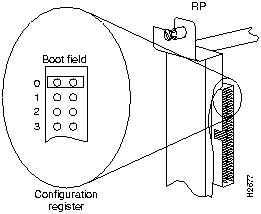
When the boot field is set to 0, you must boot the operating system manually by giving a b (or boot) command to the system bootstrap program or ROM monitor. You can enter the boot command only, or include additional boot instructions with the command such as the name of a file stored in Flash memory or a file that you specify for booting from a network server.
If you use the boot command without specifying a file or any other boot instructions, the system boots from the read-only memory (ROM) image. Otherwise, you can instruct the system to boot from a specific image such as a Flash file (using the boot system flash filename command), or boot from a network server by sending broadcast TFTP requests (using the boot system filename command), or send a direct TFTP request to a specific server (using the boot system filename address command).
When the boot field is set to 1 (the factory default), the system boots from ROM. Boot field settings of 0 and 1 both override any boot instructions in the system configuration file. If you set the boot field to any bit pattern other than 0 or 1, the system uses the resulting number to form a filename for booting from a network server.
To form the filename, the system starts with cisco and links the octal equivalent of the boot field value (jumper setting) and the processor type in the following format: cisco<jumpervalue>-<processorname>. The system uses that filename to invoke the system image from ROM or by booting from a network server.
However, if the configuration file contains any boot instructions, the system uses those boot instructions instead of the filename it computed from the jumper settings. You must set the boot field on your RP for the boot functions you require.
For more detailed information on the hardware configuration register or the software configuration register feature, which is available in Cisco Internetwork Operating System (Cisco IOS) Release 10.0 or later, refer to the section "Software Configuration Register Settings at Startup," in the chapter "Performing a Basic Configuration of the Cisco 7000," or to the Cisco 7000 Hardware Installation and Maintenance publication, which is available on Cisco Connection Documentation CD-ROM or as a printed copy.

|
Copyright 1988-1996 © Cisco Systems Inc.