


|
|

7000 Series Chassis Interface (RSP7000CI) Replacement in the Cisco 7000 Series Routers
Product Number RSP7000CI=
This document contains instructions for replacing the 7000 Series Chassis Interface (RSP7000CI) in the Cisco 7000 series routers: the Cisco 7000 and Cisco 7010. The RSP7000CI provides all of the environmental monitoring functions for the Cisco 7000 series router and is a required system component in a Cisco 7000 series chassis configured with the RSP7000.
In the Cisco 7000, the RSP7000CI is installed in the 7000 CI slot (slot 6 in the Cisco 7000 and slot 4 in the Cisco 7010) on the interface processor end of the Cisco 7000 series chassis.
The RSP7000CI operation requires that your Cisco 7000 series router has an RSP7000 installed, and is running Cisco Internetwork Operating System (Cisco IOS) Release 10.3(9), or later, Release 11.0(6), or later, or Release 11.1(1) or later.
The sections in this document include the following:
Following are brief descriptions of the Cisco 7000 series routers and the RSP7000CI.
The Cisco 7000 is a seven-slot router chassis, which uses the new RSP7000 kit. The Cisco 7000 provides up to five interface processor slots, and can accommodate the following CxBus-based interface processors: Fast Ethernet, Ethernet, Token Ring, Fiber Distributed Data Interface (FDDI), channel attachment, multichannel, serial, and so forth. The RSP7000, RSP7000CI, and interface processors are keyed with guides on the backplane to prevent them from being fully inserted in the wrong slot.
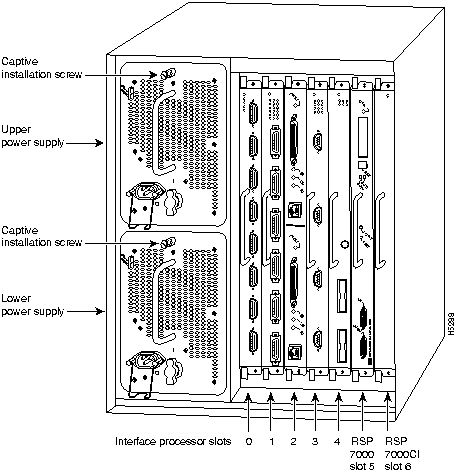
Figure 1 shows the rear of the Cisco 7000 router. In the Cisco 7000, slot 6 is reserved for the RSP7000CI board, which contains all of the environmental monitoring functions for the Cisco 7000, when configured with the new 7000 RSP. The remaining six slots (0 through 5) are for interface processors and the RSP7000.
Figure 1 : Cisco 7000 with RSP7000 and RSP7000CI Installed
The Cisco 7010 is a five-slot chassis, which uses the new RSP7000CI (and the RSP7000), and provides up to three interface processor slots that can accommodate the following CxBus-based interface processors: Fast Ethernet, Ethernet, Token Ring, Fiber Distributed Data Interface (FDDI), channel attachment, multichannel, serial, and so forth. The processor and interface processors are keyed with guides on the backplane to prevent them from being fully inserted in the wrong slot.
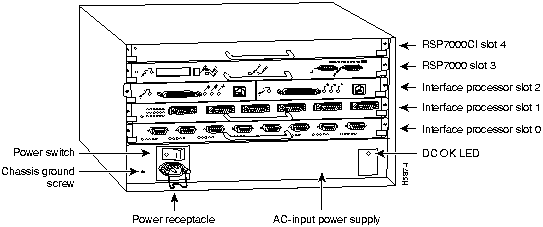
Figure 2 shows the rear of the Cisco 7010 router with the RSP7000CI and RSP7000 installed. In the Cisco 7010, slot 4 is reserved for the RSP7000CI, which contains all of the environmental monitoring functions for the Cisco 7010. The remaining three slots (slots 0 through 2) are for interface processors.
Figure 2 : Cisco 7010 with RSP7000 and RSP7000CI Installed
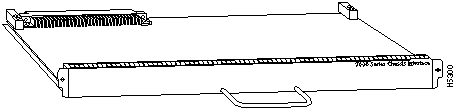
The RSP7000CI, shown in Figure 3 on page 4, consists of a printed circuit board attached to a metal carrier. The RSP7000CI provides the environmental monitoring and power supply monitoring functions for the Cisco 7000 series chassis. The RSP7000CI isolates the CPU and system software from chassis-specific variations. The RSP7000CI has no user-configurable jumpers or switches, and its faceplates contains no LEDs. The RSP7000CI is distinguishable only by the label on its faceplate, which reads 7000 Chassis Interface.
You must install the RSP7000CI in the appropriate chassis' 7000 CI slot. (See Figure 1 on page 2, for the Cisco 7000, or Figure 2 on page 3 for the Cisco 7010.) For the appropriate Cisco IOS version required for the RSP7000CI, refer to the section "Software and Hardware Prerequisites" on page 5.
The functions of the RSP7000CI are as follows:
Before you begin this installation, review the safety guidelines in this section to avoid injuring yourself or damaging the equipment.
Following are safety guidelines that you should follow when working with any equipment that connects to electrical power or telephone wiring.
Electrical Equipment Guidelines
Follow these basic guidelines when working with any electrical equipment:
Use the following guidelines when working with any equipment that is connected to telephone wiring or to other network cabling:
Preventing Electrostatic Discharge Damage
Electrostatic discharge (ESD) damage, which can occur when electronic cards or components are improperly handled, results in complete or intermittent failures. Electromagnetic interference (EMI) shielding and connectors are integral components of the carrier. Use a preventive antistatic strap whenever handling a processor module.
Following are guidelines for preventing ESD damage:
Software and Hardware Prerequisites
The RSP7000CI is compatible with any Cisco 7000 series routers that is operating with the following software and hardware:
The show version command displays the current hardware configuration of the router, including the Cisco IOS release that is currently loaded and running. The show controllers cbus command lists all CxBus interfaces installed in the system.
Following are the tools and equipment that you will need to complete this replacement:
Following are the replacement procedures for replacing an RSP7000CI in your Cisco 7000 series router. You must turn off all system power before replacing the RSP7000CI.
Remove the existing RSP7000CI as follows:
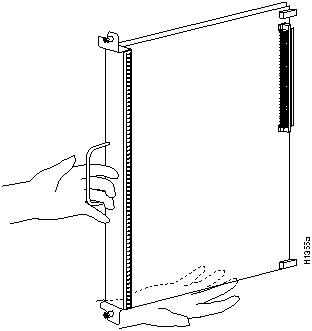
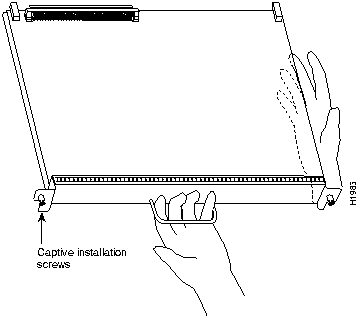
Figure 4 : Card-Installation Orientation in the Cisco 7000
Figure 5 : Card-Installation Orientation in the Cisco 7010
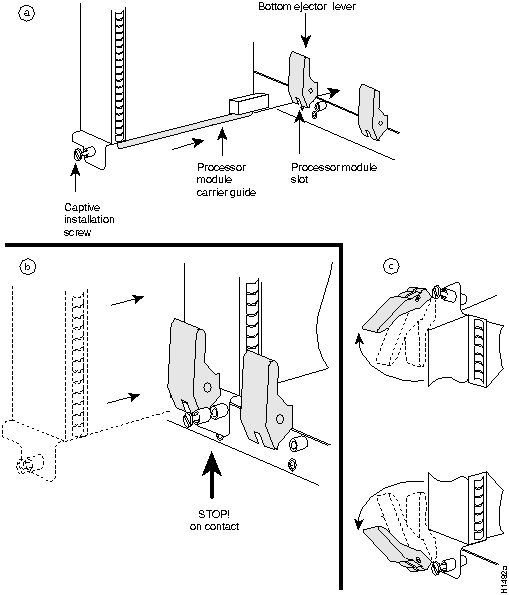
Figure 6 : Ejector Levers and Captive Installation Screw
Proceed to the section "Installing the New RSP7000CI."
Ensure that all system power is turned off before installing the RSP7000CI in the chassis. The RSP7000CI is keyed for installation only in the RSP7000CI slot (slot 6). (See Figure 1 on page 2.)
Follow these steps to install an RSP7000CI:
Verify RSP700CI is installed in the chassis' 7000 CI slot (see Figure 1 on page 2 or Figure 2 on page 3), and that both of the captive installation screws are tightened.
Using the RSP7000CI and the temperature sensors on the RSP7000, the system displays warning messages on the console if chassis interface-monitored parameters exceed a desired threshold or if a blower failure occurs. You can retrieve and display environmental status reports with the show environment, show environment all, show environment last and show environment table commands. Parameters are measured and reporting functions are updated every 60 seconds. A brief description of each of these commands follows.
Use these show commands to indicate that the RSP7000CI installation was successful.
The show environment command display reports the current environmental status of the system. The report displays parameters that are out of the normal values. No parameters are displayed if the system status is normal. The example that follows shows the display for a system in which all monitored parameters are within Normal range.
Following is sample output of the show env command:
If the environmental status is not normal, the system reports the worst-case status level in the last line of the display.
The show environment last command retrieves and displays the NVRAM log showing the reason for the last shutdown (if the shutdown was related to voltage or temperature) and the environmental status at that time. Air temperature is measured and displayed, and the DC voltages supplied by the power supply are also displayed. An example of the show env last command follows for both the Cisco 7000 and Cisco 7010:
The show environment all command displays an extended report that includes the arbiter type, backplane type, power supply type (AC or DC), wattage and status, the number and type of intermittent power failures (if any) since the system was last powered on, and the currently measured values at the RSP7000 temperature sensors and the power supply voltages. An example of the show env all command follows for both the Cisco 7000 and Cisco 7010:
RSP7010#sho env all
Arbiter type 1, backplane type 70x0 (id 5)
Power supply #1 is 600W AC (id 1)
Active fault conditions: none
Active trip points: none
01234
Dbus slots: X X
card inlet hotpoint exhaust
CI(4) 22C/71F 34C/93F 24C/75F
Shutdown temperature source is 'hotpoint' on CI(4),
requested CI(4)
+12V measured at 12.31
+5V measured at 5.17
-12V measured at -11.89
+24V measured at 23.78
+2.5 reference is 2.49
If after several attempts, the RSP7000CI does not appear to be functioning properly, or if you experience trouble with the installation (for instance, if the holes in the board do not align with the backplane holes), contact a service representative or the Technical Assistance Center (TAC). (For the TAC phone number and email address, refer to the note at the end of this document.
This completes the RSP7000CI replacement in the Cisco 7000 series router.
Cisco Information Online (CIO), formerly Cisco Information Online (CIO), is Cisco Systems' primary, real-time support channel. Maintenance customers and partners can self-register on CIO to obtain additional content and services.
Available 24 hours a day, 7 days a week, CIO provides a wealth of standard and value-added services to Cisco's customers and business partners. CIO services include product information, software updates, release notes, technical tips, the Bug Navigator, configuration notes, brochures, descriptions of service offerings, and download access to public and authorized files.
CIO serves a wide variety of users through two interfaces that are updated and enhanced simultaneously---a character-based version and a multimedia version that resides on the World Wide Web (WWW). The character-based CIO (called "CIO Classic") supports Zmodem, Kermit, Xmodem, FTP, Internet e-mail, and fax download options, and is excellent for quick access to information over lower bandwidths. The WWW version of CIO provides richly formatted documents with photographs, figures, graphics, and video, as well as hyperlinks to related information.
You can access CIO in the following ways:
For a copy of CIO's Frequently Asked Questions (FAQ), contact
Copyright 1988-1996 © Cisco Systems Inc.




Router# show env

All measured values are normal
RSP7000#sho env last
  CI(6) Inlet        previously measured at 22C/71F
    CI(6) Hotpoint     previously measured at 31C/87F
      CI(6) Exhaust      previously measured at 23C/73F
        +12 Voltage        previously measured at 12.12
          +5 Voltage         previously measured at 5.13
            -12 Voltage        previously measured at -11.84
              +24 Voltage        previously measured at 24.06

RSP7010#sho env last
  CI(4) Inlet        previously measured at 23C/73F
  CI(4) Hotpoint     previously measured at 35C/95F
  CI(4) Exhaust      previously measured at 25C/77F
  +12 Voltage        previously measured at 12.31
  +5 Voltage         previously measured at 5.17
  -12 Voltage        previously measured at -11.89
  +24 Voltage        previously measured at 23.78
RSP7000#sho env table
Sample Point      LowCritical    LowWarning     HighWarning
HighCritical
CI(6) Inlet                       44C/111F       50C/122F
CI(6) Hotpoint                    54C/129F       60C/140F
CI(6) Exhaust
+12 Voltage       10.90          11.61          12.82          13.38
+5 Voltage        4.61           4.94           5.46           5.70
-12 Voltage       -10.15         -10.76         -13.25         -13.86
+24 Voltage       20.38          21.51          26.42          27.65
2.5 Reference                    2.43           2.51
Shutdown power supplies at   70C/158F

RSP7010#sho env table
Sample Point      LowCritical    LowWarning     HighWarning
HighCritical
CI(4) Inlet                                     44C/111F       50C/122F
CI(4) Hotpoint                                  54C/129F       60C/140F
CI(4) Exhaust
+12 Voltage       10.90          11.61          12.82          13.38
+5 Voltage        4.61           4.94           5.46           5.70
-12 Voltage       -10.15         -10.76         -13.25         -13.86
+24 Voltage       20.38          21.51          26.42          27.65
2.5 Reference                    2.43           2.51
Shutdown power supplies at   70C/158F
RSP7000#sho env all
Arbiter type 1, backplane type 70x0 (id 5)
Power supply #1 is 700W (id 2), power supply #2 is removed (id 3)
Active fault conditions: none
Active trip points: none
0123456
Dbus slots: X X
card inlet hotpoint exhaust
CI(6) 21C/69F 30C/86F 22C/71F
Shutdown temperature source is 'hotpoint' on CI(6),
requested CI(6)
+12V measured at 12.12
+5V measured at 5.13
-12V measured at -11.84
+24V measured at 24.06
+2.5 reference is 2.49
http://www.cisco.com
cio.cisco.com
ciohelp@cisco.com.
For additional information, contact
cioteam@cisco.com.
tac@cisco.com.
To obtain general information about Cisco Systems, Cisco products, or upgrades, contact 800 553-6387, 408 526-7208, or
csrep@cisco.com.

