


|
|

ATM Network
Discovery Scenarios
For the discovery process, you need to provide a seed, which is the IP address of an ATM device, as the starting point for finding other ATM devices and their connections. This chapter defines ATM fabrics and presents some possible scenarios that the discovery process might encounter. You can apply the concepts from the following scenarios to your own network configuration:
An ATM fabric is a group of interconnected ATM switches and ATM end hosts that have been discovered using the Interim Local Management Interface (ILMI) neighbor discovery mechanism. For ILMI discovery to function, switches within the ATM network must support RFC 1695, "ATM Interface Configuration Entry."
Because AtmDirector is a standalone product, you must provide at least one seed for the initial discovery process. If you have devices that do not support ILMI, you need to supply AtmDirector with seeds for devices located on both sides of the unsupported device so that the discovery process can find all the ATM devices in the network.
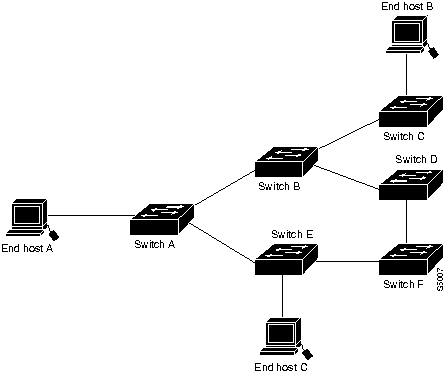
In the single ATM fabric, as shown in Figure 3-1, you need to provide one seed. The discovery process can find all Cisco devices that support the AtoM management information base (MIB) or ILMI. For a list of these Cisco devices, see the "Introduction" chapter.
Figure 3-1 : Single ATM Fabric
Two ATM Fabrics Connected Through a Router
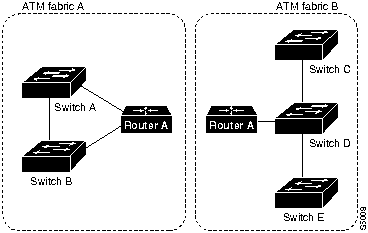
Two ATM fabrics are connected through a router. Fabric A has two LS1010 switches connected to the router, and fabric B has three switches connected to the same router. Figure 3-2 shows an example of this scenario.
Because the discovery process cannot proceed beyond the router, you need to provide two seeds, one for each ATM fabric.
Figure 3-2 : Two ATM Fabrics Connected Through a Router
Two LS1010 Groups Connected Through a Third-Party Switch
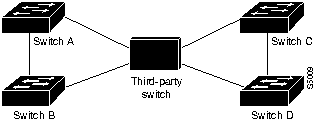
In this scenario, two groups of LS1010 switches are connected through a third-party switch. You need to provide one seed for the discovery process. How this configuration is discovered depends on whether the third-party switch supports the AtoM MIB.
Third-Party Switch Supports AtoM MIB
In this case, all switches are discovered and placed in one ATM fabric. On the topology map, if AtmDirector recognizes the type of third-party switch, it uses the appropriate icon on the topology map. If AtmDirector does not recognize the type of third-party switch, it uses a generic switch icon on the topology map. Figure 3-3 shows an example of this scenario.
Third-Party Switch Does Not Support AtoM MIB
If the third-party switch does not support the AtoM MIB, the discovery process finds one of the following configurations:
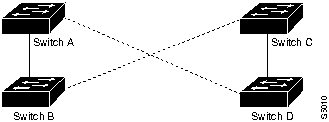
Figure 3-5 : Two LS1010 Groups Connected Through a Third-Party Switch---Two Standalone ATM Fabrics
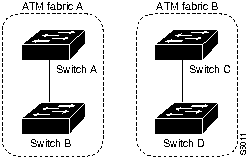
Two LS1010 Groups Connected Through a Public or Private Network
This scenario contains two LS1010 switches and an ATM host connected through a public or private network to another group of LS1010 switches. This scenario assumes that all devices support the AtoM MIB. How this configuration is discovered depends on whether VP tunneling is enabled on the ports connected to the public or private network.
If VP tunneling is enabled on the LS1010 ports connected to the public or private network, you need to provide the discovery process with one seed. All devices will be in one ATM fabric with a dotted line between switches that have VP tunneling enabled. Figure 3-6 shows an example of this scenario, which is similar to the first case presented in the "Third-Party Switch Does Not Support AtoM MIB" section.
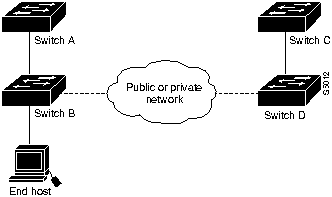
If VP tunneling is not enabled on the LS1010 ports connected to the public or private network, you need to provide the discovery process with a seed for each side of the public or private network. Each group of LS1010 switches will be a stand alone ATM fabric. Figure 3-7 shows an example of this scenario, which is similar to the second case presented in the "Third-Party Switch Does Not Support AtoM MIB" section.
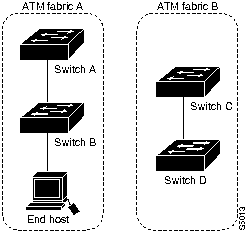
Two Groups of LS1010 Switches Connected Through a Static Link
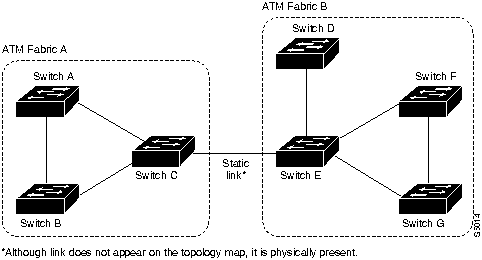
In this scenario, two groups of LS1010 switches are connected through a static link. You need to provide the discovery process with one seed for each side of the static link. This scenario is depicted on the topology map as two stand alone ATM fabrics. Figure 3-8 shows an example of this scenario.
Figure 3-8 : Two LS1010 Groups Connected Through a Static Link
Discovery Updates in a Changing Network
Over time, your network configuration might change. To handle these changes, AtmDirector has the capability to merge and separate ATM fabrics.
If a link or a port is added or enabled between two ATM switches that belong to two different ATM fabrics, the discovery process merges the two fabrics and updates the ATM database. When two fabrics merge, topology creates a new merged map. The name of the new map is added to the Fabric List in the AtmDirector window.
The new map name is generated by joining the names of the two maps that were merged. For example, if Map1 and Map2 are merged, the new map name is Map1Map2.
If the two maps are open at the time of the merger, all options, except Print, Zoom In, and Zoom Out, are grayed out. The nodes and links in the original maps cannot be selected. Use File>Close to close the maps and remove them from the Map List.
A popup message indicates that the two fabric maps have merged. To rename the new map, select Edit>Rename Fabric.
If a link or a port is disabled or disconnected between two ATM switches that belong to the same ATM fabric and no other connections or routes exist between the two ATM switches, the discovery process separates the fabric into two fabrics and updates the ATM database. When a fabric separates, topology creates two new maps. The names of these new maps are added to the Map List in the AtmDirector window.
The new map names are generated by adding -n to the end of the names, where n is a number starting with 1. For example, if Map1 is separated into two maps, the new names are Map1-1 and Map1-2.
If the map is open at the time of the separation, all functionality, except Print, is grayed out. The nodes and links in the original map cannot be selected. Use File>Close to close the map and remove them from the Map List.
A popup message indicates that the fabric map has been separated into two maps. To rename the new maps, select the Edit>Rename.

|
Copyright 1988-1996 © Cisco Systems Inc.