


|
|

A LightStream 2020 multiservice ATM switch (LS2020 switch) supports a variety of network services. These services are grouped into three primary categories: data services, ATM services, and voice/video services. Figure 3-1 shows the types of communications services comprising each category.
This chapter describes the complete range of services provided in each category and discusses the mechanisms through which virtual channel connections (VCCs) are established in an LS2020 network.
Figure 3-1 : LS2020 Network Services
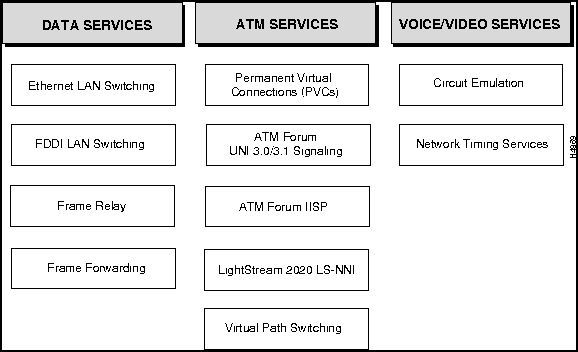
An LS2020 switch provides the following types of data services in an ATM network:
These LS2020 data services are described in the following sections.
An LS2020 network supports transparent LAN switching and translation LAN switching both within and across an ATM network.
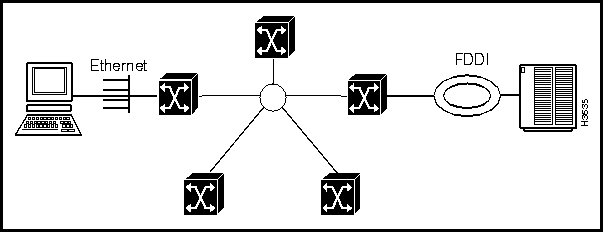
From a LAN user viewpoint, an LS2020 network can be regarded as a collection of LAN switches connected through the ATM backbone, with one LAN switch per LS2020 switch. Externally, all the LAN switches in the network appear to share a single broadcast medium within the ATM network. Each LAN switch has one internal connection to an internal broadcast backbone.
Figure 3-2 shows the LS2020 LAN switching model.
Figure 3-2 : LightStream 2020 LAN Switching Model
Ethernet and FDDI LAN Switching
LS2020 LAN switching is implemented as a cell internet with underlying ATM features. LAN switching services also include the following features, each of which is described later in this section:
Connecting LANs Over ATM Networks
An ATM network provides a connection-oriented service using virtual channel connections (VCCs). If you choose to overlay a connectionless service such as LAN switching on an ATM network infrastructure, the LS2020 network automatically manages the bandwidth and VCCs for LAN-switched traffic. These operations are invisible to the network user.
The LS2020 switch supports the following ATM LAN switching services:
The LS2020 LAN switching model is structured so that loops cannot occur in a network composed solely of LS2020 switches. However, spanning-tree support is required for interoperability with switches from other vendors. Ports that are configured for LAN switching implement the spanning-tree algorithm, as defined in IEEE 802.1d. The algorithm eliminates loops that may be caused by external switches or incorrect cabling attached to multiple LS2020 ports.
The logical network that the spanning-tree algorithm creates is a spanning tree that exhibits the following characteristics:
If the spanning-tree protocol detects a loop, one of the ports on the LAN switch goes into a blocking state to break the loop. While in this state, the port discards all LAN-switched traffic and stops learning Media Access Control (MAC) address information.
You can filter incoming traffic on LAN interfaces. You create custom filters and assign them to ports using either the LS2020 configurator or the CLI. Based on the filters applied to a port, the LAN switch drops or forwards incoming frames. You could, for instance, prohibit a particular protocol from passing between two ports by creating the appropriate filter for each port.
You create custom filters on a per-chassis basis. Creating a custom filter consists of defining the filter and then assigning the filter to a port. You can assign multiple filters to a port, and you can assign the same filter to multiple ports. However, custom filtering is applicable only on inbound ports.
The custom filtering capability for LAN flows supports the following:
For information about configuring custom filters, see the LightStream 2020 Configuration Guide.
The LS2020 LAN switching software supports static filtering (also called static bridge forwarding, as defined in IEEE 801.d). Through the LS2020 configurator or the CLI, you can make static entries in the switch's forwarding database. You can, for instance, make a static entry if you are directing all broadcast packets to specific ports in order to limit broadcast propagation. You could also make a static entry if you have an endpoint that only receives traffic, because the LAN switch cannot learn about such a station.
For information about configuring static filters, see the LightStream 2020 Configuration Guide.
The LS2020 LAN switching software provides the following capabilities to limit the amount of broadcast traffic on the network:
VirtualStream is a Cisco Systems workgroup architecture that has been implemented for LS2020 networks. This architecture allows geographically-dispersed stations on connected LANs to be grouped together logically as LAN workgroups. Such a grouping provides easy access within the LAN workgroup, while at the same time ensuring privacy between LAN workgroups and limiting the impact of one group's work on that of another.
The following LAN services are available in an LS2020 network:
Application-Specific Quality of Service
Application-specific quality of services (AS/QoS) allows you to assign traffic management attributes to LAN flows. By associating a traffic profile with a custom filter, you can determine which LAN flows should receive a specific type of configurable service. For example, you can configure the following traffic profile parameters:
For more information about setting traffic profiles, see the LightStream 2020 Configuration Guide.
High-Performance Multicast Service
High-performance multicast service (HPMS) allows multicast and broadcast flows to be sent across an LS2020 network at wire speed. This feature supports multicast groups and traffic profiles. Optionally, you can assign a multicast group or a traffic profile to a port, or both.
Multicast groups (lists of destination LAN ports) deliver LAN traffic within a network using an ATM point-to-multipoint VCC. A multicast group can include LAN ports anywhere in the network and involve different media types. For example, a multicast group can include a mixture of both Ethernet and FDDI ports.
A set of default parameters is available for the traffic profile associated with the multicast group. You can use these default parameters instead of explicitly configuring traffic profile parameters.
When a LAN flow matching that custom filter is detected, a point-to-multipoint VCC is created from that source port to each of the ports in the multicast group. If the source port is also a member of the multicast group, it is not included as a destination port of the point-to-multipoint VCC.
You cannot modify the definition of a multicast group while the group is assigned to a filter. If you want to define a new multicast group (with a different ID), you must change the assignment for the filter to the new ID. When you do, the active flows terminate and rebuild with the new multicast group configuration.
For more information about assigning multicast groups, see the LightStream 2020 Configuration Guide.
LAN Workgroups
A LAN workgroup is a defined set of LAN ports that can communicate with each other. Effectively, this defined set of LAN ports constitutes a workgroup membership list.
By assigning LAN ports to a specific workgroup, you can ensure the integrity of workgroup data, effectively isolating the LAN traffic of the workgroup from the LAN traffic of another workgroup. Thus, the privacy of each workgroup is maintained.
You can configure LAN workgroups through either the StreamView configurator (cfg) or the CLI. By default, all ports in the network are assigned to a single LAN workgroup. This makes the default behavior of the LAN workgroup identical to that of an ordinary LAN switched network.
In an LS2020 network, LAN ports can
Figure 3-3 shows a typical LAN workgroup configuration.
Figure 3-3 : Typical LAN Workgroup Configuration
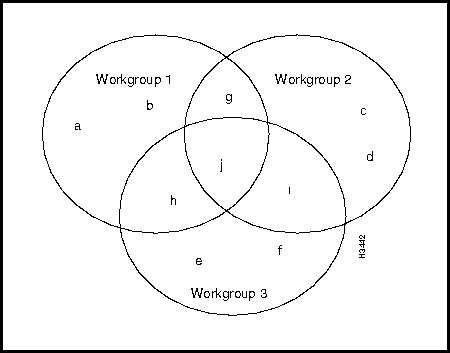
In this LAN workgroup configuration, ports a, b, c, d, e, and f belong to only one LAN workgroup; they can communicate only with other ports in that LAN workgroup.
Ports g, h, and i belong to two LAN workgroups; therefore, they can communicate with ports in either of those LAN workgroups.
Port j, however, belongs to all three LAN workgroups; therefore, it can communicate with the ports in all three LAN workgroups.
For more information about LAN workgroup configuration, see the LightStream 2020 Configuration Guide.
The LS2020 supports a Frame Relay DCE interface to which you can connect routers, packet switches, and other devices that have Frame Relay DTE interfaces. It also supports a Frame Relay network-to-network node interface (NNI) to which you can connect other Frame Relay switches or networks.
Using the Frame Relay service, the LS2020 network can accept traffic at a single port and send that traffic to diverse destinations. This contrasts with the Frame Forwarding service, in which all traffic received on a particular port is sent to the same destination port.
A Frame Relay PVC is defined by two endpoints (Frame Relay ports) on the edges of the network and the local data link connection identifiers (DLCIs) associated with those endpoints. The LS2020 network uses the DLCI associated with each frame of the traffic to determine its PVC. The LS2020 switch then segments each frame into cells and sends it to its destination.
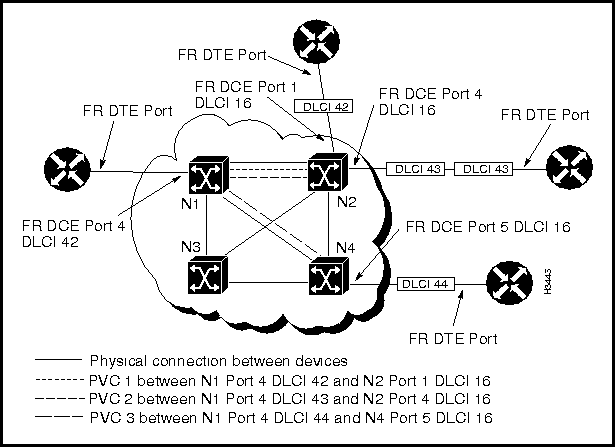
Figure 3-4 shows three Frame Relay PVCs. As the figure indicates, there can be more than one Frame Relay PVC between the same LS2020 switches.
Figure 3-4 : LS2020 Network with Three Frame Relay PVCs
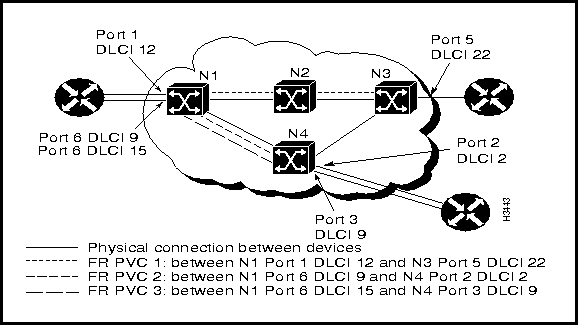
Figure 3-5 and Figure 3-6 show how frames with multiple destinations are received on one port and passed through the LS2020 network to their correct destinations.
Figure 3-5 : Frames with Multiple Destinations Passed through Network
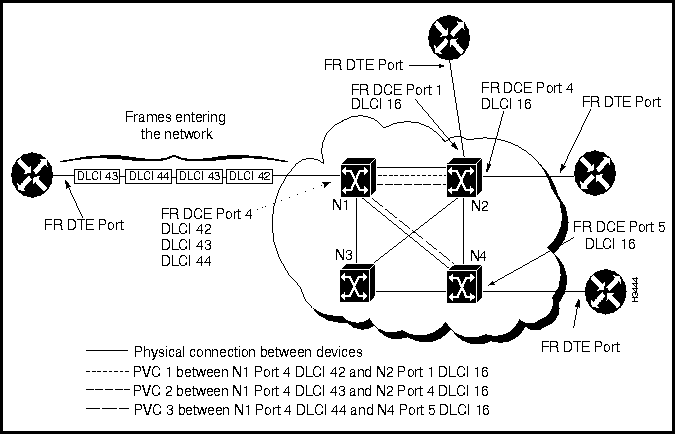
The LS2020 switch at which the traffic enters looks at each frame's DLCI and determines the PVC on which the traffic should be passed. The frame is then segmented into cells. Each cell is passed through the network on the selected PVC. When the cells reach the final LS2020 switch in the PVC, they are reassembled into a frame and passed out of the LS2020 network on the correct destination port and DLCI (see Figure 3-6).
Figure 3-6 : Frames Sent from LS2020 Switch with New DLCI
Frame Forwarding services let you replace direct connections between devices that support HDLC or SDLC with a connection through the LS2020 network. This allows you to connect older devices that do not support Frame Relay, ATM UNI, or LAN interfaces. For example, you can use the Frame Forwarding service to connect X.25 packet-switching nodes or SNA devices through the LS2020 network.
Frame Forwarding PVCs provide a "virtual wire" between two network ports on the edge of the LS2020 network. All traffic that enters the LS2020 network on a particular Frame Forwarding port is sent through the network to the port on the other end of the virtual wire. All traffic that enters the network on a particular Frame Forwarding port must have the same destination on the other side of the LS2020 network.
Unlike circuit-switched connections, which require permanent reservation of the bandwidth needed between the two ports, the Frame Forwarding function uses only internal network bandwidth when there is an actual frame to be sent and does not use any bandwidth during interframe gaps.
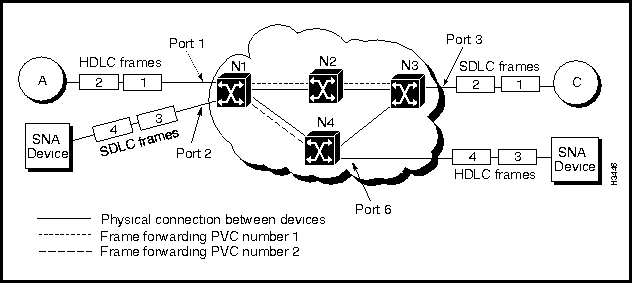
A Frame Forwarding PVC is defined by two endpoints (Frame Forwarding ports) on the edges of the network. Figure 3-7 shows two Frame Forwarding PVCs, numbered 1 and 2. The endpoints of
PVC 1 are Port 1 on N1 and Port 3 on N3. The endpoints of PVC 2 are Port 2 on N1 and Port 6 on N4. There may be any number of LS2020 switches between the endpoints. The LS2020 network selects the best route between the two endpoints and sends the ATM cells along that route.
Figure 3-7 : LS2020 Network with Two Frame Forwarding PVCs
Included in this category are the following types of services:
These ATM services are described in greater detail in the following sections.
Permanent Virtual Connections (PVCs)
An ATM UNI PVC is defined by two endpoints (ATM ports) on the edges of the network and two local virtual channel identifiers (VCIs). The VCI represents a value used by an ATM device to identify a virtual channel link comprising a part of the virtual channel connection. One VCI is associated with the source port, and the other VCI is associated with the destination port in the definition of the end-to-end PVC.
Figure 3-8 shows two ATM UNI PVCs: PVC 1, and PVC 2.
Figure 3-8 : LS2020 Network Containing Two ATM UNI PVCs
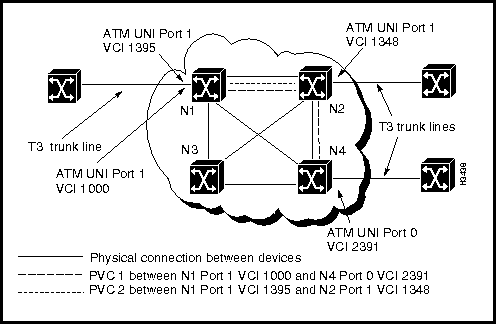
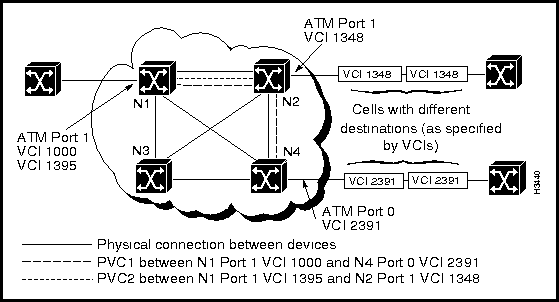
The LS2020 switch looks at the VCI value in the arriving ATM cells and determines the PVC on which the traffic should be passed. Each cell is passed through the network on the selected PVC. When the cells reach the last switch in the PVC, they are passed out of the LS2020 network on the correct destination port and VCI.
Figure 3-9 shows ATM cells entering an LS2020 network, and Figure 3-10 shows the ATM cells exiting the LS2020 network.
Figure 3-9 : ATM Cells with Multiple Destinations Entering Network Through ATM Port
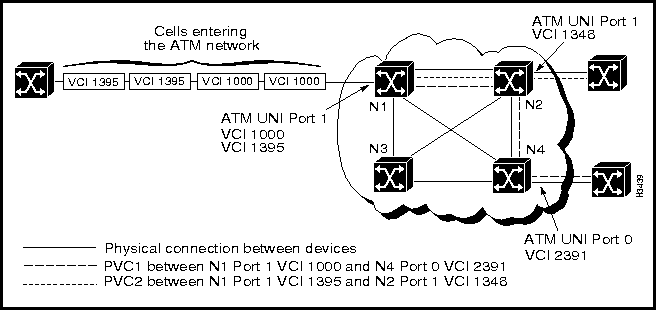
Figure 3-10 : ATM Cells Exiting LS2020 Network
ATM Forum UNI 3.0/3.1 Signaling
The LS2020 supports UNI signaling conforming to the ATM Forum UNI 3.0/3.1 specifications for both point-to-point and point-to-multipoint SVCs. In addition, the LS2020 maintains the ability to provision permanent virtual connections (PVCs) concurrently with SVCs.
This feature enables you to build a standards-based ATM network in which connections are dynamically created and torn down. This ability to create and remove SVCs eliminates the administrative burden of creating PVCs when connectivity to ATM endstations (endpoints) is required.
The LS2020 UNI signaling service provides an ATM interface that allows non-LS2020 ATM networks or other ATM-capable devices to use the LS2020 backbone network. The LS2020 ATM UNI interface conforms to the structure and field encoding conventions defined by the American National Standards Institute (see Table 2-1 in the chapter entitled "Introduction to LightStream 2020"). ATM UNI connections are managed through the use of objects defined and maintained in the public standard management information base (MIB) and the LS2020 private MIB in each ATM network node.
ATM Forum Interim Inter-Switch Protocol
The Interim Inter-Switch Protocol (IISP) is a signaling and routing protocol for multiple ATM networks.
For virtual connection signaling and routing across multiple ATM networks, this release supports the ATM Forum Interim Inter-Switch Protocol (IISP). IISP, which is sometimes referred to as P-NNI Phase 0, is a very simple scheme that allows ATM switches to be statically configured with virtual connection routing information.
IISP is an ATM Forum specification (initially promulgated by Cisco Systems) that builds upon the ATM Forum UNI 3.1 specifications, with optional support of UNI 3.0. IISP provides a base-level capability between ATM networks in the interim while the P-NNI Phase 1 protocol specification is being finalized by the ATM Forum.
IISP allows other-vendor ATM switches to be connected to an LS2020, providing the foundation for end-to-end SVCs through the network. In addition, IISP works in conjunction with the existing LS-NNI (see next section).
LightStream 2020 Network-Network Interface (LS-NNI)
The LightStream 2020 Network-Network Interface (LS-NNI) is a signaling and routing protocol for a network of LS2020 switches.
The LS-NNI is the pre-ATM-standard solution for implementing signaling and routing protocols within a network of LS2020 switches. LS-NNI is used by default to build dynamic ATM connections between multiple LS2020 switches in a network.
By default, this release supports both IISP and LS-NNI. In the future, the now emerging P-NNI Phase 1 specification will provide the capability to build a hierarchy of ATM switches through a set of standardized protocols for signaling purposes and quality of service (QoS) routing.
Within an LS2020 network, the LS-NNI provides two important services automatically:
These services, which are described briefly below, simplify network configuration and help you to maintain a consistent, network-wide database of routing and addressing information.
A neighborhood discovery process runs on every network processor (NP) in an LS2020 network. This process performs three main tasks:
Whenever you add or remove a local resource, the neighborhood discovery process informs the global information distribution (GID) system, which floods information about the change from NP module to NP module throughout the network. The neighborhood discovery process also keeps the local GID process informed about who its neighbors are so it can flood information properly.
Neighborhood discovery simplifies network configuration and eliminates the need to manually configure some of the interface module attributes in each LS2020 switch and all of the connections to other switches in the network.
Global Information Distribution (GID)
The Global Information Distribution (GID) service maintains a consistent network-wide database. GID is a process that runs on every NP in an LS2020 network. It maintains the GID database and keeps nodes in the network apprised of changes in network topology, such as ports, cards, and nodes being added or removed from the network, and trunks going up or down.
All switches in the network contribute information to and extract information from the database. The GID system ensures that every switch has an up-to-date copy of the information in the database.
NPs use a flooding algorithm to distribute global information to neighboring NPs. The flooding algorithm is similar to that used by the Open Shortest Path First (OSPF) routing system, but the updates are much more frequent. Flooding can occur only between NPs that have established a neighbor relationship and, therefore, a communication path between them. These relationships and communication paths are established, maintained, and removed by the neighborhood discovery process.
The GID system is represented by a process on every NP in the network. Each GID process serves several clients that produce and consume information. A GID process issues an update whenever a client contributes new information. The GID also has mechanisms for quickly initializing a GID database when a new LS2020 switch enters the network.
Virtual path switching allows LS2020 users to create both large-scale enterprise ATM networks and wide area networks (WANs).
In ATM processing, a virtual channel (VC) transports ATM cells belonging to a single data flow between two network nodes, and a virtual path (VP) supports multiple VCs. A single VC is able to transport numerous data flows between two network nodes.
The virtual path (VP) switching function in an LS2020 network supports the configuration and removal of multiple, point-to-point permanent virtual path connections (VPCs) through a single LS2020 switch or across a network of LS2020 switches.
Virtual path switching is an ATM cell switching service in which cells are routed through the network based only on the value of the VPI field in the ATM cell header (see Figure 1-5 in the chapter entitled "ATM Technology"); the VCI field in the ATM cell header is ignored for purposes of virtual path switching. In contrast, in virtual channel (VC) switching, both the VPI and VCI fields in the ATM cell header are used to route cells through an ATM network.
The LS2020 supports both the user-network interface (UNI) and the network-to-network interface (NNI) in configuring point-to-point permanent virtual paths (PVPs).
You set up PVPs between the host and destination nodes through the use of CLI commands. Such commands enable you to:
Similarly, you can remove a PVP connection from the network through the use of CLI commands. Such connections must be removed from both the host node and the destination node.
The ATM UNI cell header format defines an 8-bit VPI field, allowing a maximum of 256 PVPs to be defined for a single UNI interface. Similarly, the ATM NNI cell header format defines a maximum of 12 bits in the VPI field, allowing a maximum of 4096 PVPs to be defined for a single NNI interface (or trunk) in a network.
The LS2020 supports the simultaneous establishment and management of permanent, bidirectional, point-to-point VPCs and VCCs over the same interface by means of the following:
The following LS2020 line card/access card combinations support virtual path switching:
Included in this class of LS2020 services are the following:
These services are described in the following sections.
Voice and video services (circuit emulation) allow you to interconnect existing T1/E1 interfaces and other kinds of constant bit rate (CBR) equipment. Some CBR services include such features as PBX interconnect, consolidated voice and data traffic, and video conferencing.
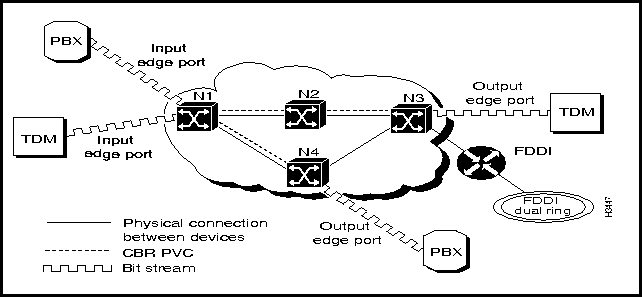
With circuit emulation, data received from an external device at the edge of the LS2020 network is converted to ATM cells, sent through the network, reassembled into a bit stream, and passed out of the LS2020 network (see Figure 3-11). T1/E1 circuit emulation does not interpret the contents of the data stream. All the bits flowing into the input edge port of the ATM network are reproduced at one corresponding output edge port.
An emulated circuit is carried across the LS2020 network on a PVC, which is configured through the network management system.
Figure 3-11 : LS2020 Network with One CBR PVC
When equipped with appropriately configured hardware, software, and network management tools, an LS2020 switch can be used to globally synchronize constant bit rate (CBR) interfaces in an LS2020 network to a central reference clock signal. This network timing distribution service, called Nettime, enables synchronous clocking and synchronous residual time stamp (SRTS) clocking functions to be accomplished through an LS2020 switch.
Network timing services depend on specific hardware capabilities in an LS2020 switch. The Nettime facility requires the presence of at least one Release 2 switch card in the chassis, as well as one or more Nettime-capable access cards. A Nettime-capable access card can provide the clock signal received from one of its line ports to a Release 2 switch card in chassis Slot A or B, to both the Release 2 switch cards in chassis Slots A and B, or to neither of the Release 2 switch cards in chassis Slots A and B.
The reference clock signal can be distributed throughout the Nettime-capable interfaces in an LS2020 network. The LS2020 access cards that support network timing services include the following:
These access cards can receive reference clock signals on their ports; similarly, their ports can serve as a source of reference clock signals for Nettime services within an LS2020 network.
Nettime software ensures consistency of clock signals within the LS2020 chassis. For example, no more than one access card can provide clock signals to a switch card. Also, a Nettime-capable access card can detect when an external clock source fails and can generate a Nettime trap to signal this event.
You can specify three possible sources for the reference clock signal for Nettime services:
The Nettime service uses the Release 2 switch card to distribute a single reference clock signal to the line cards in the LS2020 chassis.
Up to ten Nettime reference clock sources can be configured for the LS2020 chassis. These clock sources are ordered by preference for use. Thus, at LS2020 node initialization time, a table of clock source preferences is searched, and the first available clock source is selected for performing Nettime functions.
If the preferred source is not available or fails, the Nettime service automatically switches to the next most preferred source, unless a more preferred source, which was previously unavailable, has since become available.
Note that you can specify the internal/local oscillator on a Release 2 switch card as the preferred reference clock source. In the event that you specify other than the internal/local oscillator as the preferred source and that source is unavailable, the internal/local oscillator of the switch card then becomes the source by default.
If one of the switch cards fails in an LS2020 chassis equipped with redundant Release 2 switch cards, the Nettime service automatically gives control to the other card for distributing the reference clock signal.
If a more preferable clock source becomes available, the Nettime service does not cut over to that source until you specifically request it to do so by issuing the set nettime reset-level command in the CLI or by using the StreamView configurator tool.
Using the CLI, you can request a cutover to a specific clock source. If the requested clock signal is available, Nettime uses that signal. If the requested clock signal is not available, Nettime searches through the preference list for the next available clock source. For detailed information about requesting a cutover to a specific clock source, refer to the LightStream 2020 CLI Reference Manual.
In a dual switch card configuration, you can request a planned cutover of network timing functions to the other switch card in the chassis, thereby allowing testing to be done on the clock distribution circuitry of the backup card.
In an LS2020 network, virtual channel connections (VCCs) are established through the following mechanisms:
These connection types are described in the following sections.
Provisioning refers to a manual configuration process in which a VCC is explicitly created and its endpoints and connection attributes are specified in a configuration database. Since provisioned connections are static by definition, they are commonly referred to as permanent virtual connections (PVCs).
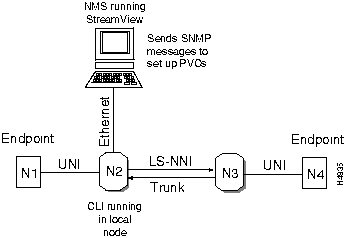
In setting up provisioned PVCs, you use the StreamView network management application on a network management station (NMS as the tool of choice. Alternatively, you can use the CLI in an LS2020 node to issue SNMP network management commands to accomplish PVC setup.
These PVC provisioning techniques are illustrated in Figure 3-12.
Figure 3-12 : Provisioned PVC Setup
A PVC is a point-to-point or point-to-multipoint connection that is always set up beforehand, typically by a network administrator, in which appropriate VPI/VCI values and connection attributes are written into an internal configuration database for each of the constituent ATM switches forming the overall transmission path for ATM data between network endpoints.
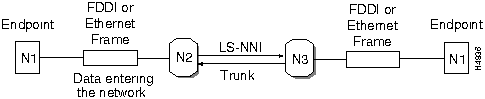
Typically, Ethernet and FDDI frame data carry sufficient addressing information in frame headers to accomplish routing functions in an ATM network. Thus, in implicit connection setup, an incoming frame on a network node is either recognized and propagated through the network on a pre-existing connection, or, if not recognized, the frame header information is processed to determine where the frame should be sent next. As this process is repeated from link to link in the network, a unidirectional connection is set up between the source endpoint and the destination endpoint.
At the destination endpoint, the incoming frame evokes a logical response to the frame's sender, causing another unidirectional connection (in the reverse direction) to be set up to the source endpoint. In this manner, a VCC is established between the source and destination endpoints to support the transfer of frame data between the communicating entities.
This implicit connection setup process is illustrated in Figure 3-13.
Figure 3-13 : Implicit VCC Setup
In this connection setup method, each LS2020 switch in the ATM network is statically configured with virtual connection routing information written into its own local routing database (typically by a network administrator). The ATM Forum UNI 3.0/3.1 signaling protocol uses this routing information in each LS2020 switch to dynamically establish, maintain, and clear VCCs on demand for all ATM UNI connection services in the network.
This method of connection setup is described in detail in the section entitled "ATM Forum UNI 3.0/3.1 Signaling."

|
Copyright 1988-1996 © Cisco Systems Inc.