|
|

This chapter provides complete instructions for installing and cabling the Workgroup WS-C1400 Concentrator. Specific topics covered in this chapter include the following:
Before you install the concentrator, read the chapter "Preparing for Installation."
There are many ways to configure and connect the concentrator. The following overview is specific to a UTP installation:
Before you install the concentrator, examine all shipping containers and contents for damage and check for missing items. If damage occurred to the containers during shipping, notify your carrier. Unpack and examine the contents of the containers. You should have the following items:
Fill out the warranty registration sheet and mail or fax it to Cisco Systems, Inc. today. Report any missing parts and any damage not related to shipping to your customer service representative.
You can mount the concentrator in a standard 19-inch rack or place it on a desktop.
The concentrator can be mounted in an open or closed EIA-standard
Following is the procedure for rack-mounting the concentrator:
To prevent bodily injury when mounting or servicing this unit in a rack, you must take special precautions to ensure that the system remains stable. To see translated versions of this warning, refer to the appendix Translated Safety Warnings. The following guidelines are provided to ensure your safety:
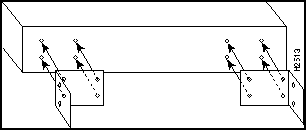
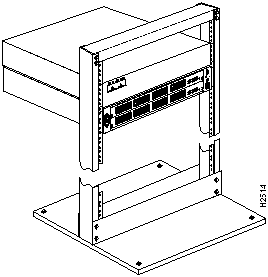
Figure 3-1 : Attaching the Rack-Mount Brackets to the Concentrator Figure 3-2 : Rack-Mounted Concentrator---Open Rack Shown The concentrator operates at a low noise level, which makes it suitable for any desktop environment. Place it on a clear and level location. Leave at least 3 inches (7.6 cm) clearance at the sides for proper ventilation, and sufficient space at the rear for easy access to cables, LEDs, and line cards. Proceed to the section "What to Do after the Hardware Is Installed."
What to Do after the Hardware Is Installed
After installing the chassis hardware, proceed to the chapter "Connecting to the Network" for the procedures required to attach all cables to the concentrator. For the information necessary to configure the software portion of the system based on your requirements, proceed to the chapter "Configuring the System Software" and the appendix "Command Reference."
Copyright 1988-1996 © Cisco Systems Inc.


19-inch rack using the rack-mount bracket kit. The rack-mount bracket kit consists of the following materials: