


|
|

Installing and Removing Line Cards
This appendix contains module installation and removal instructions. The modules provide up to 20 CDDI or FDDI ports per concentrator chassis.
Before performing any of the following procedures see the chapter "Preparing for Installation" for safety and ESD damage prevention information.
If the power supply automatically powers down, install at least one module, remove the power cord from the back of the concentrator, and reinsert it to reapply power to the concentrator.
The following procedures describe how to install and remove modules.
Module Installation and Removal
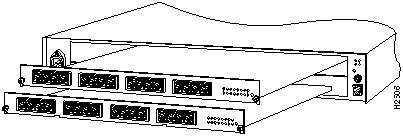
Install the modules as follows:
Figure C-1 : Installing or Removing Modules The configuration parameters assigned by the user, such as, module name, port status enable or disabled, will be preserved for the newly inserted module. The ring will reconnect automatically but any frame present on the ring at the time the module was disconnected may be corrupted.
Table C-1 describes the consequences to the network and the time for the concentrator to recover each time a module is removed and replaced.
Table C-1 : Module Removal Effect on Network
Copyright 1988-1996 © Cisco Systems Inc.

Modules Installed
Module Removed
Time to Reconnect
(Seconds)
Concentrator Status
1 only
1
120
Disconnected from the ring
1 and 2
1
10
Disconnected from the backbone ring, ports in slot 2 are still connected locally
1 and 2
2
10
Ports on slot 1, no effect, ports on slot 2 are temporarily disconnected
