


|
|
Installing the Adapter Hardware
To install the EISA adapter, make sure you complete the following procedures and have the required tools available. See the chapter "Preparing for Installation."
This section provides general instructions for installing the EISA single attachment and dual attachment adapters in your PC or workstation. Follow the instructions provided in your PC or workstation documentation to install EISA adapter cards.

Following are the general steps needed to install the EISA adapter in your PC or workstation. Refer to your PC or workstation documentation for specific EISA adapter installation instructions.
Connect the EISA adapter to the network as follows:
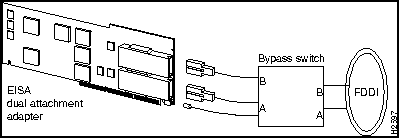
You can connect an optional bypass switch to dual attachment adapters to maintain connectivity to the FDDI ring. If a station enters a fault condition or is powered down or rebooted, the ring will not wrap if a bypass switch is present on the faulty station. Figure 3-1 shows how the bypass switch connects to the network and dual attachment adapter.
Figure 3-1 Connecting a Bypass Switch
After you complete the EISA adapter hardware installation and cabling procedures, refer to the software user guide shipped with your adapter software driver.
Refer to the chapter "Troubleshooting the Adapter" to identify and resolve problems that may occur during workgroup EISA adapter hardware and software installation.

|
Copyright 1988-1995 © Cisco Systems Inc.