


|
|

Installing the Workgroup EISA HP
Adapter Software
This chapter explains how to install the workgroup EISA HP adapter software, which includes an EISA HP driver and a Simple Network Management Protocol (SNMP) agent. If the software needs to be removed from your system, see Appendix B, "Deinstalling the EISA HP Adapter Software."
To install the EISA HP adapter software, you should be familiar with HP-UX and an HP-UX text editor. You also need to know your superuser password.
You need 1,000 kilobytes (KB) of disk space to load the EISA HP adapter software, and 2,000 KB in the root directory to rebuild the kernel.
The following software packages are required or recommended:
These software installation instructions differ depending on the version of HP-UX operating system installed in your workstation. These instructions are separated into the following sections:
Use the installation instructions appropriate for your HP workstation operating system configuration.
HP-UX 9.x and Earlier Installation Instructions
The following instructions are used to install the workgroup EISA HP adapter software in an HP workstation with HP-UX Version 9.05 or earlier operating system installed.
Copying the Software Using the update Command
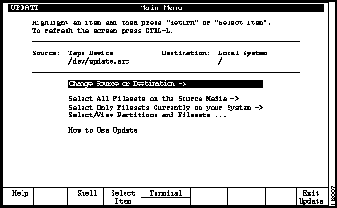
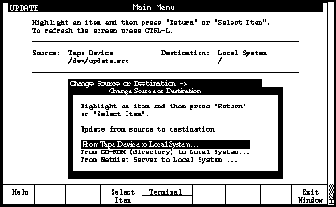
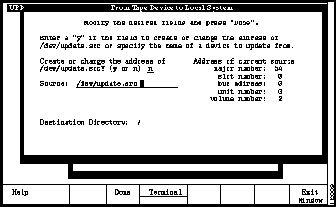
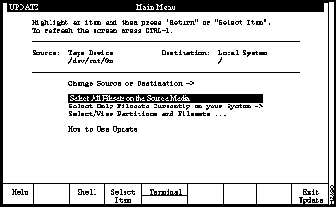
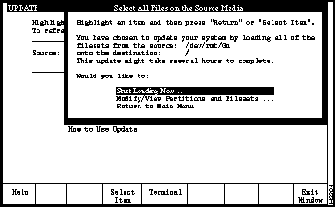
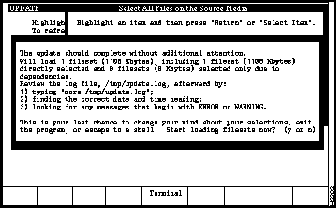
The EISA HP Version 9.x DDS tape contains the files you need to install the EISA HP Version 9.x adapter software. Use the following procedure to install the software on your system:
Files Added or Modified Using update
Use the update utility to copy the EISA HP adapter software. The following files are copied to /usr/local/cfddi:
download_flash install.fddi eisa26.rom
EISA HP Adapter Software Driver Installation
This section contains instructions for installing the FDDI driver and modifying system files. If you prefer to perform the installation manually, see the section "Configuring Your System Manually" later in this chapter.
EISA HP Adapter Installation Script Example
The following text is an example of the ./install.fddi.log file created using the previous installation procedure:
Configuring Your System Manually
The installation script modifies several system files, so you may wish to configure your system manually. This section describes the modifications you should make to various system files.
Add cfddi to this file.
Add the following lines to the end of the fileset section in /etc/master:
Add the bold text to the following code in /etc/netlinkrc.
In the example above, lan# is the LAN interface number for the FDDI interface, and hostname is the host name of the FDDI interface.
To install the SNMP agent, add the following lines to /etc/netnmrc.
Install the driver object into the archive library to allow access by the ar utility:
For HP-UX 8.07, enter the following:
For HP-UX 9.01, enter the following:
For more information, see the man pages for the ar utility.
To make the new kernel, enter the following:
When the make process is complete, back up the old kernel, copy the new one to the root directory, and reboot the system using the following commands:
HP UX 10.0 Installation Instructions
The following instructions are used to install and configure the workgroup EISA HP adapter software in an HP workstation with HP-UX Version 10.0 operating system installed.
These instructions are separated into two parts:
Copying the Software Using the swinstall Command
The EISA HP Version 10.0 DDS tape contains the files you need to install the EISA HP Version 10.0 adapter software. The following procedure to installs the software on your system:
This completes the adapter driver installation. When the workstation has rebooted, continue with the next section, "Configure TCP/IP Using SAM."
Configure TCP/IP Using the SAM Command
Use the following procedure to configure the network interface IP address on your system:
This concludes the network interface IP address configuration on your system.
Copyright 1988-1996 © Cisco Systems Inc.
download_flash.README README network_download
libfddifmt.a cfddi.hp8.o deinstall.fddi
libfddifmt.sl cfddi.hp9.o fddi.cat
cfddi.msg eisa33.rom
You have invoked the ./install.fddi script, which is used to
install

software for FDDI EISA HP Adapters.

There are two steps to the installation:


   1) Install SNMP agent (optional).

   2) Install FDDI EISA driver.


Do you wish to install the SNMP agent (y/n) [y] ? y
modifying /etc/netnmrc


Do you wish to install the FDDI HP-UX driver (y/n) [y] ? y
How many FDDI interfaces are being installed in this machine

[1] ? 1
Enter hostname for FDDI interface 1 [console-fddi]:
You are using NIS, do you want to get ip address from NIS (y/n)
[y] ? y
Retrieved ipaddr 198.133.219.59 for host console-fddi

Enter IP address for FDDI interface 1 [198.133.219.59]:
modifying /etc/hosts


The lan number for the built-in LAN[ethernet] is lan0 and the

first networking adapter in an EISA slot is lan1. The LAN

adapters in other slots are named sequentially according to

the order of the slots

Enter lan number for FDDI interface 1 [ lan1 ]:
modifying /etc/master

modifying /etc/conf/dfile


modifying /etc/netlinkrc


modifying nettl tracing and logging files


   Regenerating netfmt and nettl commands.


configuring kernel...................done


Rebuilding kernel...


Compiling conf.c ...

Loading hp-ux...


done


Saving /hp-ux in /hp-ux.sv

Copying /etc/conf/hp-ux to /hp-ux


enter command to add eisa configuration.

Format[add !CRS3203 <slotnum>] for old cards OR

Format[add !CRS3204 <slotnum>] for turbo cards


HP-UX E/ISA CONFIGURATION UTILITY


Type q or quit to exit eisa_config.

Type ? or help for help on eisa_config commands.


Slot CFG File Contents


0 !HWPC000 HP Series 720/730 EISA System Board (A1094-66531)

1 ** EMPTY **


EISA: add !CRS3204 1
Added board: 32-bit EISA FDDI Adapter


EISA: Slot CFG File Contents


 0 !HWPC000 HP Series 720/730 EISA System Board (A1094-66531)

 1 !CRS3204 32-bit EISA FDDI Adapter


EISA: save
Successfully saved configuration in NVM and in
/etc/eisa/system.sci.


EISA: q
The configuration was changed and has already been saved to NVM.


A description of the configuration was saved in
/etc/eisa/config.log.


After exiting eisa_config, follow these steps:


 (1) Make any necessary device files. Refer to the section titled

 "Making Device Files" in "Adding an EISA Board: Alternate

 Method" in chapter 2 of the "E/ISA Configuration Guide for

 HP-UX, HP 9000 Series 700". If you have moved a board you

 may also need to make new device files. Refer to the section

 titled "Moving an E/ISA Board" in chapter 3 of "E/ISA

 Configuration Guide for HP-UX, HP 9000 Series 700".

 (2) Ensure that all appropriate software I/O drivers are present

 in the kernel. Refer to "Adding Drivers to the HP-UX Kernel"

 in "Adding an EISA Board: Alternate Method" in chapter 2

 of the "E/ISA Configuration Guide for HP-UX, HP 9000 Series 700

 Computers".

 (3) Shut down the system with the "/etc/shutdown -h" command.

 (4) Once the system is shut down, turn the power off. Then set any

 physical switches and jumpers correctly. The switches and jumpers

 that have changed since you invoked eisa_config are listed below.

 Refer to the section titled "Setting Switches and Jumpers" in

 chapter 3 of the "E/ISA Configuration Guide for HP-UX, HP 9000

 Series 700 Computers".

 Also refer to /etc/eisa/config.log for a summary

 of the new configuration, including required settings.

 (5) Physically add, move, or remove boards as needed.

 (6) Turn the power on and boot the system.


No switches or jumpers have changed.

Exiting eisa_config.


 Installation of FDDI EISA HP driver complete.

 You should now halt the system, power down,

 and install the FDDI EISA HP Adapter.


 A log of the installation is in ./install.fddi.log
root@console: etc => ./install.fddi


You have invoked the ./install.fddi script, which is used to install

software for FDDI EISA HP Adapters.

There are two steps to the installation:


 1) Install SNMP agent (optional).

 2) Install FDDI EISA driver.


Do you wish to install the SNMP agent (y/n) [y] ? y


modifying /etc/netnmrc


Do you wish to install the FDDI HP-UX driver (y/n) [y] ? y


How many FDDI interfaces are being installed in this machine [1] ? 1


Enter hostname for FDDI interface 1 [console-fddi]:


You are using NIS, do you want to get ip address from NIS (y/n) [y] ? y


Retrieved ipaddr 198.133.219.59 for host console-fddi

Enter IP address for FDDI interface 1 [198.133.219.59]:


modifying /etc/hosts


The lan number for the built-in LAN[ethernet] is lan0 and the

first networking adapter in an EISA slot is lan1. The LAN

adapters in other slots are named sequentially according to

the order of the slots

Enter lan number for FDDI interface 1 [ lan1 ]:

modifying /etc/master

modifying /etc/conf/dfile


modifying /etc/netlinkrc


modifying nettl tracing and logging files


  Regenerating netfmt and nettl commands.


configuring kernel...................done


Rebuilding kernel...


Compiling conf.c ...

Loading hp-ux...


  done


Saving /hp-ux in /hp-ux.sv

Copying /etc/conf/hp-ux to /hp-ux


enter command to add eisa configuration.

Format[add !CRS3203 <slotnum>] for old cards OR

Format[add !CRS3204 <slotnum>] for turbo cards


HP-UX E/ISA CONFIGURATION UTILITY


Type q or quit to exit eisa_config.

Type ? or help for help on eisa_config commands.


Slot CFG File Contents


0 !HWPC000 HP Series 720/730 EISA System Board (A1094-66531)

1 ** EMPTY **


EISA: add !CRS3204 1


Added board: 32-bit EISA FDDI Adapter


EISA: Slot CFG File Contents


0 !HWPC000 HP Series 720/730 EISA System Board (A1094-66531)

1 !CRS3204 32-bit EISA FDDI Adapter


EISA: save


Successfully saved configuration in NVM and in /etc/eisa/system.sci.


EISA: q


The configuration was changed and has already been saved to NVM.


A description of the configuration was saved in /etc/eisa/config.log.


After exiting eisa_config, follow these steps:


(1) Make any necessary device files. Refer to the section titled

"Making Device Files" in "Adding an EISA Board: Alternate

Method" in chapter 2 of the "E/ISA Configuration Guide for

HP-UX, HP 9000 Series 700". If you have moved a board you

may also need to make new device files. Refer to the section

titled "Moving an E/ISA Board" in chapter 3 of "E/ISA

Configuration Guide for HP-UX, HP 9000 Series 700".

(2) Ensure that all appropriate software I/O drivers are present

in the kernel. Refer to "Adding Drivers to the HP-UX Kernel"

in "Adding an EISA Board: Alternate Method" in chapter 2

of the "E/ISA Configuration Guide for HP-UX, HP 9000 Series 700

Computers".

(3) Shut down the system with the "/etc/shutdown -h" command.

(4) Once the system is shut down, turn the power off. Then set any

physical switches and jumpers correctly. The switches and jumpers

that have changed since you invoked eisa_config are listed below.

Refer to the section titled "Setting Switches and Jumpers" in

chapter 3 of the "E/ISA Configuration Guide for HP-UX, HP 9000

Series 700 Computers".

Also refer to /etc/eisa/config.log for a summary

of the new configuration, including required settings.

(5) Physically add, move, or remove boards as needed.

(6) Turn the power on and boot the system.


No switches or jumpers have changed.

Exiting eisa_config.


Installation of FDDI EISA HP driver complete.

You should now halt the system, power down,

and install the FDDI EISA HP Adapter.


A log of the installation is in ./install.fddi.log
*fileset CFDDI

cfddi  cfddi  10  100  -1  -1
case $NODENAME in

  $ROOTSERVER) /etc/ifconfig lan0 inet `hostname` up

    STATUS=$?

    if [ ! $STATUS -eq 0 ]

    then

      net_init=1

    fi

    /etc/lanconfig lan0 ether

    STATUS=$?

    if [ ! $STATUS -eq 0 ]

    then

      net_init=1

    fi

    /etc/ifconfig lan# inet hostname up

    STATUS=$?

    if [ ! $STATUS -eq 0 ]

    then

      net_init=1

    fi

    ;;
if [-x /etc/snmpd.cfddi ]; then

  SNMPD=/etc/snmpd.cfddi

elif ....
ar -rv /etc/conf/libusrdrv.a cfddi.hp8.o
ar -rv /etc/conf/libusrdrv.a cfddi.hp9.o
cd /etc/conf

config -m /etc/master /etc/conf/dfile

make -f config.mk
cp /hp-ux /hp-ux.save

cp ./hp-ux /hp-ux

sync

cd /

shutdown -h -y -0
