


|
|
This chapter discusses maintenance of the MGS and C chassis and their components. As your internetworking requirements change over time, use this information to adapt as needed. Certain cards and appliques can be configured for different internetworking functions. This chapter discusses these configuration requirements.
If any upgrades requiring card, microcode, or software replacement are necessary, the appropriate documentation called configuration notes will be shipped with the replacement parts or upgrades you order.
This chapter contains information on the following:

Access to the MGS chassis interior requires that you remove either the card cage access panel to access the cards or the top cover to access the rest of the chassis components. Access to the C chassis interior and card cage requires removing the top cover; there is no access panel. Use the procedure that applies to your chassis type.
The following tools are required for accessing the MGS and C chassis interiors:
Following is the procedure for accessing the MGS chassis interior.

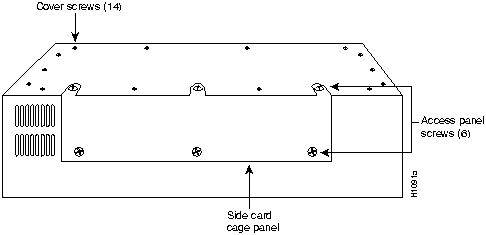
Figure 5-1 Screw Locations on the MGS Chassis Exterior---Side View
Following is the procedure for accessing the C chassis interior.

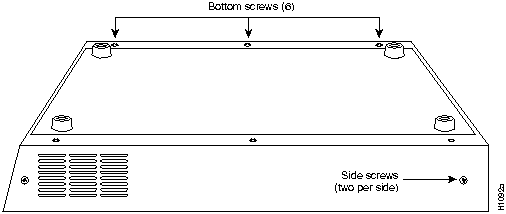
Figure 5-2 Screw Locations on the C Chassis Exterior---Side View

Some cards can be configured for different user applications. For example, the CSC-MCI card has jumpers that allow you to change the serial ports from data terminal equipment (DTE) mode to data communications equipment (DCE) mode depending upon your requirements. In addition, most Multibus cards have card-numbering switches that allow you to reconfigure them for different slot positions in the MGS and C chassis.
Included in this section is an illustration of each card and tables showing its configurable jumpers and switches. Following is a listing of all the configurable cards available for the MGS and C chassis. Cards excluded from this list are not configurable through hardware alterations.
Most Multibus interface cards require that unique card numbers be assigned to them before the entire system becomes operational. Cards that are installed in the MGS and C chassis are correctly numbered before shipment, but you may have to renumber them when you order and install new or additional cards.
These card numbers are position markers for the system software that let the system know what cards are installed in what slots. The card numbers are assigned by way of a dual in-line package (DIP) switch located on the component side of the card. These switches are set so that each card has a unique card number. In general, each card number should be unique within the set of all cards installed in the card cage. Exceptions to this are the processor cards, which have no switches and are always installed in the top slot (unless you require a CSC-MT memory card, which uses the top slot).
For both the CSC/3 and CSC/4 processor cards, the 50-pin header in the center of the front edge of the card is used as a configuration register for the processor functions and diagnostics. The following section describes the settings for this register. Figure 5-3 shows a partial component-side view of the processor cards. Both cards contain the same components and basic physical layout as illustrated.

Figure 5-3 CSC/3 and CSC/4 Processor Cards---Partial Component-Side View
The processor cards have a 16-bit hardware configuration register: the far-right 16 pairs of jumper pins on the 50-pin header in the center of the card. (Refer to Figure 5-4.) Bit 0 (or position 0) is the far right vertical pair of pins. To set a bit to 1, insert a vertical jumper. To clear a bit to 0, remove the vertical jumper. Figure 5-4 shows the configuration register with the factory settings for the CSC/3 and CSC/4 cards.
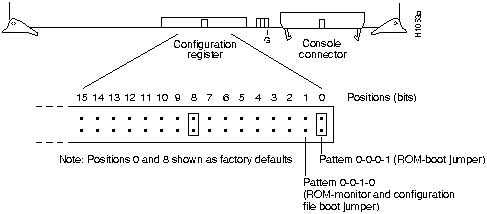
Figure 5-4 CSC/3 and CSC/4 Configuration Register---Partial Front-Edge View
To change configuration register settings, turn off the system, set or clear the bits by inserting or removing jumpers, and restart the system (or change the jumper settings while the power is still on, and then give the privileged command reload). It is not necessary to remove the processor card from the backplane or to turn off the power to change a jumper setting.
The lowest four bits of the processor configuration register (bits 3, 2, 1, and 0) form the boot field. The boot field specifies a number in binary. If you set the boot field value to 0, you must boot the operating system manually by giving a b (or boot) command to the system bootstrap program. If you set the boot field value to 1 (the factory default), the system boots using the default ROM software. If you set the boot field to any other bit pattern, the boot system commands override the default boot filenames when netbooting. For example, a jumper configuration of 0-0-1-0 (bits 3 through 0) is used when using the boot system flash command with the Flash memory card.
The system creates a boot filename as part of the automatic configuration processes. To form the boot filename, the system starts with cisco and links the octal equivalent of the boot field number, a dash, and the processor type name. Table 5-1 lists the default boot filenames or actions for the CSC/4 processor. The list is the same for the CSC/3 processor card; however, csc3 is substituted for csc4.
Table 5-1 Default Boot Filenames---Boot Field Jumper
| Action/Filename | Bit 3 | Bit 2 | Bit 1 | Bit 0 |
|---|---|---|---|---|
| bootstrap mode | 0 | 0 | 0 | 0 |
| ROM software | 0 | 0 | 0 | 1 |
| cisco2-csc4 | 0 | 0 | 1 | 0 |
| cisco3-csc4 | 0 | 0 | 1 | 1 |
| cisco4-csc4 | 0 | 1 | 0 | 0 |
| cisco5-csc4 | 0 | 1 | 0 | 1 |
| cisco6-csc4 | 0 | 1 | 1 | 0 |
| cisco7-csc4 | 0 | 1 | 1 | 1 |
| cisco10-csc4 | 1 | 0 | 0 | 0 |
| cisco11-csc4 | 1 | 0 | 0 | 1 |
| cisco12-csc4 | 1 | 0 | 1 | 0 |
| cisco13-csc4 | 1 | 0 | 1 | 1 |
| cisco14-csc4 | 1 | 1 | 0 | 0 |
| cisco15-csc4 | 1 | 1 | 0 | 1 |
| cisco16-csc4 | 1 | 1 | 1 | 0 |
| cisco17-csc4 | 1 | 1 | 1 | 1 |
Bit 8 in the configuration register controls the console Break key. Setting bit 8 to a 1 (the factory default) causes the processor to ignore the console Break key. Clearing bit 8 to 0 causes the processor to interpret Break as a command to force the system into the bootstrap monitor, suspending normal operation.
Bit 9 in the configuration register controls the use of a secondary bootstrap procedure when netbooting. If this bit is set to 1, a secondary bootstrap with the filename boot-csc4 (or csc3) is first loaded into the system over the network. This bootstrap image then loads in the desired boot file, completing the netbooting process.
Bit 10 in the configuration register controls the host portion of the Internet broadcast address. Setting bit 10 causes the processor to use all zeros; clearing bit 10 (the factory default) causes the processor to use all ones. Bit 10 interacts with bit 14, which controls the network and subnet portions of the broadcast address. Table 5-2 shows the combined effect of bits 10 and 14. This effect is overridden by values set in NVRAM using the ip broadcast address command.
Table 5-2 Configuration Register Settings for Broadcast Address Destination
| Bit 14 | Bit 10 | Address (<net><host>) |
|---|---|---|
| out | out | <ones><ones> |
| out | in | <zeros><zeros> |
| in | in | <net><zeros> |
| in | out | <net><ones> |
Bits 11 and 12 in the configuration register determine the baud rate of the console port. Table 5-3 shows the bit settings for the four available baud rates. (The factory default is 9600 baud.)
Table 5-3 System Console Port Baud Rate Settings
| Baud | Bit 12 | Bit 11 |
|---|---|---|
| 9600(1) | 0 | 0 |
| 4800 | 0 | 1 |
| 1200 | 1 | 0 |
| 2400 | 1 | 1 |
Bit 13 in the configuration register determines the system response to a boot-load failure. Setting
bit 13 causes the system to load operating software from read-only memory (ROM) after five unsuccessful attempts to load a boot file from the network. Clearing bit 13 causes the system to continue attempting to load a boot file from the network indefinitely. By factory default, bit 13 is cleared to 0.
Bit 14 in the configuration register controls the network and subnet portions of the Internet broadcast address. Setting bit 14 causes the system to include the network and subnet portions of its address in the broadcast address. Clearing bit 14 causes the system to set the entire broadcast address to all ones or all zeros, depending on the setting of bit 10. By factory default, bit 14 is cleared to 0. See Table 5-2 for the combined effect of bits 10 and 14.
Bit 15 in the configuration register controls the factory diagnostic mode in the system. Setting bit 15 causes the system to produce detailed CPU self-check messages, to automatically prompt for interface addresses (not look for them on the network), not to read configuration files or NVRAM, and to automatically set to diagnostic tracing modes using the debug commands. Clearing bit 15 (the factory default) causes the system to operate normally. Bit 15 is also used for password recovery.
Bits 16 through 19 and bit 24 are not currently used.
Bits 20 through 23 (the four pairs of pins on the far left of the 50-pin header) are not used in normal operation; however, they can be used to invoke the Slave mode, External Reset, Halt Processor, and Cache Disable mode functions (respectively) on any processor card.
Figure 5-5, which shows the optional jumper configurations, represents a partial front-edge view of the configuration register on a processor card installed in the card cage.
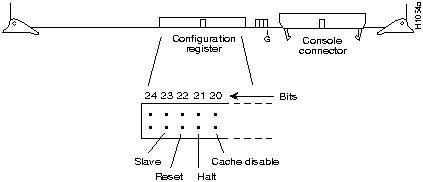
Figure 5-5 CSC/3 and CSC/4 Optional Configuration Register Settings
The CSC/3 and CSC/4 processor cards have configurable jumpers that control critical memory functions for the different sizes of erasable progammable read-only memories (EPROMs) that can be installed. These jumpers are changed only when the EPROM memory sizes are changed. Do not change these jumpers from their default settings unless you are instructed to do so when the software is changed. Figure 5-6 shows the locations of jumpers W51 through W53 on the CSC/3 card (left side), and jumpers W51 through W52 on the CSC/4 card (right side).
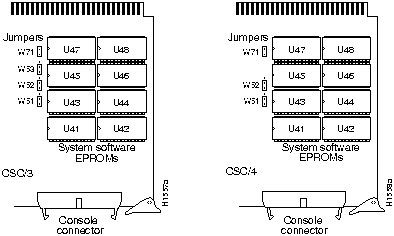
Figure 5-6 CSC/3 and CSC/4 EPROM Jumper Locations---Partial Component-Side Views
Figure 5-7 and Figure 5-8 show the EPROM jumper settings for the CSC/3 and CSC/4 cards, respectively.
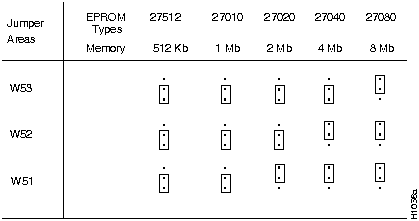
Figure 5-7 CSC/3 EPROM Jumper Settings
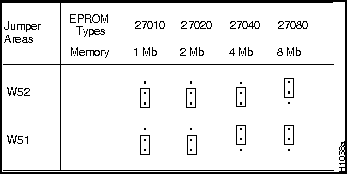
Figure 5-8 CSC/4 EPROM Jumper Settings
The following sections discuss the various configuration changes that can be made to the CSC-MCI and CSC-SCI cards. For both cards, card numbers are assigned by setting a dual in-line package (DIP) switch (S1). For the MCI card, the card-numbering switch (S1) is located toward the back of the card near the bus edge connector. (See Figure 5-9.) For the SCI card, the card-numbering switch (S1) is located toward the right-front edge of the card. (See Figure 5-10.)
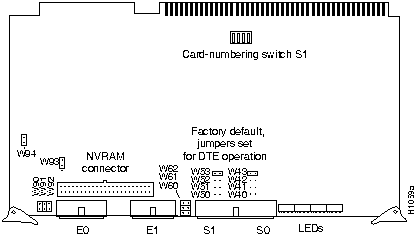
Figure 5-9 MCI Card Jumpers and Switches---Component-Side View
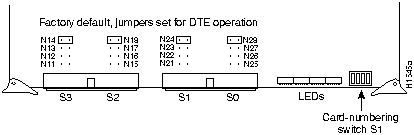
Figure 5-10 SCI Card Jumpers and Switches---Partial Component-Side View
Table 5-4 shows the switch (S1) settings for card numbering the MCI and SCI cards. Because only one interface card slot is available in the C chassis, card number 0 is used. The card numbers within the set of MCI and SCI cards installed in the MGS chassis must be unique. These card numbers must also be unique among the other cards installed.
Table 5-4 CSC-MCI and CSC-SCI Switch (S1) Settings for Card Numbering
| Card No.(1) | S1-1 | S1-2 | S1-3 | S1-4 |
|---|---|---|---|---|
| 0 | Off | Off | Off | Off |
| 1 | Off | Off | Off | On |
| 2 | Off | Off | On | Off |
On the MCI card, jumpers W51 and W41 control the serial ports 0 and 1 in data communications equipment (DCE) mode. On the SCI card, jumpers N22, N26, N12, and N16 control the serial
ports 0 through 3 in DCE mode. In addition to changing these jumpers for DCE operation, you must also configure the clock rate on the serial interface of the interface card using the clockrate speed interface subcommand (where speed is the bit rate of the interface in bits per second [bps]). The applique must be DCE (or configured as DCE) to generate the clock signals.
Following is sample output of the clockrate speed command:
Router# configure terminal
Enter configuration commands, one per line.
Edit with DELETE, CRTL/W, and CRTL/U;end with CTRL/Z
interface serial 0
clockrate 64000
^Z
Router# write memory
[ok]
Router#
The no clockrate command removes the clock rate if DTE mode is desired. Refer to the appropriate configuration and reference publication for more information on these commands. Following are the acceptable clockrate speed settings appearing as they are entered with the clockrate speed command:
1200, 2400, 4800, 9600, 19200, 38400, 56000, 64000, 72000, 125000, 148000, 500000, 800000, 1000000, 1300000, 2000000, and 4000000
The fastest speeds might not work if your cable is too long. Speeds faster than 148 kilobits per second (kbps) are not recommended for RS-232 or RS-232 SDLC signaling. It is recommended that you use the RS-232 and RS-232 SDLC appliques only at speeds up to 64 kbps; for speeds above this, use RS-449, HD V.35, and X.21.
Most data terminal equipment (DTE) interfaces require a Normal External Transmit Clock signal. All DCE interfaces require an Internal Transmit Clock (noninverted) signal. The MCI card clocking options are controlled by jumper areas W40 through W53, and the SCI card clocking options are controlled by jumper areas N11 through N28. Occasionally, delays occur between the Serial Clock Transmit External (SCTE) clock and the transmitted data that may push the data transition out to the point where using an inverted clock is appropriate (jumpers W42 and W52 for the MCI and N13, N17, N23, and N27 for the SCI); however, an inverted clock is not recommended.
Typical delays indicate that the inverted clock may be appropriate above 1.3 megabits per
second (Mbps), depending upon the DTE clock-to-data skews and setup required, and allowing some margin for temperature, cable, and other variables. Some DCE devices will not accept SCTE, so Serial Clock Transmit (SCT) must be used. Inverting the clock may be the only way to compensate for the cable length and circuit delays in the DTE and DCE.
Table 5-5 and Table 5-6 show the jumper settings for the MCI and SCI clock options, respectively. The last two columns of these tables (DTE and DCE) indicate the setting that should be used with either a DTE or DCE applique. Unless specifically noted, all products are shipped with the factory default setting to work with the DTE applique, which requires external clocking; the channel service unit/digital service unit (CSU/DSU) provides the clocking for the circuit.
Table 5-5 CSC-MCI Jumper Settings for Clock Options
| Jumper Pair | Signal Description | Interface | DTE | DCE |
|---|---|---|---|---|
| W53 | Normal External Transmit Clock | Serial 0 | X(1) | -- |
| W52 | Inverted External Transmit Clock | Serial 0 | x | -- |
| W51 | Normal Internal Transmit Clock | Serial 0 | -- | X |
| W50 | Inverted Internal Transmit Clock | Serial 0 | -- | x |
| W43 | Normal External Transmit Clock | Serial 1 | X1 | -- |
| W42 | Inverted External Transmit Clock | Serial 1 | x | -- |
| W41 | Normal Internal Transmit Clock | Serial 1 | -- | X |
| W40 | Inverted Internal Transmit Clock | Serial 1 | -- | x |
Table 5-6 CSC-SCI Jumper Settings for Clock Options
| Jumper Pair | Signal Description | Interface | DTE | DCE |
|---|---|---|---|---|
| N 24 | Normal External Transmit Clock | Serial 0 | X(1) | -- |
| N 23 | Inverted External Transmit Clock | Serial 0 | x | -- |
| N 22 | Normal Internal Transmit Clock | Serial 0 | -- | X |
| N 21 | Inverted Internal Transmit Clock | Serial 0 | -- | x |
| N 28 | Normal External Transmit Clock | Serial 1 | X1 | -- |
| N 27 | Inverted External Transmit Clock | Serial 1 | x | -- |
| N 26 | Normal Internal Transmit Clock | Serial 1 | -- | X |
| N 25 | Inverted Internal Transmit Clock | Serial 1 | -- | x |
| N 14 | Normal External Transmit Clock | Serial 2 | X1 | -- |
| N 13 | Inverted External Transmit Clock | Serial 2 | x | -- |
| N 12 | Normal Internal Transmit Clock | Serial 2 | -- | X |
| N 11 | Inverted Internal Transmit Clock | Serial 2 | -- | x |
| N 18 | Normal External Transmit Clock | Serial 3 | X1 | -- |
| N 17 | Inverted External Transmit Clock | Serial 3 | x | -- |
| N 16 | Normal Internal Transmit Clock | Serial 3 | -- | X |
| N 15 | Inverted Internal Transmit Clock | Serial 3 | -- | x |
The CSC-MCI card provides up to two Ethernet ports (the SCI card has none) and uses grounding options to accommodate the differences between the Ethernet Version 1 and IEEE 802.3 electrical specifications. Ethernet Version 1 permits certain signals to float, whereas IEEE 802.3 requires the signals to be grounded. Table 5-7 lists CSC-MCI the grounding options. Inserting a jumper grounds the signal and removing a jumper allows the signal to float. The factory default is to ground all signal pairs, which is compatible with both Ethernet and IEEE 802.3 requirements.
Table 5-7 CSC-MCI Jumper Settings for Grounding Options
| Jumper Pair | Signal Description | Interface |
|---|---|---|
| W90 | Receive Pair Shield | First Ethernet |
| W91 | Transmit Pair Shield | First Ethernet |
| W92 | Power Pair Shield | First Ethernet |
| W60 | Power Pair Shield | Second Ethernet |
| W61 | Transmit Pair Shield | Second Ethernet |
| W62 | Receive Pair Shield | Second Ethernet |
On the CSC-MCI card, jumpers W94 and W93 are 3-pin jumpers that select between Ethernet and IEEE 802.3 electrical levels. Jumper W94 controls the first Ethernet port, and jumper W93 controls the second Ethernet port. The factory default is to select IEEE 802.3 (Ethernet Version 2). Using the card orientation shown in Figure 5-9, on page 10, place a jumper on the lower pair of pins to select Ethernet Version 1.
The following sections discuss the configuration requirements for the CSC-1R and CSC-2R.
Switches 1 through 3 on the front edge of the CSC-1R and CSC-2R cards (see Figure 5-11) control card numbering within the chassis. (Switches 4 through 8 have no function.) Configure the switches on the CSC-1R card to select the desired card number. These switches (1 through 3) are listed in Table 5-8 from left to right when viewing the front edge of the card. Only the front-edge view of the CSC-1R card is shown; the CSC-2R card numbering switches are in the same order and position on the card, and have the same function. Switches 4 through 8 should all be down (off).

Figure 5-11 CSC-1R and CSC-2R Card-Numbering Switches---Front-Edge View
The card numbers of each card within a certain type (Token Ring and so forth) must be unique to allow the system to distinguish between multiple cards of one type. For example, if two CSC-1R cards are installed, they should be numbered Card 0 and Card 1. If one CSC-R16M card and one CSC-1R card are installed, they should also be Card 0 and Card 1. All other card-numbering fundamentals apply. Table 5-8 lists the card-numbering scheme for the CSC-1R and CSC-2R cards.
Table 5-8 CSC-1R and CSC-2R Card-Numbering Switch Settings
| Card No. | Switch 1 | Switch 2 | Switch 3 |
|---|---|---|---|
| 0 | Down(1) | Down | Down |
| 1 | Up | Down | Down |
| 2 | Down | Up | Down |
The speed of the Token Ring ports on the CSC-1R and CSC-2R cards must be configured immediately after the first reboot (following installation) using either the configuration dialog routine, the config terminal command, or the setup command.
The speed of the ports on these cards must be configured by the user; there is no factory default for port speed. The ports are independent and can be configured for two different speeds. Following is sample output of how to configure both ports on the CSC-2R Token Ring card for 16 megahertz (MHz) using the config terminal command:
Router# configure terminal
Enter configuration commands, one per line.
Edit with DELETE, CRTL/W, and CRTL/U;end with CTRL/Z
interface tokenring 0
ring-speed 16
interface tokenring 1
ring-speed 16 (this line and the preceding line are not used for the CSC-1R)
^z
Router# write memory
[ok]
Router#

Following are the configuration requirements of the CSC-R16M card in the MGS chassis.
The card number of the CSC-R16M is selected through the use of software-readable dual in-line package (DIP) switches on the front edge of the card. Only switches 1 through 3 are used; all others are set to down (or off). Figure 5-12 shows these switches on the card front edge as viewed from left to right. The card number of each card within a certain type (Token Ring and so forth) must be unique to allow the system to distinguish between multiple cards of one type. For example, if two CSC-R16M cards are installed, they should be numbered Card 0 and Card 1. If one CSC-R16M card and one CSC-1R card are installed, they also should be Card 0 and Card 1. Table 5-9 lists the card-numbering scheme for the CSC-R16M. All other card numbering fundamentals apply.
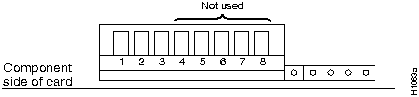
Figure 5-12 CSC-R16M Card-Numbering Switches---Partial Front-Edge View
Table 5-9 CSC-R16M Card-Numbering Switch Settings
| Card No. | Switch 1(1) | Switch 2 | Switch 3 |
|---|---|---|---|
| 0 | Down(2) | Down | Down |
| 1 | Up | Down | Down |
| 2 | Down | Up | Down |
The port speed of the CSC-R16M card is jumper configurable. Jumper area J22 configures the CSC-R16M for either 4-megabits per second (Mbps) or 16-Mbps operation. (See Figure 5-13.) No jumper at jumper area J22 (the factory default setting) selects 16-Mbps operation, while installing a jumper at location J22 selects 4-Mbps operation. The spare jumper to use at J22 is placed on the posts at jumper area J21. CSC-R16M cards are shipped configured to run at 16 Mbps. (J22 has no jumper.) To install the J22 jumper, remove the jumper from J21.
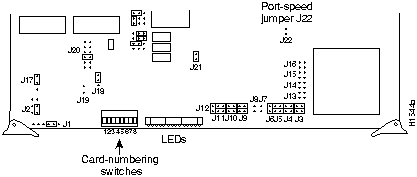
Figure 5-13 CSC-R16M Jumper and Switch Positions---Partial Component-Side View

The CSC-MT memory card is used in the MGS chassis only. The CSC-MT card provides
48 kilobytes (KB) of Multibus memory and 32 KB of nonvolatile random-access memory (NVRAM) for storing configuration files. The CSC-MT is based on the CSC-M memory card, but with more memory space available than the CSC-M card provides. The upgrade of the CSC-M card to the CSC-MT card requires that specific jumpers on the card be changed. Figure 5-14 shows the jumper settings for the CSC-MT card. If you suspect your CSC-MT card is not working correctly, check the jumper settings against those shown in Figure 5-14.
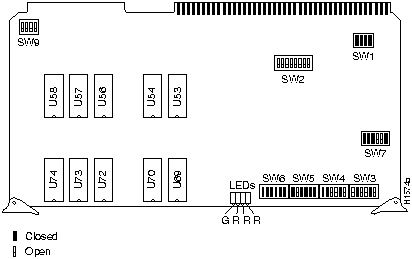
Figure 5-14 CSC-MT Memory Card Switch Settings---Component-Side View
The CSC-M card is identical to the CSC-MT card except for the following: on the CSC-M card all six switches on SW5 are open, and there are no NVRAM devices installed in U72 through U74 and U56 through U58.
The MGS and C chassis in the United States use the 175W model MAS-28 power supply. In the United Kingdom, the MGS chassis uses the 175W model MAS-26 power supply, and the C chassis uses the 175W model MAS-27 power supply. If you determine that you have a power supply problem, contact a customer service representative. Before making the call, verify the input voltage of your system by checking the label next to the power switch on the rear of the chassis and have the following information available:
The MGS and C chassis use the model MAS-20 muffin fan assembly for system cooling. The MGS chassis uses two MAS-20 fans, and the C chassis uses one. If you have determined that you have a fan problem, contact a customer service representative and have the following information ready:
The fuse for the MGS and C chassis is located in the switch assembly on the right side of the chassis, when facing the rear panel. It is not necessary to remove the switch assembly to check or replace the 4-amp (A) fuse. This procedure requires the following tools:
Following is the procedure for checking and replacing the fuse in your chassis.
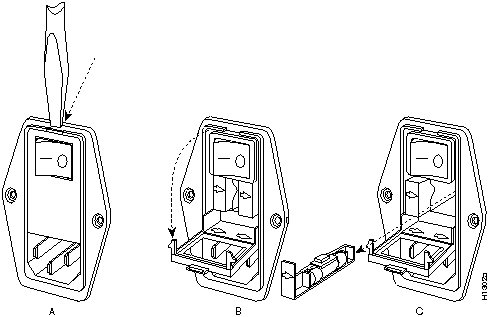
Figure 5-15 Opening the Fuse Access Door on the Switch Assembly
Following are illustrations of all of the interface, memory, and processor cards that can be used in the MGS and C chassis. Use these illustrations to locate software and microcode EPROMs, connectors, jumpers, and switches on the cards in your chassis.
Following are the cards included in this section:
The CSC-MC NVRAM card does not require a chassis slot, but instead attaches to the floor of the MGS and C chassis (below the chassis card slots). The CSC-MC card connects to the NVRAM connector on the CSC-MCI, CSC-1R, or CSC-2R cards by way of a 50-pin ribbon cable connector.
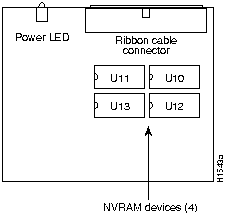
Figure 5-16 CSC-MC NVRAM Card---Component-Side View
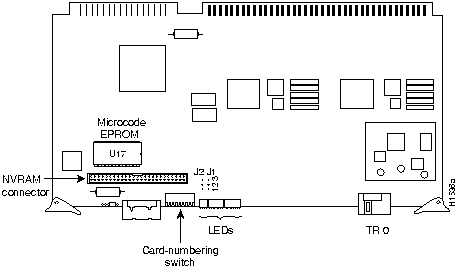
Figure 5-17 CSC-1R Token Ring Interface Card---Component-Side View
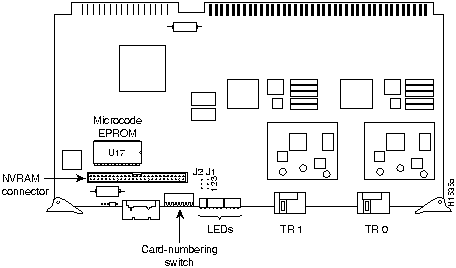
Figure 5-18 CSC-2R Token Ring Interface Card---Component-Side View
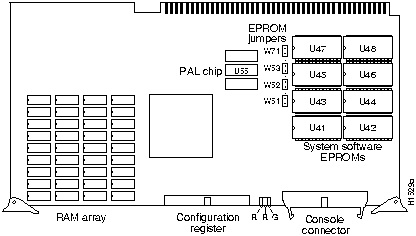
Figure 5-19 CSC/3 Processor Card---Component-Side View
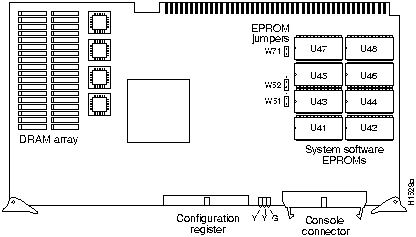
Figure 5-20 CSC/4 Processor Card---Component-Side View
.
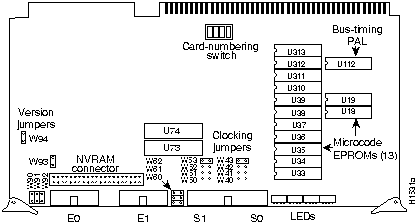
Figure 5-21 CSC-MCI Multiport Communications Interface Card---Component-Side View
The designator CSC-MCI includes three different physical versions of the card: (1) two Ethernet connectors, (2) one Ethernet connector and one serial connector, (3) two Ethernet connectors and two serial connectors.
One or the other of these three physical versions is used for the following interface combinations:
All three physical versions of the CSC-MCI card have the 50-pin NVRAM connector for the CSC-MC memory card and the CSC-MC+ Flash memory card.
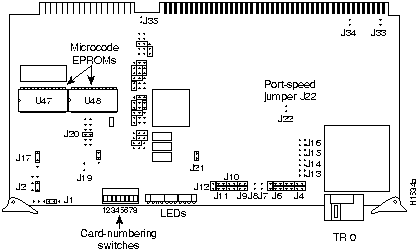
Figure 5-22 CSC-R16M Token Ring Interface Card---Component-Side View
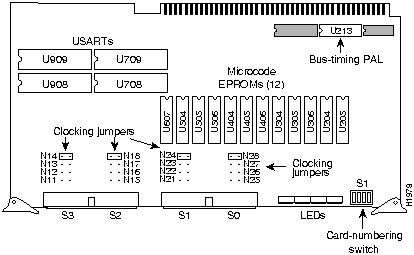
Figure 5-23 CSC-SCI Serial Communications Interface Card---Component-Side View
The designator CSC-SCI includes the CSC-4S, CSC-4T, and CSC-2S2T cards.

|
Copyright 1988-1995 © Cisco Systems Inc.