


|
|

The Cisco 3640 router, a member of the Cisco 3600 series of routers, is a four-slot modular access router with interchangeable modules and WAN interface cards. The modular design of the router provides flexibility, allowing you to configure or reconfigure the router according to your needs.
This chapter includes the following sections:
The features of the router include:
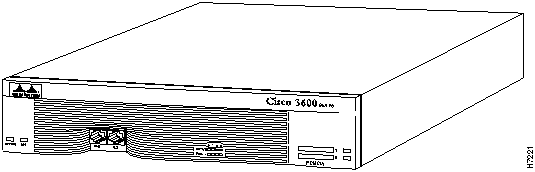
Figure 1-1 shows the front panel of the router.
Figure 1-1 : Front Panel of the Router
Identifying Network Interfaces
Each individual network interface on the router is identified by a slot number and a unit number.
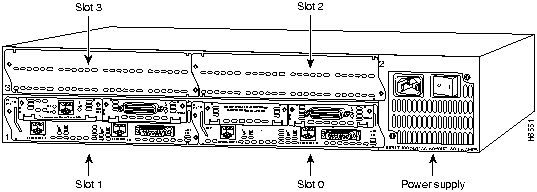
The chassis includes four slots in which you can install modules. You can install any module into any available slot in the chassis.
As shown in Figure 1-3, the slots are numbered from 0 to 3, as follows:
Figure 1-2 : Module Card Slots
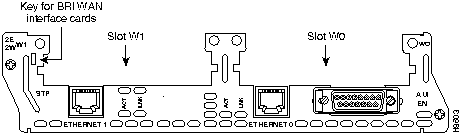
Some modules have two small slots, labeled W0 and W1, for WAN interface cards. For example, Figure 1-3 shows the W0 and W1 slots of the 2 Ethernet 2 WAN card slot (2E 2-slot) module. You can install WAN interface cards into the small module slots (W0 and W1). Integrated Services Digital Network (ISDN) Basic Rate Interface (BRI) WAN interface cards are keyed so that you can install them into slot W1 only. Serial WAN interface cards can be installed into either slot, W0 or W1.
Figure 1-3 : WAN Interface Card Slots
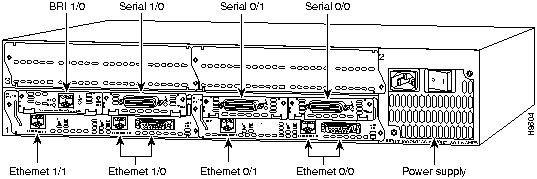
Unit numbers identify the interfaces on the modules and WAN interface cards installed in the router. Unit numbers begin at 0 for each interface type, and continue from right to left and (if necessary) from bottom to top. Modules and WAN interface cards are identified by interface type, slot number, followed by a forward slash (/), and then the unit number; for example, Ethernet 0/0.
Figure 1-4 shows a router with a 2E 2-slot module in slots 0 and 1. Two serial WAN interface cards are installed in the module in slot 0. One serial and one ISDN BRI WAN interface card are installed in the module in slot 1.
As shown in Figure 1-4, the unit numbers are as follows:
The router has the following types of memory:
Table 1-1 lists processor and memory specifications for the router.
Table 1-1 : Processor and Memory Specifications
| Description | Specification |
|---|---|
| Processor | 100-MHz IDT1 R4700 RISC |
| DRAM (main plus shared) | 4 to 128 MB |
| NVRAM | 128 KB |
| Flash memory (SIMM2) | 4 to 48 MB |
| Flash memory (PCMCIA) | 4 to 128 MB (64 MB x 2) |
| Boot ROM | 512 KB |
Table 1-2 lists the module interface options available for the router. Some of the modules provide two empty slots which accept optional WAN interface cards. Table 1-3 lists the WAN interface cards available for the router.
| Module | Short Name Used in this Publication | Port Option | Part Number |
|---|---|---|---|
| 1 Ethernet 2 WAN card slot | 1E 2-slot | One Ethernet port, slots for two WAN interface cards | NM-1E2W |
| 2 Ethernet 2 WAN card slot | 2E 2-slot | Two Ethernet ports, slots for two WAN interface cards | NM-2E2W |
| 1 Ethernet 1 Token Ring 2 WAN card slot | 1E1R 2-slot | One Ethernet port, one Token Ring port, slots for two WAN interface cards | NM-1E1R2W |
| Async/sync serial | A/S serial | Four ports
Eight ports |
NM-4A/S
NM-8A/S |
| ISDN BRI | BRI S/T1 | Four ports
Eight ports |
NM-4B-S/T
NM-8B-S/T |
| ISDN BRI with NT12 | BRI U3 | Four ports
Eight ports |
NM-4B-U
NM-8B-U |
| Channelized T1/ISDN PRI4 | CT1/PRI | One port
Two ports |
NM-1CT1
NM-2CT1 |
| Channelized T1/ISDN PRI with CSU5 | CT1/PRI-CSU | One port
Two ports |
NM-1CT1-CSU
NM-2CT1-CSU |
| Channelized E1/ISDN PRI balanced | CE1/PRI-B | One port
Two ports |
NM-1CE1B
NM-2CE1B |
| Channelized E1/ISDN PRI unbalanced | CE1/PRI-U | One port
Two ports |
NM-1CE1U
NM-2CE1U |
Table 1-3 : WAN Interface Card Options
| WAN Interface Card | Port Option | Part Number |
|---|---|---|
| 1-port serial | Synchronous serial EIA/TIA-232, EIA/TIA-449, V.35, X.21, or EIA-530 | WIC-1T |
| 1-port ISDN BRI | One BRI port with S/T interface | WIC36-1B-S/T |
| 1-port ISDN BRI with NT1 | One BRI port with U interface | WIC36-1B-U |
Table 1-4 lists the specifications of the router.
| Description | Specification |
|---|---|
| Dimensions (H x W x D) | 3.44 x 17.5 x 14.5" (8.7 x 44.5 x 36.8 cm), two rack units in height |
| Weight | 25 lb (13.6 kg), including chassis and four modules |
| Input voltage, AC power supply
Current Frequency Power dissipation |
100 to 240 VAC1, autoranging
2.0A 50 to 60 Hz 140W (maximum) |
| Input voltage, DC power supply
Current Power dissipation |
38 to 72 VDC2
5.0A 140W (maximum) |
| Network interface options | Ethernet, serial, Token Ring, BRI (S/T and U interfaces), T1/PRI, E1/PRI |
| Serial interfaces | EIA/TIA-2323, EIA/TIA-449, V.35, X.21, NRZ/NRZI4, DTE/DCE5, and EIA-530 DTE.
All serial interfaces use a DB-60 connector. |
| Console and auxiliary ports | RJ-45 connector |
| Operating humidity | 5 to 95%, noncondensing |
| Operating temperature | 32 to 104°F (0 to 40°C) |
| Nonoperating temperature | --40 to 185°F (--40 to 85°C) |
| Noise level | 51.9 dB maximum |
| Regulatory compliance | FCC Part 15 Class B. For additional compliance information, refer to the Regulatory Compliance and Safety Information document that accompanied the router. |
Cisco offers a wide variety of service and support programs, which are described in the information packet that shipped with your router. For service and support for a product purchased directly from Cisco, use Cisco Connection Online (CCO).
CCO is Cisco Systems' primary, real-time support channel. SMARTnet customers and partners can self-register on CCO to obtain additional content and services.
Available 24 hours a day, 7 days a week, CCO provides a wealth of standard and value-added services to Cisco's customers and business partners. CCO services include product information, software updates, release notes, technical tips, the Bug Navigator, configuration notes, brochures, descriptions of service offerings, and download access to public and authorized files.
CCO serves a wide variety of users through two interfaces that are updated and enhanced simultaneously---a character-based version and a multimedia version that resides on the World Wide Web (WWW). The character-based CCO supports Zmodem, Kermit, Xmodem, FTP, and Internet e-mail, and is excellent for quick access to information over lower bandwidths. The WWW version of CCO provides richly formatted documents with photographs, figures, graphics, and video, as well as hyperlinks to related information.
You can access CCO in the following ways:
For a copy of CCO's Frequently Asked Questions (FAQ), contact ccohelp@cisco.com. For additional information, contact ccoteam@cisco.com.
Please use CCO to obtain general information about Cisco Systems, Cisco products, or upgrades. If CCO is not accessible, contact 800 553-6387, 408 526-7208, or csrep@cisco.com.
Documentation for Cisco products is available in three forms: on a CD-ROM, printed books, and on the World Wide Web. You have the option of subscribing to the documentation CD through an update service. Or you can order printed documentation at an additional cost. Refer to the information packet included with the router for detailed ordering information. You can also access Cisco documentation on the World Wide Web URL http://www.cisco.com.

|
Copyright 1988-1996 © Cisco Systems Inc.