
Table of Contents
Installing WAN Modules in the Cisco 2524 and Cisco 2525 Routers
Installing WAN Modules in the Cisco 2524 and Cisco 2525 Routers
This document describes how to install WAN modules in the Cisco 2524 and Cisco 2525 routers.
You can install WAN modules in the routers without removing the chassis cover. Each router chassis can accommodate up to three WAN modules---two synchronous serial and one ISDN. The choice of synchronous serial WAN modules is as follows:
- 2-wire switched 56-kbps data service unit/channel service unit (DSU/CSU)
- 4-wire 56/64-kbps DSU/CSU
- Fractional T1/T1 DSU/CSU
- Five-in-one synchronous serial
The choice of ISDN WAN modules is as follows:
- Integrated Services Digital Network (ISDN) Basic Rate Interface (BRI)
- ISDN with integrated network termination 1 (NT1) device
The ISDN WAN modules are designed so that you cannot insert them into the synchronous serial WAN slots. A blank slot cover is installed over unused slots.
Take the following steps to install a WAN module:
Step 1 Turn OFF power to the router.
 Caution Unlike some other Cisco routers, the WAN modules are not hot-swappable (that is, you cannot remove or install them when the power to the router is ON). Be sure to turn OFF the power to the router before installing or removing WAN modules. Failure to do so may damage or halt the router.
Step 2 Remove the WAN module from the ESD-protective shipping material.
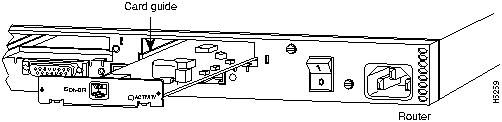
Step 3 Slide the WAN module into the appropriate slot along the card guides until it is completely seated in the connector inside the router (see Figure A-1). Then tighten the two captive screws on the module to secure it to the chassis.
 Caution Although there are three slots available for the WAN modules, the slot on the far right (labeled BRI 0) is reserved for an ISDN WAN module only. Install all other modules in the slots labeled SERIAL 0 and SERIAL 1.
Figure 1 : Installing a WAN Module
Step 4 If the router is configured with fewer than three WAN modules, make sure a blank slot cover is installed over each open slot to ensure proper airflow inside the chassis.
Step 5 Turn ON power to the router.
This concludes the procedure to install WAN modules in the Cisco 2524 and Cisco 2525 routers.

Copyright 1988-1996 © Cisco Systems Inc.



