
Table of Contents
Overview
Overview
Cisco 1600 series routers are a family of small desktop routers that link remote-site Ethernet LANs to regional and central offices over multiple WAN connections.
This chapter is an overview of the routers' features and includes the following sections:
Table 1-1 lists the Cisco 1600 series router models.
Table 1-1 : Cisco 1600 Series Router Models
| Cisco 1601
|
10BaseT (RJ-45), AUI1 (DB-15)
|
Serial2
|
- Serial
- ISDN3 BRI4 S/T
- ISDN BRI U
|
| Cisco 1602
|
10BaseT (RJ-45), AUI (DB-15)
|
Synchronous serial with integrated 56-kbps CSU/DSU5
|
- Serial card
- ISDN BRI S/T
- ISDN BRI U
|
| Cisco 1603
|
10BaseT (RJ-45), AUI (DB-15)
|
ISDN BRI S/T
|
Serial
|
| Cisco 1604
|
10BaseT (RJ-45), AUI (DB-15)
|
ISDN BRI U
ISDN BRI S/T (with integrated NT16)
|
Serial
|
1 AUI = attachment unit interface.
2 Serial ports on the Cisco1601 and serial WAN interface card support synchronous and asynchronous modes (EIA/TIA-232, V.35, X.21, EIA/TIA-499, EIA-530).
3 ISDN = Integrated Services Digital Network.
4 BRI = Basic Rate Interface.
5 CSU/DSU = channel service unit/data service unit.
6 NT1 = Network Termination 1.
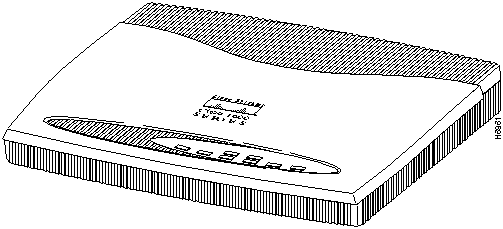
Figure 1-1 shows the front of the router.
Figure 1-1 : Cisco 1600 Series Router Front (All Models)
Features
Following are the features of Cisco 1600 series routers:
- Ethernet LAN port (using either the 10BaseT port or the AUI port)
- Console port (RJ-45)
- One fixed WAN port (see the following section "WAN Interfaces")
- Slot for a WAN interface card, for the addition of an optional WAN port
- Slot for Flash memory PC Card (Personal Computer Memory Card International Association [PCMCIA]-compatible), which can be pre-configured by a network administrator, and installed in the router at a remote site
- Router management through the console port
- Router management over the network using Simple Network Management Protocol (SNMP)
- AutoInstall for downloading configuration files automatically over a WAN
- Support for ClickStart, a World Wide Web (WWW) browser-based router configuration tool
WAN Interfaces
This section describes WAN interfaces supported by Cisco 1600 series routers.
Router WAN Interfaces
Cisco 1600 series routers have one of the following WAN interfaces:
- Cisco 1601---One serial interface (DB-60), which supports asynchronous analog connections up to 115.2 kbps, and synchronous connections, such as leased lines, Frame Relay, 56-kbps services, SMDS, and X.25, up to 2.048 Mbps.
- Cisco 1602---One CSU/DSU interface (RJ-48S), which supports switched 56 kbps and dataphone digital service (DDS) connections.
- Cisco 1603---One ISDN S/T interface (RJ-45), which supports one ISDN BRI connection. (An ISDN BRI connection consists of two 64-kbps B channels and one 16-kbps D channel.)
- Cisco 1604---One ISDN U interface (RJ-45) for routing over an ISDN BRI connection and one ISDN S/T interface (RJ-45) with an integrated NT1, which supports one additional ISDN device (such as an ISDN telephone) on the same ISDN line as the router.
WAN Interface Cards
The router can support one additional WAN interface (for a total of two WAN interfaces) by installing a WAN interface card in the slot provided on the router. Cisco 1600 series routers support the following WAN interface cards:
- Serial (synchronous and asynchronous)
- ISDN BRI S/T (can be used with Cisco 1601 and Cisco 1602 only)
- ISDN BRI U (integrated NT1, can be used with Cisco 1601 and Cisco 1602 only)
For more information on the cards, including LED descriptions and installation procedure, refer to the chapter "Using WAN Interface Cards."
Rear Panel Connectors
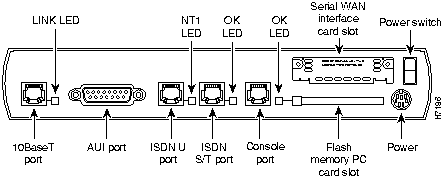
Figure 1-2 through Figure 1-5 illustrate the rear panel connectors for each of the router models.
Figure 1-2 : Cisco 1601 Rear Panel
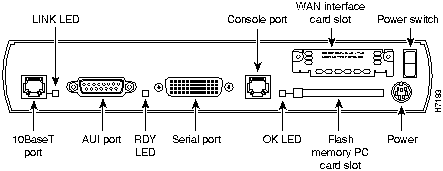
Figure 1-3 : Cisco 1602 Rear Panel
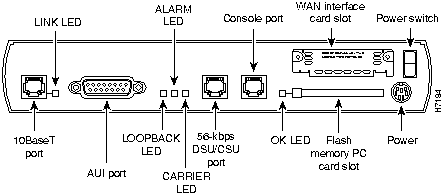
Figure 1-4 : Cisco 1603 Rear Panel
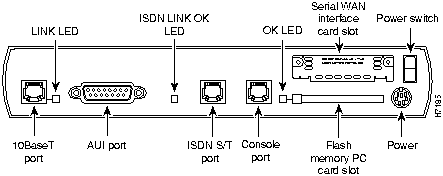
Figure 1-5 : Cisco 1604 Rear Panel
Specifications
Table 1-2 lists the system specifications for Cisco 1600 series routers.
Table 1-2 : System Specifications
| Processor
|
Motorola MC68360 QUICC (33 MHz)
|
| Dimensions (H x W x D)
|
9.5 x 7.5 x 1.6" (24 x 19 x 4 cm)
|
| Weight
|
1.3 lb (.6 kg)1
|
| Power (external)
|
14 VDC (+ / -- 8%), minimum 1 A
|
| Console port
|
RJ-45 connector
|
| 10BaseT port
|
RJ-45 connector
|
| AUI port
|
DB-15 connector
|
| Flash memory slot
|
PCMCIA2 Type 2-compatible
(for Flash memory PC Card)
|
| Serial port (Cisco 1601)
|
DB-60
|
| CSU/DSU port (Cisco 1602)
|
RJ-48S
|
| ISDN ports:
- ISDN S/T port (Cisco 1603)
- ISDN U port (Cisco 1604)
- ISDN S/T (with integrated NT1) (Cisco 1604)
|
RJ-45
RJ-45
RJ-45
|
| Nonoperating temperature
|
--40 to 185°F (--40 to 85°C)
|
| Operating humidity
|
5 to 95%, noncondensing
|
| Operating temperature
|
32 to 104°F (0 to 40°C)
|
1 This is the router weight without an installed WAN interface card.
2 PCMCIA = Personal Computer Memory Card International Association.
Memory
Cisco 1600 series routers have the following types of memory:
- Main memory---Stores the running configuration and routing tables.
- Nonvolatile random-access memory (NVRAM)---Stores the system configuration file and the virtual configuration register.
- Flash memory---Stores the operating system software image. The Cisco Internetwork Operating System (Cisco IOS) software executes from Flash memory. Also stores configuration files.
- ROM-based memory---Stores the ROM monitor (also called the bootstrap program), which allows you to boot an operating system software image from Flash memory. The ROM monitor also enables you to upgrade Cisco IOS software. For more information about the ROM monitor, refer to the appendix "ROM Monitor."
Use the show version command to view the amount of main, NVRAM, and Flash memory currently stored in the router.
Copyright 1988-1996 © Cisco Systems Inc.



