


|
|

Network Management Station Requirements
Audience · Organization · Related Documentation · Acronyms and Abbreviations
This document will help you prepare your site for the installation of LightStream" 2020 enterprise ATM switches. Use these instructions to
The primary audience for this book is customers who have purchased or are considering the purchase of LightStream switches.
The secondary audience includes employees of LightStream Corp. and partner companies who need information on setting up LightStream hardware.
This manual is arranged as follows
The following is a list of LightStream manuals and other material relevant to LightStream users.
Before attempting to install, configure, operate, or troubleshoot a network of LightStream switches, read the LightStream 2020 System Overview. This overview provides important background information about the LightStream product and the ATM technology on which the product is based. After reading the LightStream 2020 System Overview, refer to Table 1-1 to determine which manuals you should read next.
Table 1-1 : LightStream Reading Path
| If you want to: | Read the following manuals in the order listed below: |
|---|---|
| Install LightStream switches | LightStream 2020 Release Notes1
LightStream 2020 Site Planning and Cabling Guide LightStream 2020 Installation and Troubleshooting Manual |
| Configure LightStream switches | LightStream 2020 Release Notes 1
LightStream 2020 Configuration Guide LightStream 2020 Online Help Screens |
| Set up or expand a LightStream network | LightStream 2020 Release Notes1
LightStream 2020 Administration Guide LightStream 2020 Online Help Screens |
| Operate a LightStream network | LightStream 2020 Release Notes1
LightStream 2020 Operations Guide LightStream 2020 Command and Attribute Reference Guide LightStream 2020 Command Line Interface (CLI) Reference Card LightStream 2020 Traps Reference Manual LightStream 2020 Online Help Screens |
| Manage or troubleshoot a LightStream network | LightStream 2020 Release Notes1
LightStream 2020 Operations Guide LightStream 2020 Administration Guide LightStream 2020 Command and Attribute Reference Guide LightStream 2020 Command Line Interface (CLI) Reference Card LightStream 2020 Traps Reference Manual LightStream 2020 Online Help Screens |
| Troubleshoot LightStream hardware | LightStream 2020 Release Notes1
LightStream 2020 Installation and Troubleshooting Manual LightStream 2020 Site Planning and Cabling Guide |
Below is a list of acronyms and abbreviations used in this book.
| Acronyms and Abbreviations | Meanings |
|---|---|
| btu | British thermal unit |
| °C | degrees Celsius |
| cm | centimeters |
| db(A) | decibels (A-weighted) |
| EIA | Electronic Industries Association |
| EMI | electro-magnetic interference |
| °F | degrees Fahrenheit |
| ft | feet |
| Hz | Hertz |
| in | inches |
| kg | kilograms |
| km | kilometers |
| lb | pounds |
| m | meters |
| TIA | Telecommunications Industry Association |
| V | volts |
| VAC | volts of alternating current |
| VDC | volts of direct current |
| W | watts |
Site Prep Checklist · Space Requirements · Electrical Requirements · Environmental Requirements · Unpacking and Inspecting the Hardware
This chapter tells you how to prepare your site for the installation of LightStream 2020 enterprise ATM switches. It includes information on the system's weight, dimensions, environmental and electrical requirements, and a site planning checklist.
LightStream switches can be installed in any area that meets the specifications outlined in this chapter. A dedicated computer room with raised floors, controlled temperature and humidity, and clean air is desirable, but is not required.
Use this checklist several weeks before the expected delivery date to ensure that your site is ready to receive LightStream hardware.
Keep the following considerations in mind when choosing a location for your LightStream hardware:
Table 2-1 : LightStream Switch Dimensions
| Dimension | Chassis | Shipping Crate | ||
|---|---|---|---|---|
| Height | 26.07 in. | 66.2 cm | 36 in. | 91.4 cm |
| Width | 18.91 in. | 48.0 cm | 24 in. | 61.0 cm |
| Depth | 24.73 in. | 62.8 cm | 31 in. | 78.7 cm |
| All chassis dimensions are ±.02 inches (.05 centimeters). | ||||
Use Table 2-2 to determine the weight of your system. Starting with the weight of a chassis with blowers only (no boards, line cards, disks, or power supplies), add the weight of each option included with your unit. (Cables and the equipment rack are excluded from this table.)
Table 2-2 : Calculating LightStream Switch Weight
| Number of units | |||||
|---|---|---|---|---|---|
| Specification | Weight | Min. | Max. | ||
| Start with chassis w/blowers only: | 74 lb (33.5 kg) | ||||
| Add weights of optional components: | |||||
| NP option1 | 8 lb (3.6 kg) | 1 | 2 | ||
| Switch card | 3.4 lb (1.5 kg) | 1 | 2 | ||
| Line card option2 | 3.75 lb (1.7 kg) | 1 | 9 | ||
| Bulk power tray | 1 | 2 | |||
| AC | 10 lb (4.5 kg) | ||||
| DC | 4.5 lb (2 kg) | ||||
| Fantail (for LSC only) | 1.9 lb (0.9 kg) | 0 | 18 | ||
| Minimum configurations:3 | |||||
| AC power | 99.2 lb (44.9 kg) | ||||
| DC power | 93.7 lb (42.4 kg) | ||||
| Maximum configurations:4 | |||||
| without fantails | 146,8 lb (66.5 kg) | ||||
| with 16 fantails | 177.2 lb (80.3 kg) | ||||
Each LightStream chassis requires a dedicated branch circuit. See Table 2-3, Table 2-4, and Table 2-5, which specify the power requirements and power ratings of LightStream systems.
The following notice applies to each LightStream switch:
The LightStream switch is designed to operate with all boards, bulkheads, filler panels, covers, and components (disks and blowers) in place and firmly screwed to the chassis frame. When all these items are in place, they form an enclosure that performs three important functions:
Table 2-3 : Site Power Requirements
| Power Option | Voltage | Current |
|---|---|---|
| AC | 100 to 240 | 20A to 10A |
| DC | 48 | 24A |
| Characteristic | Rating |
|---|---|
| Inlet Power Connector | IEC 320 C20 |
| Input Voltage Frequency Phase | 100 - 240 VAC 50 - 60 Hz Single |
| Input Current | 16 A - 8 A |
| Power Consumption* | 975 Watts maximum |
| Heat Dissipation* | 3330 Btu/hr maximum |
| * See Table 2-6 for more information. | |
| Characteristic | Rating |
|---|---|
| Input Connections | Support for up to 2 separate -48 VDC input feeds via 3-position terminal blocks |
| Input Voltage | -43 to -60 VDC |
| Input Current | 24 A |
| Power Consumption* | 975 W maximum |
| Heat Dissipation* | 3330 Btu/hr maximum |
| * See Table 2-6 for more information. |
Table 2-6 : Component Heat Dissipation
| Component | Power Consumption in Watts | Dissipation (Btu/hr) |
|---|---|---|
| Chassis with no I/O1 | 335 | 1145 |
| NP option2 | 70 | 240 |
| Switch card | 40 | 140 |
| Low-speed line card option3 | 65 | 225 |
| Medium-speed line card option3 | 65 | 225 |
| Packet line card option3 | 55 | 190 |
| Cell line card option3 | 30 | 105 |
| Max. configuration4 | 975 | 3330 |
Table 2-7 : Certifications & Standards for LightStream 2020
| Safety | UL 1950 (AC systems) UL 1459 (DC systems) TUV (EN 60950) CSA 22.2 #9501 |
|---|---|
| Emissions | FCC Part 15 Class A CISPR 22 Class A (EN 55022) |
Table 2-8 : Telco Certifications & Standards for LightStream 2020
| V.35 Interface1 | NET 2 Layer 1 |
|---|---|
| RS-449 Interface1 | NET 2 Layer 1 |
| E3 Interface | G.703 at 34 Mbps (Germany) SIN 219 (UK) |
The physical environment during operation, storage, and transport of the LightStream switch must meet the specifications outlined in Table 2-9.
Table 2-9 : Environmental Specifications
| Operating temperature at sea level (760 mm Hg)1 | 41° to 104° F (5° to 40° C) |
|---|---|
| Relative operating humidity | 10% to 90% noncondensing |
| Altitude1 | Up to 10,000 ft (3048 m) |
| Nonoperating temperature | -4° to 140° F (-20° to 60° C) |
| Nonoperating humidity | 10% to 95% noncondensing |
| Air quality | The LightStream switch is designed to run in a non- corrosive, relatively dust-free environment. The enclosure does not contain air filters; a relatively dust-free environment prevents accumulation of dust on the circuit boards and in the air flow inlet, internal flow paths, and exhaust openings. |
| Noise Emission | 68 db(A) maximum |
Cooling Air and Hardware Placement
A LightStream chassis takes in cooling air through the bottom of the front panel and exhausts it at the top rear and the top right side. (The air vents on the right side can safely be covered with rack side panels, but should not be otherwise blocked.) To minimize thermal problems, position the chassis such that
Unpacking and Inspecting the Hardware
When it arrives, unpack the LightStream switch as follows:
Rack Characteristics · Rack Space: Height and Depth
This chapter provides guidelines on selecting an equipment rack for your LightStream 2020 enterprise ATM switch.
The rack you use for your LightStream switch should be a TIA or EIA standard 19-inch (48.3 cm) wide rack that meets the specifications outlined below.
A LightStream chassis needs 26.25 in. (15 rack units, or 66.7 cm) of vertical rack space.
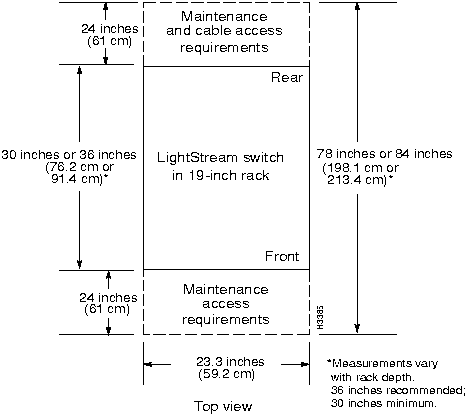
A LightStream rack should be at least 30 in. (76.2 cm) deep; 36 in. (91.4 cm) is recommended so there is comfortable clearance at the rear for fantails and cables.
If your system contains low-speed line cards, consider the system's fantails when you plan rack space. One LightStream switch using V.35 and/or RS-449 fantails can have up to 18 fantails---two per low-speed line card. (A system using only X.21 fantails can have a maximum of nine fantails---one per low-speed line card.) Each fantail is 1.75 inches (1 rack unit, or 4.45 cm) high; thus a switch fully loaded with fantails uses up to 31.5 inches (80 cm) of fantail space at the rear. (Medium-speed, packet, and cell line cards do not use fantails.)
Hardware Requirements · Software Requirements
To manage a network of LightStream" 2020 enterprise ATM switches, you need a workstation that meets the hardware and software requirements listed in this chapter.
The network management system (NMS) workstation must be a Sun SPARCstation (Sun-4). Although LightStream management software is designed to run on any SPARCstation model that runs SunOS 4.1.x and HP OpenView, only the following models are supported and tested:
The NMS workstation must have:
The NMS workstation must have the following software loaded:
In addition, you may choose to run HP OpenView version 3.3 network management software on your NMS workstation. For information on HP OpenView's requirements, see the HP OpenView Management Platform Performance and Configuration Guide, available from Hewlett-Packard.
Low-Speed Connectors and Cables · Medium-Speed Connectors and Cable · OC-3c Connectors and Cables · FDDI Connectors and Cables · Ethernet Connectors and Cables · Console, Modem Connectors and Cable · Country Kits and Power Cordsets
The first six sections of this chapter describe I/O interfaces of the LightStream 2020 enterprise ATM switch and data cables for each interface. Signal diagrams are provided for each I/O connector and cable. This chapter's last section describes LightStream power cords.
For each cable sold by LightStream Corp., two part numbers are provided: the manufacturing number, which appears on the cable, and the order number, which you should use to order the cable. Some cables described here do not have numbers; these cables are not offered for sale by LightStream. The information here is provided to help you procure the cables from other sources.
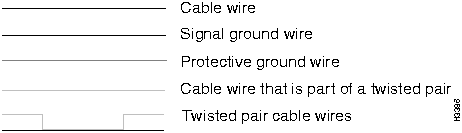
Figure 5-1 shows the graphic conventions used in this chapter.
Figure 5-1 : Graphic Conventions:
Low-Speed Connectors and Cables
This section describes the following connectors on low-speed fantails:
The cable that connects low-speed access cards to fantails is discussed in the subsection entitled Fantail Cable. X.21, RS-449, and V.35 cables are described in the subsections entitled X.21 Cable, RS-449 Straight-Through Cable, RS-449 Crossover Cable, V.35 Straight-Through Cable, and V.35 Crossover Cable.
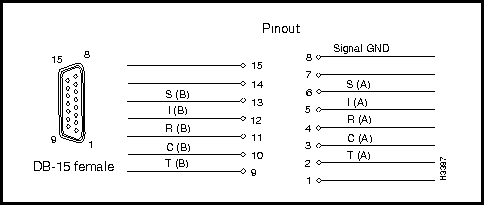
X.21 Fantail Connector Specification
Interface connector type: DB15 female
Connectors per fantail: 8 (numbered 0 - 7)
Figure 5-2 shows a X.21 connector signal
Figure 5-2 : X.21 connector signal diagram.
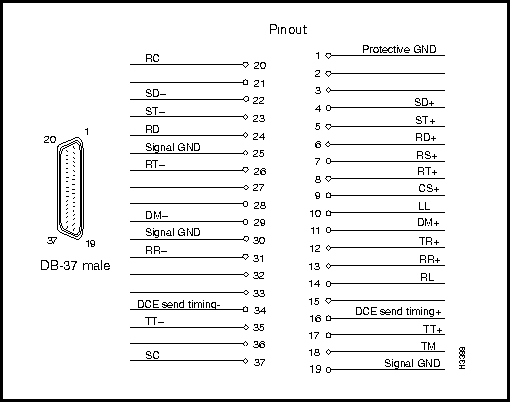
RS-449 Fantail Connector Specification
Interface connector type: DB37 male
Connectors per fantail: 4 (numbered 0 - 3)
Figure 5-3 shows a RS-499 connector signal.
Figure 5-3 : RS-449 connector signal diagram.
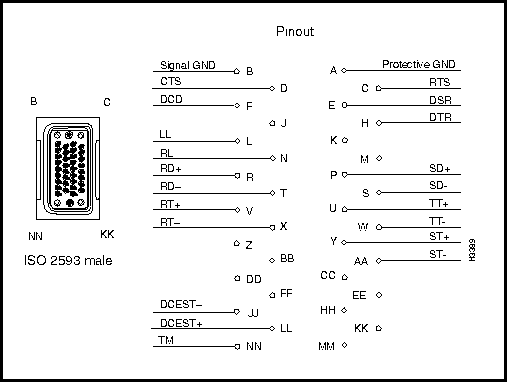
V.35 Fantail Connector Specification
Interface connector type: ISO 2593 male (34-pin block type)
Connectors per fantail: 4 (numbered 0 - 3)
Figure 5-4 shows a V.35 connector signal
Figure 5-4 : V.35 connector signal diagram.
DSU/CSU Control Port Connector Specification
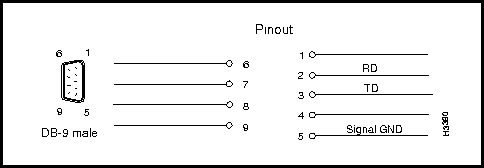
The RS-232 connector shown in Figure 5-5 appears on both the V.35 and RS-449 fantails. If you connect the control port to the craft port on a DSU/CSU device, you can use the csumon program to communicate with the DSU/CSU from a LightStream switch.
Interface connector type: DB9 male
Connectors per fantail: 4 (numbered 0 - 3)
Figure 5-5 : RS-232 DSU/CSU control port connector signal diagram.
To connect fantails to low-speed access cards, LightStream offers a 100-pin cable in three lengths:
| Manufacturing No. | Length | Order No. |
|---|---|---|
| 2422865-02 | 4 feet | 9303-1 |
| 2422865-03 | 8 feet | 9303-2 |
| 2422865-04 | 12 feet | 9303-3 |
Two fantail cables are required to connect one X.21 fantail to a low-speed access card. One fantail cable is required to connect each V.35 or RS-449 fantail to a low-speed access card.
Where used: To connect a LightStream 2020's X.21 fantail interface to an X.21 device. This cable is available from LightStream Corp. See Figure 5-6.
| Manufacturing No. | Length | Order No. |
|---|---|---|
| 2418483G01 | 30 feet | 9321-1 |
| 2418483G02 | 50 feet | 9321-2 |
| 2418483G03 | 100 feet | 9321-3 |
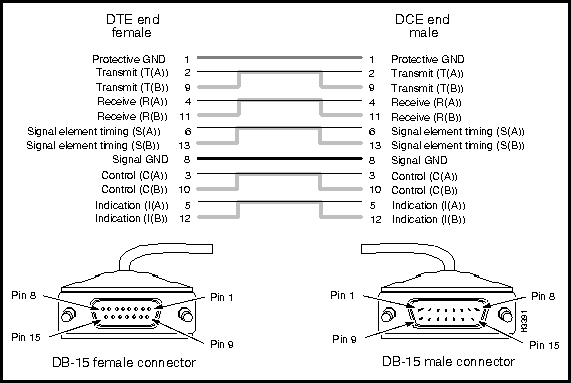
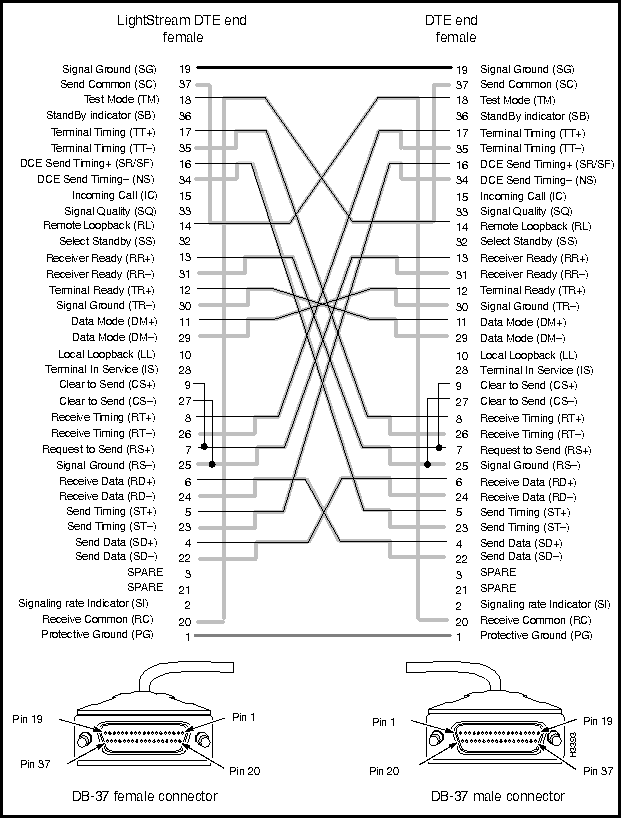
Where used: To connect a LightStream 2020's RS-449 fantail interface to an RS-449 DCE device. This cable is available from LightStream Corp. See Figure 5-7.
| Manufacturing No. | Length | Order No. |
|---|---|---|
| 2423253G01 | 30 feet | 9349-1 |
| 2423253G02 | 50 feet | 9349-2 |
| 2423253G03 | 100 feet | 9349-3 |
Figure 5-7 : RS-449 straight-through cable.
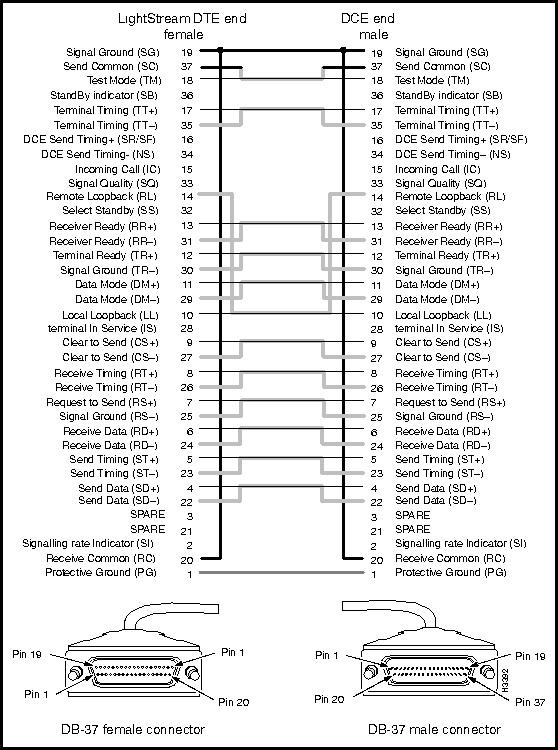
Where used:
This cable is available from LightStream Corp. See also Figure 5-8.
| Manufacturing No. | Length | Order No. |
|---|---|---|
| 2423254G01 | 30 feet | 9349-5 |
| 2423254G02 | 50 feet | 9349-6 |
| 2423254G03 | 100 feet | 9349-7 |
| 2423254G04 | 8 feet | 9349-4 |
Figure 5-8 : RS-449 crossover cable.
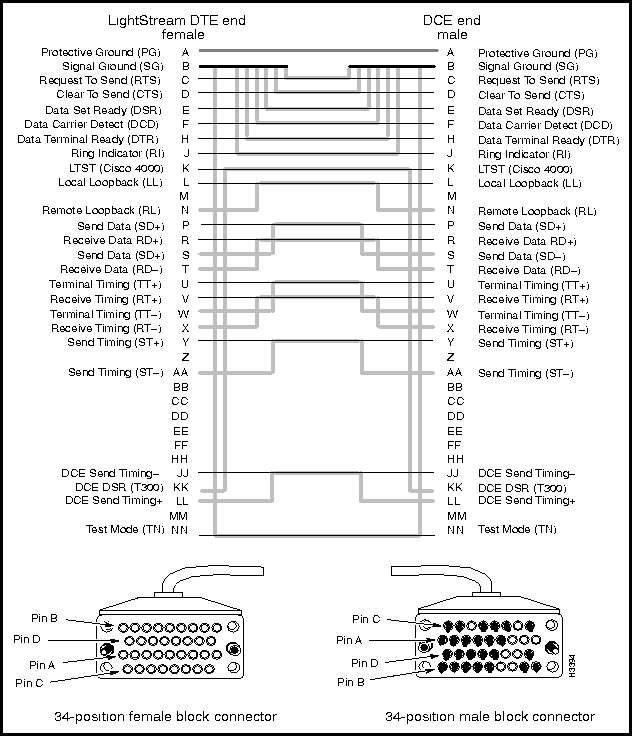
Where used: To connect a LightStream 2020's V.35 fantail interface to a V.35 DCE device. This cable is available from LightStream Corp. See also Figure 5-9
| Manufacturing No. | Length | Order No. |
|---|---|---|
| 2423880G01 | 30 feet | 9335-1 |
| 2423880G02 | 50 feet | 9335-2 |
| 2423880G03 | 100 feet | 9335-3 |
Figure 5-9 : V.35 straight-through interface cable.
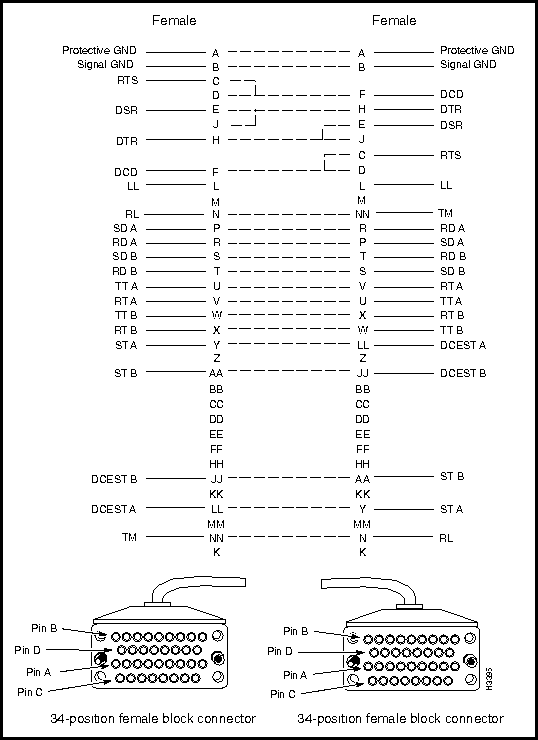
Where used:
This cable is available from LightStream Corp. See also Figure 5-10.
| Manufacturing No. | Length | Order No. |
|---|---|---|
| 2420721G01 | 30 feet | 9335-5 |
| 2420721G02 | 50 feet | 9335-6 |
| 2420721G03 | 100 feet | 9335-7 |
| 2420721G04 | 8 feet | 9335-4 |
Figure 5-10 : V.35 crossover cable.
Medium-Speed Connectors and Cable
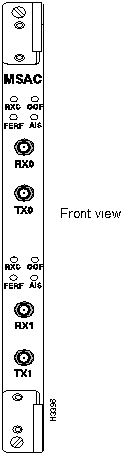
This page shows the external connectors on the medium-speed access card. The data cable is described in the subsection entitled T3/E3 Coaxial Cable. See Figure 5-11.
Interface connector type: 75 ohm BNC jacks
Connectors per access card: 4 (2 receive and 2 transmit)
Figure 5-11 : Medium-speed access card showing coaxial connectors.
Where used:
This cable is available from LightStream Corp. See also Figure 5-12.
| Manufacturing No. | Length | Order No. |
|---|---|---|
| 2423252G01 | 3 feet | 9203-1 |
| 2423252G02 | 25 feet | 9203-2 |
| 2423252G03 | 50 feet | 9335-3 |
| 2423252G04 | 100 feet | 9335-4 |
Figure 5-12 : T3/E3 coaxial cable.
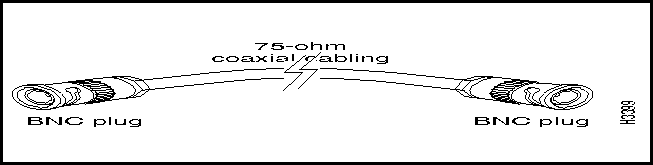
Figure 5-13 shows external connectors on the multimode and single mode OC-3c access cards. OC-3c cables are described in the subsections entitled Multimode OC-3c Cable and Single Mode OC-3c Cable.
Multimode interface connector type: Duplex SC
Connectors per multimode access card: 4 (2 per port; ports are numbered 0 and 1)
Single mode interface connector type: ST
Connectors per single mode access card: 4 (2 per port; ports are numbered 0 and 1)
Figure 5-13 : Connectors on multimode and single mode OC-3c access cards.
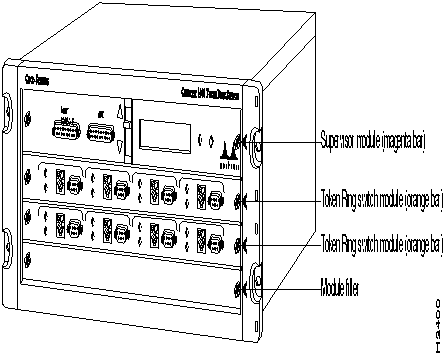
Figure 5-14 shows Multimode OC-3c cable with simplex SC connectors.
Where used: To connect a multimode OC-3c access card on a LightStream switch to another OC-3c device. LightStream Corp. does not provide this cable; it is widely available from other sources.
The LightStream OC-3c interfaces operate at a wavelength of 1300 nanometers. Multimode cables should conform to the following specifications:
Figure 5-14 : Multimode OC-3c cable with simplex SC connectors.
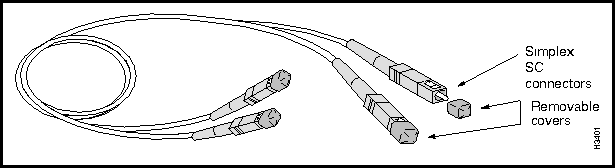
Figure 5-15 shows a Single mode OC-3c cable with ST connectors.
Where used: To connect a single mode OC-3c access card on a LightStream switch to another OC-3c device. LightStream Corp. does not provide this cable; it is widely available from other sources.
LightStream's OC-3c interfaces operate at a wavelength of 1300 nanometers. Single mode cables should conform to the following specifications:
Figure 5-15 : Single mode OC-3c cable with ST connectors.
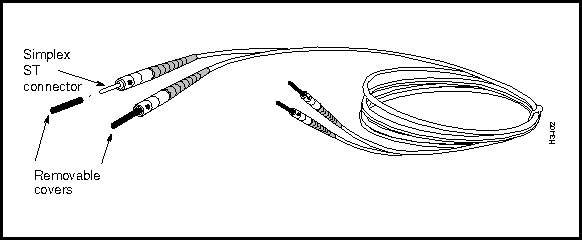
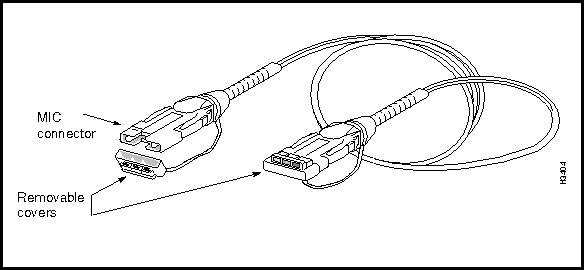
Figure 5-16 shows MICs (media interface connectors) on an FDDI access card. An FDDI cable is show in Figure 5-17.
Figure 5-16 : Detail of FDDI access card showing connectors.
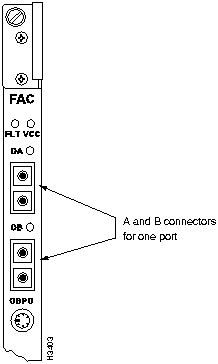
Each FDDI port consists of two connectors, A (red) and B (blue). FDDI connectors are keyed to ensure proper connection of the cable to the access card.
Where used: To connect a LightStream switch's multimode FDDI access card to another FDDI device. LightStream Corp. does not provide this cable; it is widely available from other sources.
LightStream's FDDI interface operates at a wavelength of 1300 nanometers. Cables should conform to the following specifications:
Ethernet Connectors and Cables
This section describes Ethernet connectors and cables on the NP access card and the Ethernet access card.
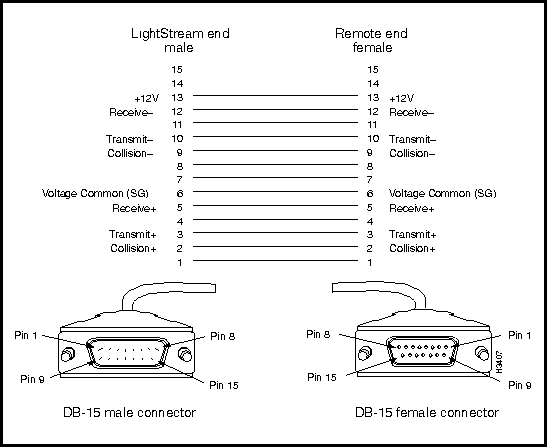
This page describes the 15-pin Ethernet AUI connector on the NP access card and the Ethernet access card (ports 0 and 7). The data cable is described in the subsection entitled Ethernet AUI Cable. See Figure 5-18.
Figure 5-18 : Ethernet AUI interface.
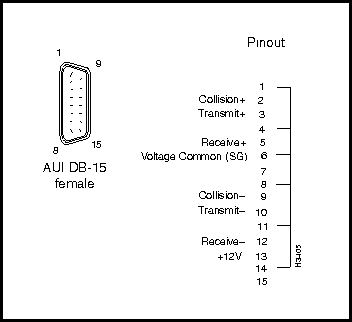
Figure 5-19 shows the RJ-45 connectors on the Ethernet access card. These connectors are used by the twisted pair (10Base-T) ports. The cables used with these ports are shown in Figure 5-21 and Figure 5-22.
Figure 5-19 : Ethernet RJ-45 connectors and pinout.
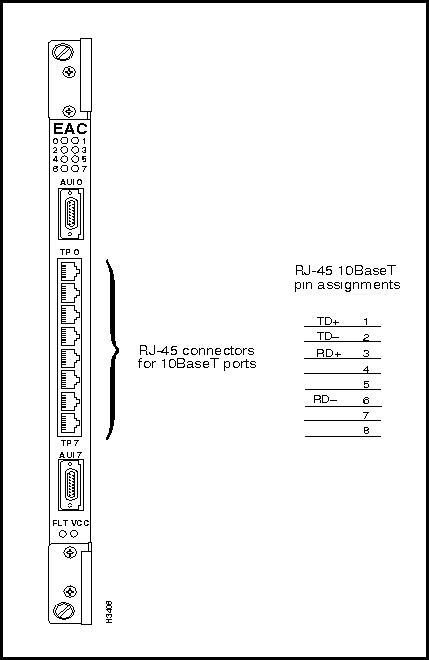
Figure 5-20 shows an Ethernet AUI cable.
Where used: Connects an AUI port on the NP access card or Ethernet access card of a LightStream switch to an Ethernet 10Base2 or 10Base5 transceiver. LightStream Corp. does not provide this cable; it is widely available from other sources.
Figure 5-20 : Ethernet AUI cable.
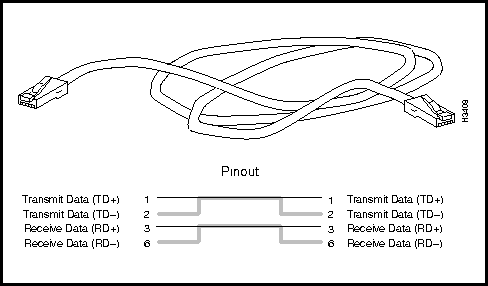
Ethernet 10Base-T Straight-Through Cable
Where used:
LightStream Corp. does not provide this cable; it is widely available from other sources. See Figure 5-21.
Figure 5-21 : Straight-through 10Base-T (twisted pair) Ethernet cable.
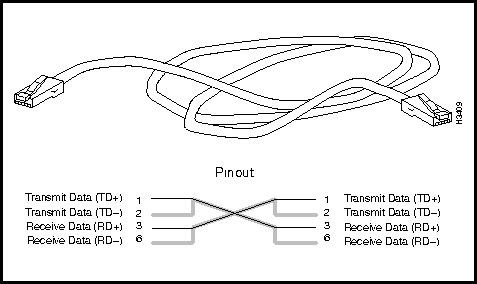
Ethernet 10Base-T Crossover Cable
Where used: To connect an Ethernet access card on a LightStream switch directly to another device on the Ethernet, such as a workstation.
LightStream Corp. does not provide this cable; it is widely available from other sources. See Figure 5-22.
Figure 5-22 : Crossover 10Base-T (twisted pair) Ethernet cable.
Console, Modem Connectors and Cable
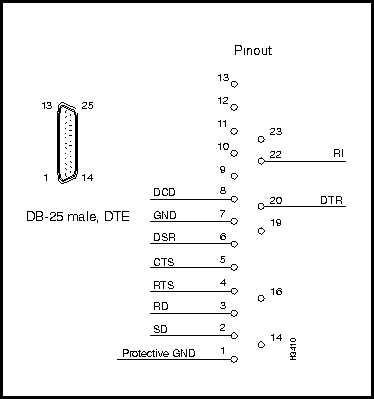
Figure 5-23 and Figure 5-24 describe the modem and console connectors, respectively, on the switch card's console/modem assembly. The data cable used for both ports is described in the subsection entitled RS-232 Straight-Through Cable.
Interface connector type: DB25 male, DTE
Connectors per assembly: labeled MODEM
Figure 5-23 : RS-232 DB-25 modem port signal diagram.
Console Connector Specification
Figure 5-24 shows a RS-232 DB-25 console port signal diagram.
Interface connector type: DB25 female, DCE
Connectors per assembly: labeled CNSL
Figure 5-24 : RS-232 DB-25 console port signal diagram.
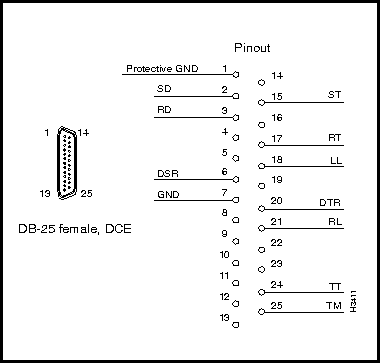
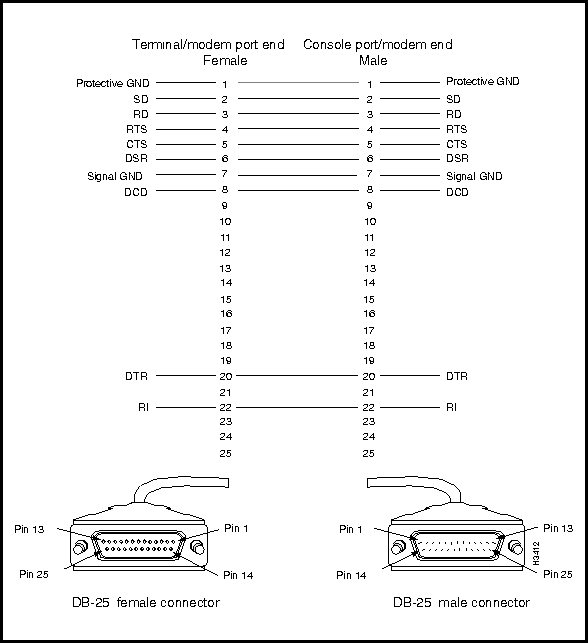
Figure 5-25 shows a RS-232 straight-through cable.
Where used: To connect the LightStream console port or modem port to a console or modem. LightStream Corp. does not provide this cable; it is widely available from other sources.
Figure 5-25 : RS-232 straight-through cable.
Country Kits and Power Cordsets
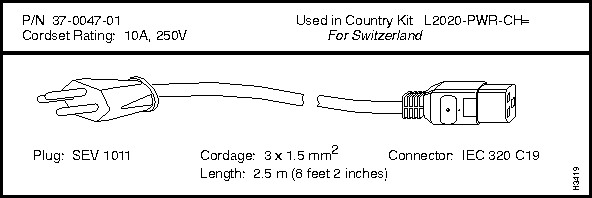
Several power cordsets are available for AC-powered LightStream ATM switches, both with systems and as spare parts. This section can help you choose the right cordset for your site.
If you are specifying a cordset as part of a new system order, refer to the LightStream Price List or Product Catalogue and order the appropriate Country Power Kit. This ensures that you will also receive the appropriate labels and instructions for the country of destination.
If you want to check the cordset included in a specific Country Power Kit, use TableTable 5-1, which cross-references cordset product numbers and Country Power Kit models.
If you need to order a replacement cordset that is not part of a Country Power Kit, you must use the cordset's part number. (The part number (P/N) of each cordset appears above the cordset illustration, later in this section.)
An AC-powered LightStream chassis is equipped with a recessed male power inlet. The chassis connector follows IEC standard 320 C20 and requires a cordset with an IEC 320 C19 female connector. (All the cordsets offered for the LightStream switch have IEC 320 C19 female connectors.)
Table 5-1 summarizes the information in this section; it lists the countries of use, cordset rating, plug type, part number, and Country Power Kit for each cordset. Figure 5-26 through 5-26 illustrate the cordsets.
Table 5-1 : Summary Specifications for LightStream Cordsets
| Countries | Cordset Rating | Plug | P/N | Ctry. Kit |
|---|---|---|---|---|
| North America, Japan | 125 V @ 20 A | NEMA 5-20P | 9814927-01 | 0104-1 |
| North America | 125 V @ 20 A | NEMA L5-20P | 9814927-02 | 0104-24 |
| North America | 250 V @ 20 A | NEMA L5-20P | 9814927-04 | 0104-25 |
| Continental Europe, including Finland, France, Germany, Norway, Sweden | 250 V @ 16 A | CEE 7/7 | 9814927-05 | 0104-5 |
| Israel | 250 V @ 16 A | SI 32 | 9814927-08 | 0104-13 |
| Switzerland | 250 V @ 10 A | SEV 1011 | 9824106-01 | 0104-11 |
| U.K., Ireland, Scotland, Hong Kong | 250 V @ 13 A | BS 1363 | 9814927-11 | 0104-2 |
Figure 5-26 : Country Kit 0104-1
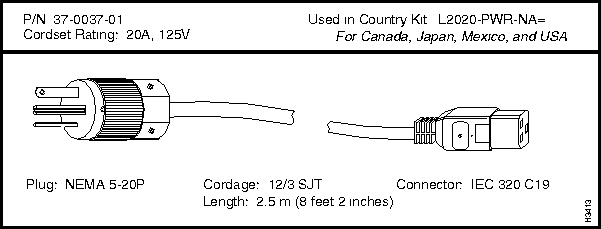
Figure 5-27 : Country Kit 0104-24
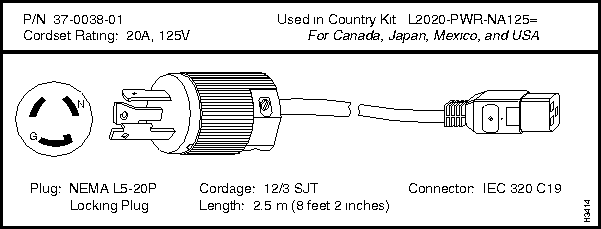
Figure 5-28 : Country Kit 0104-25
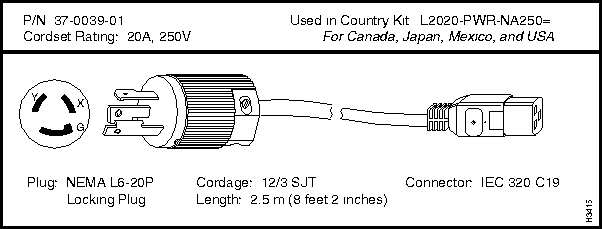
Figure 5-29 : Country Kit 0104-5
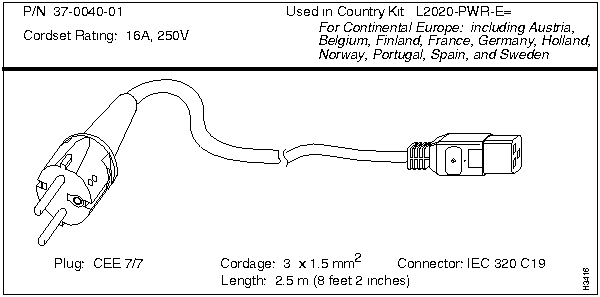
Figure 5-30 : 0104-2
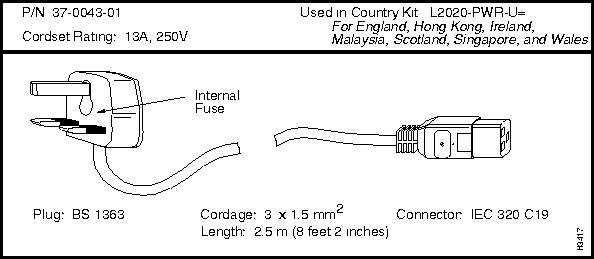
Figure 5-31 : Country Kit 0104-13

Figure 5-32 : Country Kit 0104-11

|
Copyright 1988-1996 © Cisco Systems Inc.