


|
|

This chapter describes the configuration attributes available in basic mode for LightStream 2020 enterprise ATM switches, and offers advice on how to set them. You can use this chapter as a reference when setting attributes during configuration.
The chapter is organized into sections according to the order that you configure a switch: first you must configure a chassis, then cards and ports, and then you can configure protocol attributes, PVC end points and VLI attributes. Within each section, the attributes are arranged in alphabetical order.
The attribute fields accept fill-in or multiple choice values. Fill-in fields accept only printable ASCII text, and most accept a limited number of characters. The configurator provides a field box for any value that you have to fill in.The configurator provides either an option button or a radio button for any value that has multiple choice selections. To select a value for either of these types of buttons, you simply click on the correct setting.
You can set all the attributes described here using the configurator. Note that LightStream uses a number of attributes that cannot be configured; these are not listed here. For example, there are two card status attributes: cardAdminStatus, which is listed in this section, and cardOperStatus, which is not. The cardAdminStatus attribute specifies whether you want a card to be up or down. The cardOperStatus attribute, which is set by the system, indicates the actual status of the card. The LightStream 2020 Command and Attribute Guide provides information on all attributes.
Entries in this chapter list interrelationships between attributes, if any exist. Some attributes listed under the Interrelationships heading are given English names like Hello Time, while others are given MIB names such as ls1InfoOperRcvBaudRate. If the English name is provided, that means the referenced attribute is configurable and you can look it up in this chapter. (Use the index at the end of the book.) If the MIB name is provided, the attribute is not configurable, and is not described in this chapter.
This section describes the attributes that you can set from the Chassis Configuration dialog box. These attributes are associated with the switch as a whole, and they include system attributes, IP addresses, and SNMP agent attributes.
| MIB name | chassisID |
|---|---|
| Field Type | Fill-in |
| Legal Values | Printable ASCII characters |
| Default value | None |
Specifies the vendor's unique identification number for the system. If you don't know the chassis ID, you can use the configurator's verify function or the show chassis general command in the CLI to display it. See the LightStream 2020 Operations Guide for information on the CLI.
Specifies a name for the switch. The field holds up to 32 characters.
| MIB name | sysName |
|---|---|
| Field Type | Fill-in |
| Legal Values | Printable ASCII characters |
| Default value | None |
Identifies the person responsible for this node, including information on how to contact this person. The field holds up to 48 characters.
| MIB name | sysContact |
|---|---|
| Field Type | Fill-in |
| Legal Values | Printable ASCII characters |
| Default value | None |
Specifies the physical location of this node. (For example: telephone closet, 3rd floor.) The field holds up to 48 characters.
| MIB name | sysLocation |
|---|---|
| Field Type | Fill-in |
| Legal Values | Printable ASCII characters |
| Default value | None |
See the LightStream 2020 Installation and Troubleshooting Guide if you are unfamiliar with IP addresses, network classes, address masks, subnetting and host IDs.
Specifies the IP address of the NP Ethernet port's default router. If an Ethernet LAN is attached to the primary NP in order to communicate with an NMS, but the NMS is not directly connected to that LAN, a router on the Ethernet LAN may be configured as the default router. This default router provides a route from the NP to the network management system (NMS).
The IP address for the default router has the network number for the attached Ethernet LAN (not the network number of the LightStream network) plus a host number that is assigned by the network administrator of the Ethernet LAN.
| MIB name | chassisDefaultIpRouter |
|---|---|
| Field Type | Fill-in |
| Legal Values | Decimal numbers from 0 to 255 separated by periods |
| Default value | None |
Specifies the IP address for the NP's Ethernet port. An Ethernet LAN may be attached to the NP solely for communicating management traffic between the node and a network management system (NMS). If an Ethernet LAN is connected to the NP, then the NP's Ethernet IP address must be configured. If there is a backup NP, then both NPs must be attached to the same Ethernet segment and the NP's Ethernet IP address is used by whichever NP is primary.
The NP Ethernet IP address has the network number for the attached Ethernet LAN (not the network number of the LightStream network) plus a host number that is assigned by the network administrator of the Ethernet LAN.
| MIB name | chassisEthernetIPAddr |
|---|---|
| Field Type | Fill-in |
| Legal Values | Decimal numbers from 0 to 255 separated by periods |
| Default value | None |
| Interrelationships | NP IP Mask |
Specifies the subnet mask for the NP Ethernet port's IP address. The subnet mask specifies which portion of the IP address is the network number and which portion is the host ID. This mask is the same for all nodes on the Ethernet LAN that is attached to the primary NP. You obtain it from the administrator of that Ethernet LAN.
| MIB name | chassisEthernetIPMask |
|---|---|
| Field Type | Fill-in |
| Legal Values | Decimal numbers from 0 to 255 separated by periods |
| Default value | None |
| Interrelationships | NP IP Address |
The IP address of the active NP for the node. Nodes in a LightStream network use their primary IP addresses to communicate network management traffic to one another. The address can also be used by any external system with IP connecting to any port of the LightStream network. In a system with two NPs, if the active NP fails and the backup becomes primary, the two NPs exchange management IP addresses so that the primary IP address remains with the active NP.
An IP address is a 32-bit identifier assigned to hosts that use the Internet Protocol. The address is represented by four octets (8-bit fields). In decimal form, an IP address comprises four fields separated by dots; each field contains a value of 0-255.
An IP address consists of two parts. The first part of the address, called the network number, identifies a network on the Internet; the remainder, called the host ID, identifies an individual host on that network. All internal NP IP addresses within the same LightStream network must have the same network number and each must have a unique host ID.
Host IDs are assigned by the administrator of the network. The network number is assigned by the administrator of the internetwork. For a public network on the Internet, the network number is assigned by the Network Information Center (NIC).
| MIB name | chassisActiveIpAddr |
|---|---|
| Field Type | Fill-in |
| Legal Values | Decimal numbers from 0 to 255 separated by periods |
| Default value | None |
| Interrelationships | Secondary IP Address
Subnet Mask |
Specifies the secondary IP address for the chassis. If a node has a backup NP, then it uses its primary and secondary IP addresses to pass network management traffic between the two NPs within the node. The secondary IP address is used by whichever NP is the backup. All internal IP addresses within the same LightStream network must have the same network number, and each must have a unique host ID.
| MIB name | chassisSecondaryIpAddr |
|---|---|
| Field Type | Fill-in |
| Legal Values | Decimal numbers from 0 to 255 separated by periods |
| Default value | None |
| Interrelationships | Primary IP Address Subnet Mask |
Specifies the subnet mask used for the IP addresses associated with switch ports (the primary and secondary IP addresses). The subnet mask specifies which portion of the IP address is the network number and which portion is the host ID. This mask is the same for all nodes on a given LightStream network.
If you plan to handle just one physical LightStream network under your network ID number, and the LightStream network is a class C network, then record 255.255.255.0 as the subnet mask. (The mask is 255.255.0.0 for a class B network with no subnetting, and 255.0.0.0 for a class A network with no subnetting.)
| MIB name | chassisNetworkMask |
|---|---|
| Field Type | Fill-in |
| Legal Values | Decimal numbers from 0 to 255 separated by periods |
| Default value | None |
| Interrelationships | Primary IP Address Secondary IP Address |
Specifies the lowest priority of traps that are passed from the MMA to the CLI and the NMS. Priorities from highest to lowest are: operational, informational, trace, debug. For a description of LightStream trap filters, see the LightStream 2020 Operations Guide. (The default value, Oper, works relatively well in most cases.)
| MIB name | mmaTrapFilter |
|---|---|
| Field Type | Multiple choice |
| Legal Values | Oper, Info, Trace, Debug |
| Default value | Oper |
This parameter specifies the trap log control field. If enabled, the MMA logs traps that it receives from LWMA clients. These traps are logged to the disk. As new traps are added, old traps are deleted. (The default value works relatively well in most cases.)
| MIB name | mmaTrapLog |
|---|---|
| Field Type | Multiple choice |
| Legal Values | Enabled, Disabled |
| Default value | Enabled |
This section describes attributes associated with function cards. These are fairly simple attributes: status, name and type.
Specifies the desired status of the card. (See also Port Status.) The system makes the card's actual status match this value as soon as it can. It's generally best to set this attribute to up in the configuration database; you can change the status temporarily from the CLI.
| MIB name | cardAdminStatus |
|---|---|
| Field Type | Multiple choice |
| Legal Values | Up, Down |
| Default value | Up |
| Interrelationships | cardOpenStatus |
This parameter specifies the name for an NP or line card. You can leave this blank if you wish. The field holds up to 20 characters.
| MIB name | cardName |
|---|---|
| Field Type | Fill-in |
| Legal Values | Printable ASCII characters. (Do not use a name that begins with a number or contains special characters such as quotation marks.) |
| Default value | None |
Specifies the kind of card.
| MIB name | cardBoardType |
|---|---|
| Field Type | Multiple choice |
| Legal Values | LS-Edge, LS-Trunk, T3-Trunk, E3-Trunk, T3-Edge, E3-Edge, FDDI, Ethernet, OC3-Trunk, OC3-Edge, NP |
| Default value | LS-Edge, or the type of card most recently created |
This section describes attributes associated with ports. Within this section, attributes are grouped as follows:
Specifies the name of this port.
| MIB name | portInfoName |
|---|---|
| Field Type | Fill-in |
| Legal Values | Printable ASCII characters. (Do not use a name that begins with a number or contains special characters such as quotation marks.) |
| Default value | Combination of chassis name, card slot number and port number in the following form: <chassis name.card#.port#> |
Specifies the desired status of the port. The system makes the port's actual status match this value as soon as it can. A port automatically enters testing mode when you load the diagnostics on its parent card. It's generally best to set this attribute to Up in the database; you can use CLI to change the value for short periods as needed.
| MIB name | ifAdminStatus |
|---|---|
| Field Type | Multiple choice |
| Legal Values | Up, Down |
| Default value | Up |
| Interrelationships | ifOpenStatus |
This subsection contains the definitions of all attributes associated with low-speed edge and trunk ports provided by the LSC. These attributes are found on the LS-Edge Frame Forwarding, LS-Edge Frame Relay and LS-Trunk Port Configuration dialog boxes. Some attributes are common to both types of ports and some are unique to one or the other. Attributes are listed in alphabetical order.
Specifies, in kilobits per second, the desired bit rate for an edge or trunk port. This rate is in effect only when the interface is configured as a DCE and, therefore, is providing the clock signal.
| MIB name | ls1InfoAdminRcvBaudRate |
|---|---|
| Field Type | Multiple choice |
| Legal Values | 56 Kbps, 64 Kbps, 128 Kbps, 192 Kbps, 256 Kbps, 384 Kbps, 448 Kbps, 512 Kbps, 768 Kbps, 896 Kbps, 1344 Kbps, 1536 Kbps, 1792 Kbps, 2688 Kbps, 3584 Kbps, 4000 Kbps, 5376 Kbps |
| Default value | 56 Kbps |
| Interrelationships | DTE Bit Rate
DCE/DTE Type |
Specifies the desired network interface type for a trunk or edge port. If the port is configured as a DCE, then the LightStream port provides the clock signal. If the port is configured as a DTE, then the external device connected to the LightStream port provides the clock signal. The DCE-tt-loop setting is used for connecting to certain DTEs that don't reflect clock (TT) signals, which is required for full V.35 compliance.
| MIB name | ls1InfoAdminNetIntType |
|---|---|
| Field Type | Multiple choice |
| Legal Values | DTE, DCE, DCE-tt-loop |
| Default value | DCE |
| Interrelationships | DCE Bit Rate
DTE Bit Rate ls1InfoOperNetIntType |
Specifies, in kilobits per second, the bit rate for a trunk or edge port. This rate is in effect only if the port is configured as a DTE, and therefore, is receiving clock from an external device.
| MIB name | ls1InfoAdminRcvBaudRate |
|---|---|
| Field Type | Fill-in |
| Legal Values | 9 kbps to 6,000 kbps |
| Default value | 64 kbps |
| Interrelationships | DCE Bit Rate
DCE/DTE Type |
Specifies, for frame relay edge ports, the number of status enquiry intervals that pass before the user portion of this frame relay interface (if it is configured as an NNI) issues a full status enquiry message. LMI parameter reference: nN1/N391.
| MIB name | frProvMiUserFullEnquiryInterval |
|---|---|
| Field Type | Fill-in |
| Legal Values | Decimal numbers from 1 to 255 |
| Default value | 6 |
| Interrelationships | LMI Type |
Specifies, for frame relay edge ports, the data link connection management scheme, or local management interface (LMI), that's active on this frame relay port. "LMI FRIF" is the original LMI; it uses DLCI 1023 for LMI messages. "ITU-TSS Q.933A" was formerly known as CCITT Q.933A; it uses DLCI 0 for LMI messages. "ANSI T1.617D" also uses DLCI 0.
| MIB name | frProvMiState |
|---|---|
| Field Type | Multiple choice |
| Legal Values | LMI FRIF, ANSI T1.617D,
ITU-TSS Q.933A, No LMI |
| Default value | No LMI |
Specifies, for edge ports, the desired maximum frame size for this port, in bytes. (The default value of this attribute, 1536 bytes, is the maximum size of an encapsulated Ethernet frame.)
| MIB name | edgeMaxFrameSize |
|---|---|
| Field Type | Fill-in |
| Legal Values | Decimal numbers from 1 to 8152 |
| Default value | 1536 |
Specifies, for frame relay edge ports, the maximum number of virtual circuits allowed for this interface. This number is usually dictated by the frame relay network.
| MIB name | frProvMiMaxSupportedVCs |
|---|---|
| Field Type | Fill-in |
| Legal Values | Decimal numbers in the range 1 to 976 |
| Default value | 25 |
| Interrelationships | Max VCs (expert mode attribute) |
Specifies, for frame relay edge ports, the number of status polling intervals over which the Net Error Threshold is counted. If this interface receives the number of errors specified in Net Error Threshold within this number of events, the LMI port is declared unreliable. (All PVCs will be reported inactive.) LMI parameter reference: nN3/N393.
| MIB name | frProvMiNetMonitoredEvents |
|---|---|
| Field Type | Fill-in |
| Legal Values | Decimal numbers from 1 to 10 |
| Default value | 5 |
| Interrelationships | LMI Type
Net Error Threshold |
Specifies, for frame relay edge ports, the type of frame relay network interface on this port: UNI for user network interface, NNI for network to network interface. (Some NNI functionality is present in Release 2.0 to support loopback, but full NNI for connection to external systems is not supported.)
| MIB name | frProvMiNetInterfaceType |
|---|---|
| Field Type | Multiple choice |
| Legal Values | UNI, NNI |
| Default value | UNI |
Specifies, for frame relay edge ports, the maximum number of seconds the system expects to elapse between status enquiry messages from the user end of the FR connection. If a status enquiry message does not arrive within this time, trap number LCC-3036 is issued. LMI parameter reference: nT2/T392.
| MIB name | frProvMiNetRequestInterval |
|---|---|
| Field Type | Fill-in |
| Legal Values | 5, 10, 15, 20, 25 or 30 |
| Default value | 10 |
| Interrelationships | LMI Type |
Specifies, for frame relay edge ports, the number of seconds between consecutive status enquiries sent by the user portion of a frame relay interface that has an LMI. This attribute is used only when the LightStream interface is configured as an NNI. LMI parameter reference: nT1/T391.
| MIB name | frProvMiUserPollingInterval |
|---|---|
| Field Type | Fill-in |
| Legal Values | 5, 10, 15, 20, 25 or 30 |
| Default value | 10 |
| Interrelationships | LMI Type
Net Interface Type User Error Threshold frProvMiUserMonitoredEvents |
Specifies, for frame relay edge ports, the maximum number of unanswered status enquiries the LightStream system will tolerate before it declares the LMI port unreliable at the user side of the interface. (All PVCs will be reported inactive.) This attribute is used only when the LightStream interface is configured as an NNI.
| MIB name | frProvMiUserErrorThreshold |
|---|---|
| Field Type | Fill-in |
| Legal Values | Decimal numbers from 1 to 10 |
| Default value | 5 |
| Interrelationships | LMI Type
Net Interface Type frProvMiUserMonitoredEvents Polling Interval |
This subsection contains the definitions of all attributes associated with medium-speed edge and trunk ports provided by the MSC. These attributes are found on the T3-Trunk, E3-Trunk, T3-Edge and E3-Edge Configuration dialog boxes. Attributes are listed in alphabetical order.
Specifies the length of the cable connected to this T3 or E3 trunk or edge port. The PLPP chip on the medium-speed line card, which sources clock, has several algorithms it can use to synchronize its clock signal; it chooses the best one based on the length of the cable. If this attribute is set incorrectly, the connection will be noisy, or it may not come up.
| MIB name | ms1InfoAdminCableLength |
|---|---|
| Field Type | Multiple choice |
| Legal Values | T3:0 - 450 feet
450 - 900 feet E3:0 - 400 feet 300 - 1000 feet 800 - 1300 feet 1100 - 1900 feet |
| Default value | T3 Trunk or Edge: 0 - 450 feet
E3 Trunk or Edge: 0 - 400 |
Specifies the type of DS3 line used on this T3 trunk or edge port. If necessary, check with your carrier to learn the characteristics of the line they provide. (Clear channel is sometimes referred to as M13.)
| MIB name | dsx3LineType |
|---|---|
| Field Type | Multiple choice |
| Legal Values | C-bit Parity, Clear Channel |
| Default value | Clear Channel |
Turns cell payload scrambling on or off on this T3 or E3 trunk or edge port. Cell payload scrambling is a technique used to maintain framing. It rearranges the data portion of a cell to maintain the line synchronization with certain common bit patterns.
| MIB name | ms1InfoAdminScramble |
|---|---|
| Field Type | Multiple choice |
| Legal Values | Enabled, Disabled |
| Default value | Trunk interfaces:
T3: Disabled E3: Enabled Edge interfaces: Enabled |
The following subsections contain the definitions of all attributes associated with FDDI and Ethernet ports provided by the PLC. These attributes are found on the FDDI and Ethernet Configuration dialog boxes. Attributes are listed in alphabetical order.
Specifies the bit error rate estimate at which a link connection generates an alarm, expressed in negative powers of 10, e.g., 8 = 10-8 (or .00000001%).
| MIB name | fddimibPORTLerAlarm |
|---|---|
| Field Type | Fill-in |
| Legal Values | 4 to 15 |
| Default value | 8 |
Specifies the bit error rate estimate at which a link connection is broken, expressed in negative powers of 10, e.g., 7 = 10-7 (or .0000001%).
| MIB name | fddimibPORTLerCutoff |
|---|---|
| Field Type | Fill-in |
| Legal Values | 4 to 15 |
| Default value | 7 |
Specifies the length of timer (in seconds) used in the FDDI SMT Neighbor Notification protocol.
| MIB name | fddimibSMTTNotify |
|---|---|
| Field Type | Fill-in |
| Legal Values | 2 to 30 seconds |
| Default value | 30 seconds |
The Ethernet port has no port-specific attributes.
This section contains the definitions of all attributes associated with OC-3c ports provided by the CLC. These attributes are found on the OC3-Trunk and OC3-Edge Configuration dialog boxes. Attributes are listed in alphabetical order.
Specifies the source of the transmit clock used for this OC-3c trunk or edge port. If you specify external, then recovered receive clock (clock derived from the receive data input) is used for the transmit clock. If you specify internal, then a local timing source (such as an oscillator) on the OC-3c access card generates the transmit clock.
| MIB name | clcInfoAdminClock |
|---|---|
| Field Type | Multiple choice |
| Legal Values | internal/external |
| Default value | internal |
Specifies whether or not cell payload scrambling is enabled for this OC-3c trunk or edge port.
| MIB name | clcInfoAdminScramble |
|---|---|
| Field Type | Multiple choice |
| Legal Values | enable/disable |
| Default value | enable |
This section describes attributes associated with internetworking. These attributes are only applicable for switches using Packet Line Card and the FDDI and/or Ethernet access cards.
Release 2.0 of the configurator only supports the bridging internetworking attributes. Within this section, bridging attributes are grouped as follows:
This section describes the attributes used to affect the operation and configuration of the LightStream 2020 spanning tree bridge functionality. These attributes are found in the Spanning Tree Configuration dialog box. Attributes are divided into subsections according to switch-level and port-level attributes. Within these subsections, attributes are listed in alphabetical order.
You should be familiar with IEEE 802.1d-1990, MAC Bridges, before you attempt to set any of these attributes. Specifically, you should be familiar with the following terms: root bridge, designated port, spanning tree bridge, Hello Time, Forward Delay, Max Age, bridge priority, bridge ID, path cost and port ID. You can also reference RFC 1493, Definition of Managed Objects for Bridges for more information on spanning tree bridge attributes.
Specifies the time period, in hundredths of a second, that all bridges use for Forward Delay when this bridge is acting as the root. Forward Delay is the time interval spent in the certain states when the bridge is transitioning between states.
| MIB name | dot1dStpBridgeForwardDelay |
|---|---|
| Field Type | Fill-in |
| Legal Values | 400 to 3000 (hundredths of a second) |
| Default value | 1500 (15 seconds) |
| Interrelationships | 2 x (Forward Delay - 1) >=Max Age
2 x (Hello Time + 1) <= Max Age |
Specifies the time period, in hundredths of a second, that all bridges use for Hello Time when this bridge is root. Hello Time is time interval between the transmission of configuration messages by a bridge that is, or is attempting to become, the root.
| MIB name | dot1dStpBridgeHelloTime |
|---|---|
| Field Type | Fill-in |
| Legal Values | 100 to 1000 (hundredths of a second) |
| Default value | 200 (2 seconds) |
| Interrelationships | 2 x (Forward Delay - 1) >=Max Age
2 x (Hello Time + 1) <= Max Age |
Specifies the time period, in hundredths of a second, that all bridges use for Max Age when this bridge is acting as the root. Max Age is the maximum amount of time that received protocol information is saved before it is discarded.
| MIB name | dot1dStpBridgeMaxAge |
|---|---|
| Field Type | Fill-in |
| Legal Values | 600 to 4000 (hundredths of a second) |
| Default value | 2000 (20 seconds) |
| Interrelationships | 2 x (Forward Delay - 1) >=Max Age
2 x (Hello Time + 1) <= Max Age |
Specifies the value of the priority portion of the bridge ID: the first two octets of the bridge ID. The other six octets of the ID are provided by a read-only MIB attribute: dot1dBaseBridgeAddress. The bridge Priority, along with Port Priority and Path Cost attributes, are used to manage the spanning tree active topology. The lower the numerical value of the priority attribute, then the higher its priority. The bridge with the lowest bridge ID becomes the root bridge. If the priority portion of two IDs are the same, then the bridge with the lower address portion of the ID becomes bridge.
| MIB name | dot1dStpPriority |
|---|---|
| Field Type | Fill-in |
| Legal Values | Integers from 0 to 65535 |
| Default value | 32768 |
| Interrelationships | dot1dBaseBridgeAddress |
Specifies the contribution of this port to the path cost of paths towards the spanning tree root that includes this port. The Path Cost, along with Port Priority and bridge Priority attributes, are used to manage the spanning tree active topology. The higher the cost value is, then the less likely it is to be chosen as part of the spanning tree.
| MIB name | dot1dStpPortPathCost |
|---|---|
| Field Type | Fill-in |
| Legal Values | Integers from 1 to 65535 |
| Default value | 100 for Ethernet
10 for FDDI |
| Interrelationships | dot1dStpPort |
Specifies the value of the priority field, which is contained in the first octet (in network byte order) of the two-octet port ID. The other octet of the ID is provided by a read-only MIB attribute: dot1dStpPort. The Port Priority, along with Path Cost and bridge Priority attributes, are used to manage the spanning tree active topology. The lower the attribute value is, then the higher its priority: a lower value makes the bridge more likely to be chosen when the bridge has two ports connected in a loop.
| MIB name | dot1dStpPortPriority |
|---|---|
| Field Type | Fill-in |
| Legal Values | Integers from 0 to 255 |
| Default value | 80 |
| Interrelationships | dot1dStpPort |
Specifies the status of the port as either enabled/disabled for bridged traffic.
| MIB name | dot1StpPortEnable |
|---|---|
| Field Type | Multiple choice |
| Legal Values | Enabled/disabled |
| Default value | Enabled |
This section describes the attributes used to create per-node custom filters. These attributes are found in the Custom Filter Configuration dialog box. Attributes are divided into subsections according to those used to define filters and those used to apply filters to a port or ports. Within these subsections, attributes are listed in alphabetical order.
The rules governing the creation and use of custom filters are as follows:
The attributes associated with custom filtering are specified in the LightStream private MIB; they are not defined in any industry standard MIBs.
Specifies a unique ID for this filter. Each filter ID on a chassis must be unique.
| MIB name | lightStreamBrFilterId |
|---|---|
| Field Type | Fill-in |
| Legal Values | Integer (1 - 65535) |
| Default value | None |
| MIB name | lightStreamBridgeFilterEntry |
|---|---|
| Field Type | Multiple choice |
| Legal Values | fields
operators constants parentheses (See following descriptions) |
| Default value | None |
Specifies the expression performed by the filter. An expression is a complex condition applied to incoming frames. The syntax of a filter expression is loosely modeled after the syntax of general programming languages, such as C. You create filter expression by entering fields, operators, and constants and using parentheses. Each of these is described in more detail below.
Fields
The configurator provides the following fields, corresponding to the fields of packet headers, for use in constructing the filter expression:
| Field Name | Packet Header Field |
|---|---|
| macSrc | MAC source address field |
| macDst | MAC destination address field |
| macProto | Protocol type field |
| llcSSAP | LLC source SAP field |
| llcDSAP | LLC destination SAP field |
| snapOUI | SNAP OUI field |
| snapProto | SNAP protocol type field |
| Operator | Description |
|---|---|
| Boolean | |
| && | Boolean AND |
| || | Boolean OR |
| Comparison | |
| == | equal |
| != | not equal |
| > | greater than |
| >= | greater than or equal |
| < | less than |
| <= | less than or equal |
| Arithmetic | |
| & | bitwise AND (used for masking) |
Constant
The configurator allows you to enter constants for use in constructing the filter expression. The format of the constant depends upon the associated field (or masked field) as shown below:
| Field Names | Packet Header Field |
|---|---|
| macSrc | 6 hex digit pairs (xx.xx.xx.x.xx.xx) |
| macDst | 6 hex digit pairs (xx.xx.xx.x.xx.xx) |
| macProto | 4 hex digits (must have leading 0s if necessary) |
| llcSSAP | 2 hex digits (must have leading 0s if necessary) |
| llcDSAP | 2 hex digits (must have leading 0s if necessary) |
| snapOUI | 6 hex digits (must have leading 0s if necessary) |
| snapProto | 4 hex digits (must have leading 0s if necessary) |
Parentheses
Use parentheses to:
Syntax
An expression is evaluated from left to right at both the top level of the expression and within a pair of parentheses. The result of a filter expression is either a Boolean true (if the received packet matches the expression) or a Boolean false (if the received packet doesn't match). Then, based on the Action attribute setting, the packet is either blocked or forwarded.
You create a filter expression using the building blocks of fields, operators, constants and parentheses, which have been described above. Figure 4-1 shows the composition of a filter expression.
Figure 4-1 : Composition Of A Filter Expression
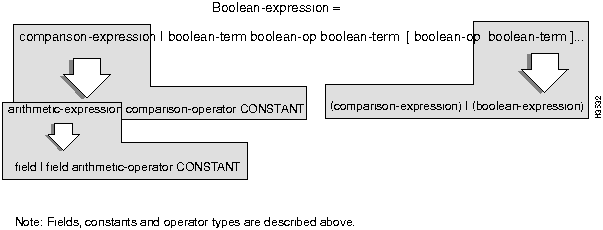
The following are some examples of filter syntax:
llcSSAP >= 01
(snapOUI & 00ff00) >= 005500
macSrc == 00:00:dd:00:00:12
(macSrc==00:00:dd:00:00:12) && (macDst != 00:00:dd:00:00:76)
(macSrc && ff:ff:00:00:00:00) == 00:dd:00:00:00:00
((macSrc & ff:ff:00:00:00:00) == 00:dd:00:00:00:00) &&
((macDst & ff:ff:00:00:00:00) != 00:dd:00:00:00:00)
(llcSSAP >= 01) && (macProto == 1234) && (macSrc == 00:00:dd:00:00:12)
((llcSSAP == 02) || (llcSSAP == 04)) &&
((macSrc == 00:00:dd:00:00:12) || (macSrc == 00:00:dd:00:00:14))
Sample Filters
Sample 1. Suppose that you want the network to only allow Local Area Transport (LAT) traffic to be passed between two LANs. You would create a filter for the ports that support those LANs that blocks any traffic that is not LAT and forwards only LAT traffic. This filter would be specified as follows:
macProto==6004. (6004 is the hexadecimal value assigned to the LAT protocol type in RFC 1340, Assigned Numbers.)
You would then apply this filter to the ports that you want to use exclusively for LAT traffic with the Action attribute for the filter set to forward. You would also need to set the Default Action for the port to block. This combination of settings forwards LAT frames and blocks all others.
Sample 2. Consider the connections shown in Figure 4-2. Suppose that you want to prohibit end stations xx:xx:xx:xx:xx:xx and yy:yy:yy:yy:yy:yy from communicating with each other. You would create a filter for each port that blocks the traffic to the other end station.
Figure 4-2 : Connections to Be Filtered
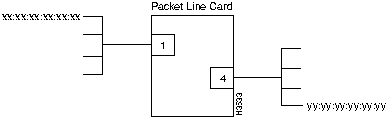
The filters would be specified as follows:
For Port 1:
(macSrc==xx:xx:xx:xx:xx:xx) && (macDst==yy:yy:yy:yy:yy:yy)
For Port 4:
(macDst==xx:xx:xx:xx:xx:xx) && (macSrc==yy:yy:yy:yy:yy:yy)
You then assign each filter to the appropriate port and set the Action attribute for the filter to block. You would set the Default Action for the port to forward. This combination of settings prevents communication between the two end stations, but allows all other communication.
Sample 3. Using the same connections shown in Figure 4-2, suppose that you wanted to allow communication only between end station xx:xx:xx:xx:xx:xx and yy:yy:yy:yy:yy:yy. You would create a filter for each port that allows communication between the two end stations.
The filters would be specified as follows:
For Port 1:
(macSrc==xx:xx:xx:xx:xx:xx) && (macDst==yy:yy:yy:yy:yy:yy)
For Port 4:
(macDst==xx:xx:xx:xx:xx:xx) && (macSrc==yy:yy:yy:yy:yy:yy)
You then assign each filter to the appropriate port, but this time you would set the Action attribute for the filter to forward. You would set the Default Action for the port to block. This combination forwards traffic between the two end stations and blocks all other traffic.
Specifies the action to be taken if a frame meets the conditions defined by the filter. This is a filter-level attribute. You can either specify that the frame should be forwarded into the network or blocked, in which case it is dropped at the edge. If you don't specify a setting for the filter-level Action attribute, then the opposite of the setting for the port-level Default Action attribute is used.
| MIB name | lightStreamBrFilterParmAction |
|---|---|
| Field Type | Multiple choice |
| Legal Values | Forward or block |
| Default value | Block if Port Default Action = Forward
Forward if Port Default Action = Block |
| Interrelationships | Default Action |
Specifies the number of receive broadcast packets that this port accepts and attempts to forward per second. The node discards all broadcast packets above this number per second.
| MIB name | lightStreamBrPortBcastRateLimit |
|---|---|
| Field Type | Fill-in |
| Legal Values | 0 = all broadcast packets are discarded.
1 - 128 = Packets above that number per second are discarded. -1 = all broadcast packets are forwarded. |
| Default value | -1 |
Specifies the default action (either forward or block) to be taken for the port in the absence of any specific port filters or if there is not a match with the configured filter/s for the port. This is a port-level attribute.
| MIB name | lightStreamBrPortDefaultAction |
|---|---|
| Field Type | Multiple choice |
| Legal Values | Forward or block |
| Default value | Forward |
| Interrelationships | Action |
Specifies the precedence assigned to this filter. The lower the number, then the higher the filter's priority with regard to the other filters assigned to the port. Filters are performed in order of priority, with the highest priority filter being performed first. The lowest numerical priority value has the highest priority.
The rules regarding the assignment of priority are as follows:
| MIB name | lightStreamBrFilterParmFilterPriority |
|---|---|
| Field Type | Fill-in |
| Legal Values | 1 - 65,535 |
| Default value | 1 (highest priority) |
This section describes the attributes used to create static entries in the bridge's filtering database. These attributes are found in the Static Route Configuration dialog box. Attributes are listed in alphabetical order.
The filtering database equates a MAC destination address with a LightStream port that can receive the frames with this MAC destination address and a set of LightStream ports on which the frames can then be transmitted. (The association between the receive port and the transmit port/s is called a profile. The assignment of a MAC address to a profile is called a static route.) The forwarding process uses the entries in the filtering database to determine if frames with a given MAC destination address should be specifically forwarded to a given port/s.
Through the configurator (or the CLI), you can explicitly make an entry in the filtering database; this is called a static entry. You may, for instance, want to make a static entry if you are directing a broadcast to specific ports in order to limit broadcast propagation. You would also make a static entry if you have an end station that only receives traffic, in which case the bridge can't learn about the station.
The rules governing the creation of static filters are as follows:
You should be familiar with IEEE 802.1d-1990, MAC Bridges, before you attempt to set any of these attributes. Specifically, you should be familiar with the following terms: filtering database, forwarding, MAC destination addresses, and receive port and transmit ports. You can also reference RFC 1493, Definition of Managed Objects for Bridges, for more information on static filtering attributes.
Specifies the destination MAC address to which this entry in the filtering database applies. The address can be a unicast, multicast or broadcast address. You can obtain MAC addresses from the appropriate network administrators.
| MIB name | dot1dStaticAddress |
|---|---|
| Field Type | Fill-in |
| Legal Values | xx:xx:xx:xx:xx:xx (48-bit MAC address) |
| Default value | None |
Specifies the LightStream interface number that must receive the frame in order for this filtering database entry to apply.
| MIB name | dot1dStaticReceivePort |
|---|---|
| Field Type | Fill-in |
| Legal Values | 0 = this entry applies on all ports of the bridge for which there is no other applicable entry; a frame with the specified MAC address can be received on any port of the bridge.
Interface number comprised of the card slot number and the port number |
| Default value | None |
Specifies the interface numbers of the LightStream ports that the frames with the associated MAC destination can be transmitted to. You can specify up to eight transmit ports. Transmit ports can be on the same card or on different cards within the same chassis.
| MIB name | dot1dStaticAllowedToGoTo |
|---|---|
| Field Type | Fill-in |
| Legal Values | Interface number comprised of the card slot number and port number |
| Default value | None |
The attributes described in this section are used by LightStream software to set up PVCs between two switches. These attributes are found in the PVC Configuration dialog box.
The two endpoint switches are called Node A and Node B in the configurator. You need to provide the same type of information for Node A and Node B. Node A attributes are for the PVC from Node A to Node B. Node B attributes are for the PVC from Node B to Node A. The configurator allows you to specify the attributes for both nodes at the same time. By supplying this information, you are provisioning for PVCs.
The endpoint identification attributes (A Card, A Name and A Port) in this section are named from the Chassis A end of the PVC. On the other end of the PVC (Chassis B), the endpoint attributes are reversed: on Chassis A the cktAdminDestNode and cktAdminDestIfIndex contain the values for the node at the other side of the PVC (Chassis B).
Specifies the LightStream card at this end of the frame relay, frame forwarding, or ATM UNI virtual circuit.
| MIB name
|
rCktSrcIfIndex
ffCktSrcIfIndex sUniCktSrcIfIndexf |
|---|---|
| Field Type | Multiple choice |
| Legal Values | 2 - 10 |
| Default value | None |
Specifies, in bits per second (for FR and FF) or cells per second (for ATM UNI), the data throughput from node A to node B that the LightStream network commits to support under normal network conditions. See the LightStream 2020 System Overview for more information on Insured Rate.
| MIB name
|
frCktAdminSrcInsuredRate
ffCktAdminSrcInsuredRate sUniCktAdminSrcInsuredRate |
|---|---|
| Field Type | Fill-in |
| Legal Values | LSC: 0, or 5456 - 3548000 bps
MSC: T3: 0, or 109 - 96000 cps E3: 0, or 109 - 72000 cps E3/G.804: 0, or 109 - 80000 cps CLC: 0, or 218 - 350000 cps |
| Default value | LSC: 5456 bps
MSC: 109 cps CLC: 218 cps |
| Interrelationships | A Insured Burst (expert mode attribute)
Max Frame Size |
Notes:
Specifies the maximum amount of insured plus uninsured data in bits per second (for FR and FF) or cells per second (for ATM UNI) that the LightStream network will attempt to deliver from node A to node B under normal conditions. The uninsured portion of traffic may be discarded if the network is congested. See the LightStream 2020 System Overview for more information on Maximum Rate.
| MIB name
|
frCktAdminSrcMaxRate
ffCktAdminSrcMaxRate sUniCktAdminSrcMaxRate |
|---|---|
| Field Type | Fill-in |
| Legal Values | LSC: 5456 - 3548000 bps
MSC: T3: 109 - 96000 cps E3: 109 - 72000 cps E3/G.804: 109 - 80000 cps CLC: 218 - 350000 cps |
| Default value | LSC: Physical line rate for the port
MSC: 109 cps CLC: 218 cps |
| Interrelationships | A Insured Rate |
Notes:
Specifies the LightStream node at this end of the frame relay, frame forwarding, or ATM UNI virtual circuit, using the node's name.
| MIB name
|
frCktSrcNode
ffCktSrcNode sUniCktSrcNode |
|---|---|
| Field Type | Multiple choice |
| Legal Values | ASCII characters |
| Default value | None |
| Interrelationships | frCktOperDestNodes
ffCktOperDestNodes sUniCktOperDestNodes |
Specifies the LightStream port at this end of the frame relay, frame forwarding, or ATM UNI virtual circuit.
| MIB name
|
frCktSrcIfIndex
ffCktSrcIfIndex sUniCktSrcIfIndex |
|---|---|
| Field Type | Multiple choice |
| Legal Values | LSC: 0 - 7
MSC: 0 - 1 CLC: 0 - 1 |
| Default value | None |
Specifies the DLCI (data link connection identifier) of the LightStream port at this end of the frame relay virtual circuit. Along with the endpoints of the VCC, the DLCI number is used to identify and distinguish one VCC from another. You are not required to use the same DLCI number at both ends of a connection. You can use the same DLCI number in many places in your network; however, all VCCs connecting to a given port must have different DLCI numbers at that port.
DLCIs are used to identify frame relay VCCs. If you are provisioning for UNI VCCs then the configurator requires a VCI number. If you are provisioning for frame forwarding ports, then no number is required.
If a port attaches to a device (such as a frame relay router) that also maintains DLCI numbers, then the LightStream DLCI for the corresponding PVC must be the same number. If you are not the system administrator for the attached router, then you should obtain the numbers and associated endpoints from that person. Many routers can automatically learn DLCI numbers if you activate LMI on that port and the router is configured for the same type of LMI.
| MIB name | frCktSrcDlci |
|---|---|
| Field Type | Fill-in |
| Legal Values | Decimal numbers from 16 to 991 |
| Default value | 16 or the next highest unused number |
Specifies the virtual channel identifier at this end of the ATM UNI VCC. Along with the endpoints of the VCC, the VCI number is used to identify and distinguish one VCC from another. You are not required to use the same VCI number at both ends of a connection. You can use the same VCI number in many places in your network; however, all VCCs connecting to a given port must have different VCI numbers at that port.
If a port attaches to another ATM device that also maintains VCI numbers, then the LightStream VCI for the corresponding PVC must be the same number. If you are not the system administrator for the attached ATM device, then you should obtain the numbers and associated end points from that person.
| MIB name | sUniCktSrcVCI |
|---|---|
| Field Type | Fill-in |
| Legal Values | MSC: 1 to 8191
CLC: 1 to 32399 |
| Default value | 1 or the next highest unused number |
The endpoint identification attributes (B Card, B Name and B Port) in this section are named from the Chassis B end of the PVC. On the other end of the PVC (Chassis A), the endpoint attributes are reversed: on Chassis B the cktAdminDestNode and cktAdminDestIfIndex contain the values for the node at the other side of the PVC (Chassis A).
Specifies the LightStream card at this end of the frame relay, frame forwarding, or ATM UNI virtual circuit.
| MIB name | frCktAdminDestIfIndex
ffCktAdminDestIfIndex sUniCktAdminDestIfIndex |
|---|---|
| Field Type | Multiple choice |
| Legal Values | 2 - 10 |
| Default value | None |
Specifies, in bits per second (for FR and FF) or cells per second (for ATM UNI), the data throughput from node B to Node A that the LightStream network commits to support under normal network conditions. See the LightStream 2020 System Overview for more information on Insured Rate.
| MIB name | frCktAdminDestInsuredRate
ffCktAdminDestInsuredRate sUniCktAdminDestInsuredRate |
|---|---|
| Field Type | Fill-in |
| Legal Values | LSC: 0 or 5456 - 3548000 bps
MSC: T3: 0 or 109 - 96000 cps E3: 0 or 109 - 72000 cps E3/G.804: 0 or 109 - 80000 cps CLC: 0 or 218 - 350000 cps |
| Default value | LSC: 5456 bps
MSC: 109 cps CLC: 218 cps |
| Interrelationships | B Insured Burst (expert mode attribute)
Max Frame Size |
Specifies the maximum amount of insured plus uninsured data in bits per second (for FR and FF) or cells per second (for ATM UNI) that the LightStream network will attempt to deliver under normal conditions, from node B to node A. The uninsured portion of this traffic may be discarded if the network is congested. See the LightStream 2020 System Overview for more information on Max Rate.
| MIB name | frCktAdminDestMaxRate
ffCktAdminDestMaxRate sUniCktAdminDestMaxRate |
|---|---|
| Field Type | Fill-in |
| Legal Values | LSC: 5456 - 3548000 bps
MSC: T3: 109 - 96000 cps E3: 109 - 72000 cps E3/G.804: 109 - 80000 cps CLC: 218 - 350000 cps |
| Default value | LSC: Physical line rate for the port
MSC: 109 cps CLC: 218 |
| Interrelationships | B Insured Rate |
Notes:
Specifies the LightStream node at this end of the frame relay, frame forwarding, or ATM UNI virtual circuit, using the node's name.
| MIB name | frCktAdminDestNode
ffCktAdminDestNode sUniCktAdminDestNode |
|---|---|
| Field Type | Multiple choice |
| Legal Values | ASCII characters |
| Default value | None |
| Interrelationships | frCktOperDestNodes
ffCktOperDestNodes sUniCktOperDestNodes |
Specifies the LightStream port at this end of the frame relay, frame forwarding, or ATM UNI virtual circuit.
| MIB name | frCktAdminDestIfIndex
ffCktAdminDestIfIndex sUniCktAdminDestIfIndex |
|---|---|
| Field Type | Multiple choice |
| Legal Values | LSC: 0 - 7
MSC: 0 - 1 CLC: 0 - 1 |
| Default value | None |
Specifies the DLCI (data link connection identifier) of the LightStream port at this end of the frame relay virtual circuit. Along with the endpoints of the VCC, the DLCI number is used to identify and distinguish one VCC from another. You are not required to use the same DLCI number at both ends of a connection. You can use the same DLCI number in many places in your network; however, all VCCs connecting to a given port must have different DLCI numbers at that port.
DLCIs are used to identify frame relay VCCs. If you are provisioning for UNI VCCs then the configurator requires a VCI number. If you are provisioning for frame forwarding ports, then no number is required.
If a port attaches to a device (such as a frame relay router) that also maintains DLCI numbers, then the LightStream DLCI for the corresponding PVC must be the same number. If you are not the system administrator for the attached router, then you should obtain the numbers and associated end points from that person. Many routers can automatically learn DLCI numbers if you activate LMI on that port and the router is configured for the same type of LMI.
| MIB name | frCktDestDlci |
|---|---|
| Field Type | Fill-in |
| Legal Values | Decimal numbers from 16 to 991 |
| Default value | 16 or the highest unused number |
Specifies the virtual channel identifier at this end of the ATM UNI VCC. Along with the endpoints of the VCC, the VCI number is used to identify and distinguish one VCC from another. You are not required to use the same VCI number at both ends of a connection. You can use the same VCI number in many places in your network; however, all VCCs connecting to a given port must have different VCI numbers at that port.
If a port attaches to another ATM device that also maintains VCI numbers, then the LightStream VCI for the corresponding PVC must be the same number. If you are not the system administrator for the attached ATM device, then you should obtain the numbers and associated end points from that person.
| MIB name | sUniCktDestVCI |
|---|---|
| Field Type | Fill-in |
| Legal Values | MSC: 1 to 8191
CLC: 1 to 32399 |
| Default value | 1 or the highest unused number |
You use workgroups to perform automatic specialized filtering, based on MAC source and destination addresses. This feature allows you to specify which interfaces can communicate with each other.
You don't have to configure any workgroups; it is optional. If you don't configure a interface for workgroups, then it automatically belongs to the Default workgroup (ID = 1).
The following attributes are used to create workgroups and to assign interfaces to those workgroups.
The card that contains the interface you are assigning to a workgroup/s.
| MIB name | cardName |
|---|---|
| Field Type | Multiple choice |
| Legal Values | Printable ASCII characters |
| Default value | None |
The node that contains the interface you are assigning to a workgroup/s.
| MIB name | sysName |
|---|---|
| Field Type | Multiple choice |
| Legal Values | Printable ASCII characters |
| Default value | None |
The port number of the interface you are assigning to a workgroup/s.
| MIB name | lightStreamVnaPortWorkGroupPort |
|---|---|
| Field Type | Multiple choice |
| Legal Values | Integer 0 -7 |
| Default value | None |
Determines if the interface is included in or excluded from the workgroup/s in the list. (Read notes before changing this value.)
As a default, an interface is automatically included in the workgroup called Default that has an ID of 1. Therefore, by default, all interfaces are initially included in the same workgroup and can communicate with one another.
| MIB name | lightStreamVnaPortCtlMode |
|---|---|
| Field Type | Multiple choice |
| Legal Values | include/exclude |
| Default value | include |
Notes:
The numerical identifier of the workgroup being assigned to the specified port.
| MIB name | lightStreamVnaPortWorkGroupID |
|---|---|
| Field Type | Fill-in |
| Legal Values | Integer 1 - 65535 |
| Default value | None |
The name of the workgroup being assigned to the specified port.
| MIB name | None |
|---|---|
| Field Type | Fill-in |
| Legal Values | Printable ASCII characters |
| Default value | None |

|
Copyright 1988-1996 © Cisco Systems Inc.