


|
|

Workgroup CDDI/FDDI SBus Adapter Upgrade and Configuration
This publication provides instructions for upgrading SBus adapter cards to enable diskless boot operation over the network. Instructions are provided for both SunOS 4.1.x and Solaris 2.x operating systems. The upgrade instructions include steps for configuring the firmware and upgrading SBus adapter cards.
For complete descriptions of configuration options available for the CDDI/FDDI SBus adapter, refer to the Workgroup CDDI/FDDI SBus Adapter User Guide.
Sections in this publication include the following:
The diskless client is any system that does not have a hard disk and relies on an assigned server for all of its resources. The diskless boot client's file systems, disk storage, and swap space are stored on a server, and it requires access to a server to boot.
Before you can begin upgrading adapter cards, you will need the following:
Make sure you have the following equipment before you begin the upgrading procedure:
Preventing Electrostatic Discharge Damage
Electrostatic discharge (ESD) damage, which can occur when electronic boards or components are handled improperly, can result in complete or intermittent failures. Make sure to handle the PROMs by the metal frame or carrier only; avoid touching the board (particularly avoid touching any components, connector pins, or the metal fingers on the edge connector).
Following are guidelines for preventing ESD damage:
Perform the following tasks to configure the firmware:
Following are the procedures for replacing the programmable read-only (PROM) devices on the SBus adapters. Make sure to follow the procedures with the numbers that correspond to the adapters you are replacing.
Replacing WA-C300T, WA-C301T, or WA-303T Adapters
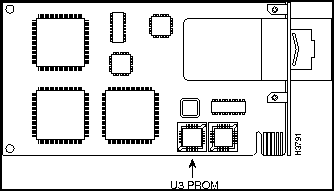
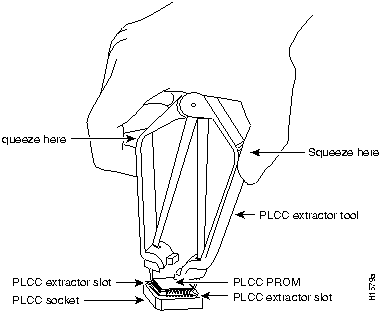
Following are the steps for replacing the PROM for the WA-C300T, WA-C301T, or WA-303T adapters.
Figure 1 : PROM Socket Designator for WA-C300T, WA-C301T, or WA-303T Adapters
Figure 2 : Removing a PROM from a PLCC-Type Package
Replacing WA-C300, WA-C301M, or WA-C303 Adapters
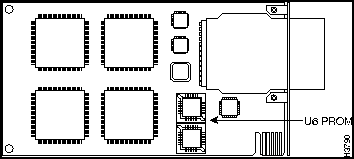
In general, you follow the preceding instructions to replace the PROM for the WA-C300, WA-C301M, or WA-C303 adapters. However, instead of replacing the PROM from the U3 socket, replace the PROM from the socket labeled U6. (See Figure 3.) If you are upgrading a CDDI card, you may need to remove the daughterboard to get direct access to the PROM.
Figure 3 : PROM Socket Designator for WA-C300, WA-C301M, or WA-C303
Installing the SunOS 4.1.x Diskless Boot Server Software
This section describes how to install of diskless boot clients using the SunOS 4.1.x operating system using the ./install.fddi command and how to add a client using the add_client command. Refer to the section "Administering Workstations" in the Sun System and Network Configuration manual for detailed installation instructions.
The installation requires the following steps:
Adding a Client to the Server Databases
Perform the following tasks to add the client to the server databases:
Installing the Driver on the Server
Perform the following tasks to install the SunOS diskless boot driver on the server:
When the server console prompt reappears, the SunOS diskless boot driver installation is complete. Continue with the instructions in the section "Configuring the Diskless Boot Client" at each diskless boot client.
Installing the Sun Solaris 2.x Diskless Boot Server Software
This section describes to install diskless boot clients for the Sun Solaris 2.x operating system using the administration tool and how to add a client using the pkg_add command. Refer to the section "Introducing a Machine to a Network" in the Solaris 2.3 System Configuration and Installation Guide for detailed installation instructions.
This section includes the following:
Adding a Client Using the Administration Tool
This section describes how to use the host manager to add a client using the administration tool.
Perform the following steps to modify the administration files to add a client using the host manager:
Continue with the following procedure in the section "Installing the Solaris Client Using the pkgadd Script" at each diskless boot client.
Installing the Solaris Client Using the pkgadd Script
At the server, use the pkgadd utility to add the SBus FDDI diskless boot adapter driver for the client workstation.
Perform the following steps:
Installing Solaris 2.x JumpStart
This section describes how to configure the diskless workstation and server to use the Sun Microsystems custom JumpStart utility to automatically install the Solaris software over the FDDI network. Refer to the Sun Microsystems document SPARC: Installing Solaris Software for detailed installation instructions.
Follow the instructions in the Sun document to configure the local server as an install server and/or as a boot server.
The following procedure will not affect the kernel running on the server, but it will make changes to JumpStart files to allow Solaris installation over the FDDI.
Follow these steps to prepare the install server to perform the jumpstart installation over FDDI.
Table 1 : Diskless Workstation Device Paths
The Solaris custom JumpStart feature configuration is complete.
Configuring the Diskless Boot Client
Perform the following steps at each diskless boot client to boot from the remote server:
Table 2 : Diskless Workstation Device Paths
Example:
Cisco Information Online (CIO) is Cisco Systems' primary, real-time support channel. Maintenance customers and partners can self-register on CIO to obtain additional content and services.
Available 24 hours a day, 7 days a week, CIO provides a wealth of standard and value-added services to Cisco's customers and business partners. CIO services include product information, software updates, release notes, technical tips, the Bug Navigator, configuration notes, brochures, descriptions of service offerings, and download access to public and authorized files.
CIO serves a wide variety of users through two interfaces that are updated and enhanced simultaneously---a character-based version and a multimedia version that resides on the World Wide Web (WWW). The character-based CIO (called "CIO Classic") supports Zmodem, Kermit, Xmodem, FTP, Internet e-mail, and fax download options, and is excellent for quick access to information over lower bandwidths. The WWW version of CIO provides richly formatted documents with photographs, figures, graphics, and video, as well as hyperlinks to related information.
You can access CIO in the following ways:
For a copy of CIO's Frequently Asked Questions (FAQ), contact If you are a network administrator and need personal technical assistance with a Cisco product that is under warranty or covered by a maintenance contract, contact Cisco's Technical Assistance Center (TAC) at 800 553-2447, 408 526-7209, or
Copyright 1988-1996 © Cisco Systems Inc.


download_flash sbusxx.rom



/usr/local/diskless/cfddi
) on the diskless boot server, and proceed to the section "Installing the SunOS 4.1.x Diskless Boot Server Software" in this document.
Server #
./
add_client -i
The following screen appears:
Interactive mode uses no command line arguments


CLIENT FORM      [?=help] [DEL= erase one char] [RET=end of input data]


-----------------------------------------------------------------------

 Architecture type  :
[sun4c.sunos.4.1.3]
x [sun4m.sunos.4.1.3_u1]

 Client name        :
cisco-fddi

 Choice             : x [create]  [delete]   [display]  [edit]


 Ok to use these values [y/n]
[x/X=select choice] [space=next choice] [^B/^P=backward] [^F/^N=forward]
CLIENT FORM      [?=help] [DEL= erase one char] [RET=end of input data]


-------------------------------------------------------------------

 Architecture type  :
[sun4c.sunos.4.1]
x [sun4m.sunos.4.1.3_u1]

 Client name        :
cisco-fddi

 Choice             : x [create] [delete] [display] [edit]

 Root fs: /export/root (sd3h)     118805504     Hog:   3d3h 118805504

 Swap fs: /export/swap (sd3h)       118805504   Hog:   3d3h 118805504


 Client Information   :

      Internet Address           :  198.133.219.2511

      Ethernet Address           :  8:00:20:19:ef:4

      NIS Type                   :    X [none]  [client]


      Swap size (e.g. 8B, 8K)    :   16M

      Path to Root               :   /export/root/cisco-fddi

      Path to Swap               :   /export/swap/cisco-fddi

      Path to Executable         :   /usr

      Path to Kernel Executable  :   /usr/kvm

      Path to Home               :   /export/home/Boot-server-fddi

      Terminal type              :   sun


   Ok to use these values [y/n]
y

    [x/X=select choice][space=next choice][^B/^P=backward][^F/^N=forward]
CLIENT FORM     [?=Help]  [DEL= erase one char] [RET=end of input data]


----------------------------------------------------------------------

 Architecture type  :
[sun4c.sunos.4.1]
x [sun4m.sunos.4.1.3_u1]

 Client name        :
cisco-fddi

 Choice             : x [create] [delete] [display] [edit]


  sun4m.sunos.4.1.3_u1 Clients:


  cisco-fddi


   Are you finished with this form [y/n]
y

    [x/X=select choice][space=next choice][^B/^P=backward][^F/^N=forward]
Updating the server's database
Setting up server file system to support client
Making client's swap file
Setting up client's files system
Copying /export/exec/proto.root.sun4m.sunos.4.1.3_u1 to /export/root/cisco-fddi
Copying binaries
Updating client's database
Setting up Client's ttytab
You must now ask the system administrator to update the NIS
master's /etc/hosts, /etc/bootparams and /etc/ethers files,
because of the change in the status of the client "cisco-fddi.'
cisco-fddi root=Boot_server: /export/root/cisco-fddi\
swap=Boot_server:/export/swap/cisco-fddi
Boot_server #
./install.fddi

    You have invoked the ./install.fddi script, which is used to install
software for FDDI SBus Adapters.
There are two steps to the installation:
1) Install SNMP agent (optional).
2) Install FDDI SBus driver.
Is this install for a diskless station (y/n) [n] ?
y
/export/root
total 2
drwxr-xr-x 3 root 512 May 12 1994 SUNWxt
drwxr-sr-x 11 root 512 Mar 6 16:28 cisco-fddi
Input diskless base directory ==
/export/root/cisco-fddi
Do you wish to install the SNMP agent on diskless station (y/n) [y] ?
y
Copying snmpd.cfddi to /export/root/cisco-fddi/etc
Updating /export/root/cisco-fddi/etc/rc.local to start SNMP agent at boot time.
Installation of SNMP agent done.
How many FDDI interfaces are being installed in this machine [1] 1?
Enter hostname for FDDI interface fddi0 [Boot_server]: cisco-fddi
You are using NIS, do you want to get ip address from NIS (y/n) [y] ? y
Retrieved ipaddr 172.20.25.146 for host cisco-fddi
Enter IP address for FDDI interface fddi0 [172.20.25.146]:
Enter client architecture (sun4c or sun4m) [ sun4m ] ==> sun4m
/export/exec/kvm
total 3
drwxr-sr-x 7 root 1024 Sep 14 17:15 sun4c.sunos.4.1.3
lrwxrwxrwx 1 root 20 Sep 14 10:37 sun4m -> sun4m.sunos.4.1.3_U1
lrwxrwxrwx 1 root 8 Sep 14 10:37 sun4m.sunos.4.1.3_U1 -> /usr/kvm
Enter client architecture kernel build path ==>

   /export/exec/kvm/sun4m
Enter existing kernel configuration file [GENERIC]:
Enter new kernel configuration file [FDDI]: FDDI_DLESS
Copying/updating files ...
Copying fddi_conf.c to /usr/kvm/sys/sunif
Copying if_fddi.o to /usr/kvm/sys/sun4m/OBJ
Adding config.fddi to /usr/kvm/sys/sun4m/conf/ERIC
Updating /usr/kvm/sys/sun4m/conf/files to include FDDI files
Updating /usr/kvm/sys/netinet/in_proto.c to increase tcp snd/rcv space
Updating /usr/kvm/sys/sun4m/conf/ERIC for diskless station
changing fddi_conf.c file to flag diskless booting
Copying fddistat to /export/root/cisco-fddi/usr/etc
Rebuilding diskless kernel ...
Doing a "make depend"
cc -sparc -c -O -Dsun4m -DGENERIC -DSUN4M_35 -DSUN4M_50 -DSUN4M_690 -
.
. data omitted
.
DSYSACCT -DPCFS -DTMPFS -DNFSCLIENT -DINET -DMULTIPROCESSOR -DKERNEL -I. -I.. -I../.. confvmunix.c
loading vmunix
rearranging symbols
text data bss dec hex
1368064 456104 208360 2032528 1f0390
Changing fddi_conf.c back to non-diskless case
Installing kernel ...
Saving old /export/root/cisco-fddi/vmunix file in /export/root/cisco-fddi/vmunix.save
Copying vmunix to /export/root/cisco-fddi/vmunix
A log of the installation is in ./install.fddi.log
Boot_server #
Boot_server# /usr/bin/admintool
cisco-fddi root=Boot_server: /export/root/cisco-fddi\
swap=Boot_server:/export/swap/cisco-fddi
client # pkgadd -R /export/root/cisco-fddi -d /floppy/floppy0
The following packages are available:
1 CSCOmibs Solaris 2.X Mibs
(sparc) 4.1
2 SBUSfddi Solaris 2.X FDDI Driver
(sparc) 3.1
3 SBUSsnmp Solaris 2.X FDDI SNMP Agent
(sparc) 4.1
Select package(s) you wish to process (or 'all' to process
all packages). (default: all) [?,??,q]:
2
Processing package instance <SBUSfddi> from </floppy/floppy0>
Solaris 2.X FDDI Driver
(sparc) 3.1
Copyright (c) 1991-1995 Cisco Systems, Inc.
Using </export/root/cisco-fddi> as the package base directory.
Is this installation for a diskless station [n] [y,n,?,q]
y
Is the FDDI Adapter currently installed in the machine [y] [y,n,?,q]
y
Will the ethernet interface continue to be used [y] [y,n,?,q]
y
How many FDDI interfaces are being installed in this machine [1] [1-4,?,q] 1
NIS is running, Do you want to get ip addresses from NIS [y] [y,n,?,q]
y
Enter hostname for FDDI interface fddi0 [Diskless-fddi] [?,q]

   cisco-fddi
Enter IP address for FDDI interface fddi0 [198.133.219.99] [?,q]

   198.133.219.99
## Processing package information.
## Processing system information.
## Verifying disk space requirements.
## Checking for conflicts with packages already installed.
## Checking for setuid/setgid programs.
This package contains scripts which will be executed with super-user
permission during the process of installing this package.
Do you want to continue with the installation of this package [y,n,?]
y
Installing Solaris 2.X FDDI Driver as <SBUSfddi>
## Installing part 1 of 1.
/export/root/cisco-fddi/kernel/drv/fddi
[ verifying class <driver> ]
/export/root/cisco-fddi/opt/SBUSfddi/README
/export/root/cisco-fddi/opt/SBUSfddi/dflash.4.1.X
/export/root/cisco-fddi/opt/SBUSfddi/dflash.solaris
/export/root/cisco-fddi/opt/SBUSfddi/download_flash
/export/root/cisco-fddi/opt/SBUSfddi/download_flash.README
/export/root/cisco-fddi/opt/SBUSfddi/fddistat
/export/root/cisco-fddi/opt/SBUSfddi/network_download
/export/root/cisco-fddi/opt/SBUSfddi/ttcp
[ verifying class <tools> ]
## Executing postinstall script.
Running add_drv to add driver to system ...
Reboot client to install driver.
Note: major number maximum based on server, not client
Creating file /export/root/cisco-fddi/etc/hostname.fddi0 with host cisco-fddi
Hostname: cisco-fddi ip address: 198.133.219.99
Diskless station installed successfully
Installation of <SBUSfddi> was successful.
The following packages are available:
1 CSCOmibs Solaris 2.X Mibs
(sparc) 4.1
2 SBUSfddi Solaris 2.X FDDI Driver
(sparc) 3.1
3 SBUSsnmp Solaris 2.X FDDI SNMP Agent
(sparc) 4.1
Select package(s) you wish to process (or 'all' to process
all packages). (default: all) [?,??,q]:
q
cisco-fddi root=Boot_server: /export/root/cisco-fddi\
swap=Boot_server:/export/swap/cisco-fddi
#
cp -r SBUSfddi install_dir_path/Solaris_2.4
# chmod +x neti
# ./neti
# Are you sure you want to continue with FDDI jumpstart network installation script [n] y
# Begin network installation
# Enter type of architecture for target installation machine [sun4m] sun4m
Performing add_drv to jumpstart directory ../../../export/exec/kvm/sparc.sum.Solaris_2.4
removing request entry from pkgmap
changing .package toc
changing .order
Done
#
./add_install_client -i 188.122.139.45 -e 8:0:20:0d:92:23 -s install_srv:/ install_dir_path -c install_srv:/var/adm/jumpstart install_cli sun4m
# Profile Keyworks profile values
# ---------------- --------------
package SBUSfddi add
boot device_path -install, where the device_path is your type of workstation. See Table 1 for the proper device path.
Workstation Type
Device Path
Notes
Sun4c
/sbus/fddi
Sun4d
/io-unit@f,e0200000/sbi/fddi
For Solaris only
Sun4m
/iommu/sbus/fddi
Diskless # boot /iommu/sbus/fddi -install
ifconfig: SIOCGIFFLAGS: fddi0: no such interface
ifconfig fddi# plumb
ifconfig fddi# diskless_name up
arp -d diskless_name
Workstation Type
Device Path
Notes
Sun4c
/sbus/fddi
Sun4d
/io-unit@f,e0200000/sbi/fddi
For Solaris only
Sun4m
/iommu/sbus/fddi
Diskless # boot /sbus/fddi
ok
show-devs
/FM,MB86904
/virtual-memory@0,0
/memory@0,0
/obio
/iommu@0,10000000
/openprom
.
.
. (information omitted)
.
.
.
/iommu@0,10000000/sbus@0,10001000
/iommu@0,10000000/sbus@0,10001000/cgsix@3,0
/iommu@0,10000000/sbus@0,10001000/fddi@1,400000" 1
/iommu@0,10000000/sbus@0,10001000/fddi@1,400000" 2
.
.
. (information omitted)
.
.
.
ok
ok setenv boot-device /sbus/fddi
ok printenv
Parameter Value Default Value
type-link-test true true
.
.
. (information omitted)
.
.
boot-device /sbus/fddi disk net
.
.
. (information omitted)
.
.
ok
ok boot
abcoo hostname: cisco-fddi;
domainname: eng.com
root server: Boot_server
root directory: /export/home/root/cisco-fddi
SunOS Release 5.4 Version [UNIX(R) System V Release]
Copyright (c) 1983-1994, Sun Microsystems, Inc.
http://www.cisco.com
cio.cisco.com
ciohelp@cisco.com.
For additional information, contact
cioteam@cisco.com.
tac@cisco.com.
To obtain general information about Cisco Systems, Cisco products, or upgrades, contact 800 553-6387, 408 526-7208, or
csrep@cisco.com.

