


|
|

The Cisco 7507 router is part of the Cisco 7500 series. The seven-slot Cisco 7507 supports multiprotocol, multimedia routing and bridging with a wide variety of protocols and any combination of Asynchronous Transfer Mode (ATM), Ethernet, Fast Ethernet, Token Ring, Fiber Distributed Data Interface (FDDI), serial, High-Speed Serial Interface (HSSI), channel attachment, and multichannel media.
Network interfaces reside on interface processors that provide a direct connection between the two Cisco Extended Buses (CyBuses) and your external networks. The Cisco 7507 has seven slots: interface processor slots 0 and 1, Route Switch Processor (RSP2) slots 2 and 3, and interface processor slots 4 through 6.
There are bays for up to two AC-input or DC-input power supplies. The chassis will operate with one power supply. While a second power supply is not required, it allows load sharing and increased system availability.

Following is a list of acronyms that identify the system components and features:
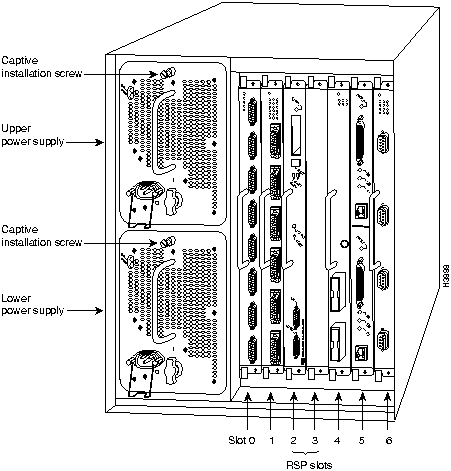
Figure 1-1 shows a view of the interface-processor end of the Cisco 7507 with two AC-input power supplies and a single RSP2 installed.
Figure 1-1 Cisco 7507, Rear View
The dual-CyBus backplane has seven slots: interface processor slots 0 and 1 (Cybus 0), two RSP slots (2 and 3), and interface processor slots 4 through 6 (CyBus 1), as shown in Figure 1-2.
Figure 1-2 Cisco 7507 Dual CyBus Backplane
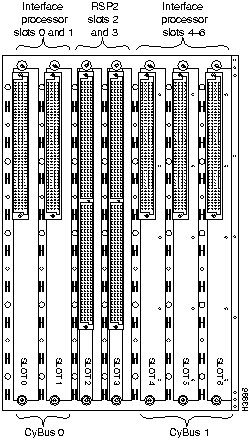
Table 1-1 lists the specifications for the Cisco 7507 system.
Table 1-1 Cisco 7507 Specifications
| Description | Specifications |
|---|---|
| High-speed backplane | Two 1.0677-Gbps CyBuses: 5 interface processor slots, 2 RS2P slots |
| Dimensions (H x W x D) | 19.25 x 17.5 x 25.1'' (48.90 x 44.45 x 63.75 cm)Chassis depth including power cord is 28'' (71.12 cm) |
| Weight | Chassis only: 76 lb (34.47 kg)Chassis fully configured, using all slots and 2 power supplies: 145 lb (65.76 kg) |
| Power supply | 700 watts (W) maximum (for AC-input and DC-input power supplies) |
| Power dissipation | 626W, maximum configuration 530W typical with maximum configuration |
| Heat dissipation | 1200W (4100 British thermal units [Btus]/hr) with AC-input300W (1024 Btus/hr) with DC-input |
| Input voltage | 100 to 240 volts alternating current (VAC) wide input with power factor correction (PFC) |
| Frequency | 50 to 60 Hz autoranging |
| AC-input ratings | 12A maximum @ 100 VAC, 6A maximum @ 240 VAC, chassis fully configured |
| DC-input ratings | --40 volts DC (VDC) minimum--48 VDC nominal--72 VDC maximum |
| Airflow | 140 cubic feet per minute (cfm) through the system blower |
| Operating temperature | 32 to 104°F (0 to 40°C) |
| Nonoperating temperature | --4 to 149°F (--20 to 65°C) |
| Humidity | 10 to 90%, noncondensing |
| Agency approvals | Safety: UL 1950, CSA 22.2-950, EN60950: 1992 EMI: FCC Class A, EN55022 Class B, VCCI Class 2 |
The system blower on the Cisco 7507 provides cooling air for the processor modules. The blower is located inside the front chassis compartment, as shown in Figure 1-3.
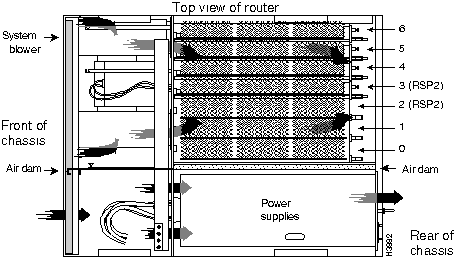
The blower draws air in through the air filter in the front chassis panel and directs it up through the floor of the internal slot compartment and over the cards. The exhaust air is forced out the rear of the chassis above and to each side of the processor slots. The blower needs a clean air filter in order to draw in sufficient amounts of cooling air; excessive dust in the filter will restrict the airflow. Keep the air filter clean and replace it when necessary.
Sensors on the RSP2 monitor the inlet and internal chassis air temperatures. If the air temperature at either of the sensors exceeds a desired threshold, an environmental monitor displays warning messages and can interrupt system operation to protect the system components from possible damage from excessive heat or electrical current.
The power supplies have their own fans. An air dam between the power supply bays and the processor module compartment keeps the airflow constant.
For complete information on fan and environmental considerations, refer to the Cisco 7507 Hardware Installation and Maintenance publication, which is available on Cisco Connection Documentation CD-ROM or in print. For information on ordering Cisco Connection Documentation CD-ROM, see the section "If You Need More Configuration Information," in the chapter "Performing a Basic Configuration of the Cisco 7507."

|
Copyright 1988-1996 © Cisco Systems Inc.