|
|

This appendix provides a summary of all the LEDs (status indicators) used in the router. The LED on the interface processor end of the router and on the RSP1 indicate the system power and processor status; LEDs on the other interface processors indicate the status of the individual interface processor and its interfaces.
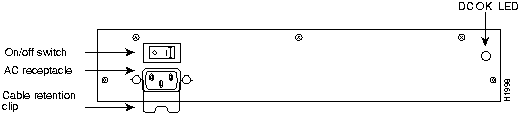
The DC OK LED (shown in Figure B-1), on the interface processor end of the AC-input and DC-input power supplies, goes on when the power supply is receiving AC or DC source power and providing DC power to the internal chassis components. The power supply self-monitors its own temperature and internal voltages. For a description of the power supply shutdown conditions and threshold status levels, refer to the section "Environmental Monitoring and Reporting Functions" in the chapter "Product Overview."
Figure B-1 : DC OK LED---AC-Input Power Supply Shown
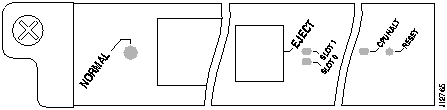
The two LEDs on the RSP1, which are shown in Figure B-2, indicate the system and RSP1 status. The normal LED goes on to indicate that the system is operational. During normal operation, the CPU halt LED on the RSP1 should be off. The CPU halt LED, which goes on only if the system detects a processor hardware failure, should stay off. A successful boot is indicated when the normal LED comes on and stays on; however, this does not necessarily mean that the system has reached normal operation.
The slot 0 and slot 1 LEDs indicate which PCMCIA (Flash memory) card slot is in use and blinks when it is being accessed by the system.
Each interface processor (except the RSP1, which is not really an interface processor) contains an enabled LED. When on, this LED indicates that the interface processor is operational and that it is powered up. It does not necessarily mean that the interface ports are functional or enabled. The following sections describe the LEDs for each interface processor.
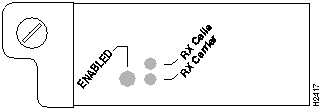
The three LEDs above the ATM port (see Figure B-3) indicate the following:
Following are the functions of the CIP LEDs. (See Figure B-4.)
Following are the sequences for the CIP LED indicators. The enabled LED is not part of the following sequences. On cold boots, the following four LED sequences apply:
The following sequence indicates that the CIP is waiting for commands from the RSP1.
On warm boots, the LEDs flash briefly. On downloads, the following three LED sequences apply; the first indicates that the system is downloading volatile programmable logic device (VPLD) code:
The following sequence indicates that the CIP is downloading microcode:
The following sequence indicates that the CIP is starting to execute the microcode:
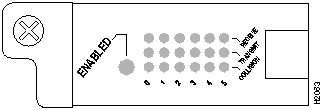
The EIP contains a bank of 18 LEDs: one horizontal row of 3 LEDs for each of the 6 Ethernet interfaces, as shown in Figure B-5.
As with the other interface processors, the enabled LED goes on when the EIP is enabled for operation. Three LEDs for each port indicate the following:
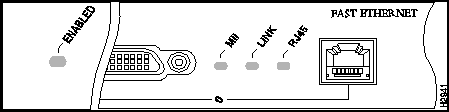
The FEIP contains the enabled LED, standard on all interface processors, and a bank of three status LEDs for the ports. After system initialization, the enabled LED goes on to indicate that the FEIP has been enabled for operation. (The LEDs are shown in Figure B-6.) The following conditions must be met before the enabled LED goes on:
If any of these conditions is not met, or if the initialization fails for other reasons, the enabled LED does not go on.
A bank of three LEDs indicates the following:
Either the MII LED or the RJ-45 LED should be on at one time; never both.
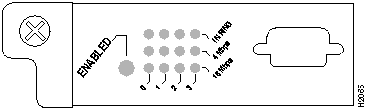
The TRIP LEDs are shown in Figure B-7. Each horizontal row of three LEDs, one for each Token Ring interface, indicates the speed (4 or 16 Mbps) of the interface and whether the interface is inserted into the ring.
All TRIPs, regardless of whether they provide two or four ports, contain the bank of LEDs shown in Figure B-7. As with the other interface processors, the enabled LED goes on when the TRIP is enabled for operation. Three LEDs for each port indicate the following:
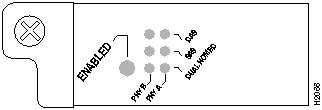
The FIP LEDs are shown in Figure B-8. The LEDs on the left indicate the state of PHY B, and those on the right indicate the state of PHY A. (The PHY B interface is also to the left of the PHY A interface on the face of the FIP.) As with the other interface processors, the enabled LED goes on when the FIP is enabled for operation.
The state of each B/A pair of LEDs indicates the status of one type of three possible station connections: dual attachment station (DAS), single attachment station (SAS), or dual homed. The states of the FIP LED combinations, and the meanings of each are described and illustrated in Table B-1.
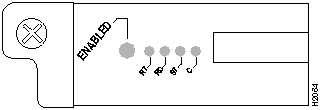
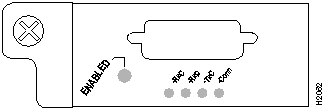
The FSIP LEDs are shown in Figure B-9. As with the other interface processors, the enabled LED goes on when the FSIP is enabled for operation. However, unlike the LED cluster on other interface processors, the LEDs for each serial port are adjacent to the connector. Table B-2 lists descriptions of each LED.
The Conn (connected) LED goes on when the interface is connected to the network. During normal operation, the three other LEDs go on to indicate data and timing signal traffic, or an idle pattern that is commonly sent across the line during idle time.
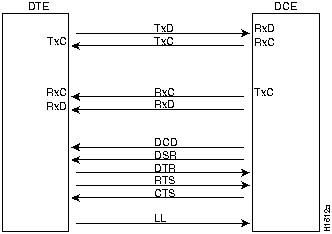
The labels on each LED indicate the signal state when the FSIP port is in DTE mode. However, the direction of the signals is reversed when the FSIP port is in DCE mode. For example, a DCE device usually generates a clock signal, which it sends to the DTE device. Therefore, when the Receive Clock (RxC) LED lights on a DTE interface, it indicates that the DTE is receiving the clock signal from the DCE device. However, when the RxC LED lights on a DCE interface, it indicates that the DCE is sending a clock signal (RxC) to the DTE device. Because of limited space on the FSIP faceplate, only DTE mode states are labeled on each port.
Figure B-10 shows the signal flow between a DTE and DCE device and the LEDs that correspond to signals for each mode. The following LED state descriptions include the meanings for both DTE and DCE interfaces.
Figure B-10 : DTE to DCE Signals
The default mode for all interface ports without a port adapter cable attached is DCE, although there is no default clock rate set on the interfaces. The DCE default allows you to perform local loopbacks without having to terminate the port or connect a cable. Because the serial adapter cables determine the mode and interface type, the FSIP port becomes a DTE when a DTE cable is connected to it. If a DTE cable is connected to a port with a clock rate set, the DTE will ignore the clockrate and use the external clock signal that is sent from the remote DCE.
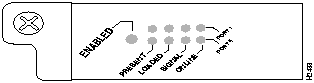
Four LEDs on the HIP indicate that state of the HSSI interface. (See Figure B-11.) As with the other interface processors, the enabled LED goes on when the HIP is enabled for operation.
The four LEDs above the HSSI port indicate the following:
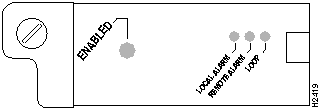
After system initialization, the enabled LED (shown in Figure B-12), which is present on all interface processors, turns on to indicate that the MIP is enabled for operation.
The following conditions must be met before the MIP is enabled:
If any of these conditions is not met, or if the initialization fails for other reasons, the enabled LED does not turn on.
The three LEDs associated with each MIP port indicate alarm or loop conditions on that port as follows:
Copyright 1988-1996 © Cisco Systems Inc.

Present
Loaded
Signal
Online
Port 1
On
On
Off
Off
Port 0
Off
Off
Off
Off
Present
Loaded
Signal
Online
Port 1
On
On
On
On
Port 0
On
On
Off
Off
Present
Loaded
Signal
Online
Port 1
On
On
On
On
Port 0
On
On
On
On
Present
Loaded
Signal
Online
Port 1
Off
Off
Off
Off
Port 0
Off
Off
Off
Off
Present
Loaded
Signal
Online
Port 1
On
On
On
On
Port 0
On
On
On
Off
Present
Loaded
Signal
Online
Port 1
Off
Off
Off
Off
Port 0
On
On
On
On
Present
Loaded
Signal
Online
Port 1
Off
Off
Off
Off
Port 0
Off
Off
Off
Off
LED Pattern1
State
Indication
B A
DAS
Note: Both lights off means not connected.
-- --
X X
X X
Both lights off
Not connected
O O
X X
X X
Both lights on
Through A
O --
X X
X X
B on and A off
Wrap B
-- O
X X
X X
B off and A on
Wrap A
B A
SAS
X X
-- --
X X
Both lights off
Not connected
X X
O --
X X
B on and A off
Single attachment B (PHY A shut down)
X X
-- O
X X
B off and A on
Single attachment A (PHY B shut down)
B A
Dual Homed
X X
X X
-- --
Both B and A off
Not connected
X X
X O
O O
Single attachment A on
plus both B and A on
Dual homed with A active; not a normal condition; indicates potential problem on B
X X
O X
O O
Single attachment B on
plus both B and A on plus
Dual homed with B active, which is a normal condition
X X
O X
O X
Single attachment B on
plus B on
Single attachment B, Dual homed A failed
X X
X O
X O
Single attachment A on
plus A on
Single attachment A, Dual homed B failed
1 For the LED patterns "" means off, "O" means on, and "X" means does not apply. Refer to FigureB-8
LED
DTE Signal
DCE Signal
RxC
Receive clock (from DTE)
(TxC) Transmit clock (to DTE)
RxD
Receive data (from DTE)
(TxD) Transmit data (from DTE)
TxC
Send timing (from DCE)
(RxC) Receive timing (to DTE)
Conn
Connected
Connected