


|
|

Installing or Replacing the DRAM SIMM
in Cisco 1600 Series Routers
Text Part Number: 78-3922-01
Cisco Product Numbers:
MEM1600-2D=
MEM1600-4D=
MEM1600-8D=
MEM1600-16D=
CPA016-MEM2D=
CPA016-MEM4D=
CPA016-MEM8D=
CPA016-MEM16D=
This document describes how to install or replace the dynamic random-access memory (DRAM) single in-line memory module (SIMM) in Cisco 1600 series routers. You might need to upgrade the DRAM SIMM for some Cisco Internetwork Operating System (Cisco IOS) feature sets or if the router is storing large routing or spoofing tables.
This document contains the following sections:
The following tools are required to upgrade the router's DRAM SIMM:
Table 1 lists the DRAM SIMMs available for Cisco 1600 series routers.
Table 1 : DRAM SIMMs for Cisco 1600 Series Routers
| Cisco Product Number | Amount of DRAM |
|---|---|
| MEM1600-2D=
CPA016-MEM2D= |
2 MB |
| MEM1600-4D=
CPA016-MEM4D= |
4 MB |
| MEM1600-8D=
CPA016-MEM8D= |
8 MB |
| MEM1600-16D=
CPA016-MEM16D= |
16 MB |
Preventing Electrostatic Discharge Damage
Before installing a DRAM SIMM, read the electrostatic discharge (ESD) instructions in this section to prevent damage to the equipment. ESD is a discharge of stored static electricity that can damage equipment and impair electrical circuitry. It occurs when electronic components are improperly handled and can result in complete or intermittent failures.
Following are guidelines for preventing ESD damage:

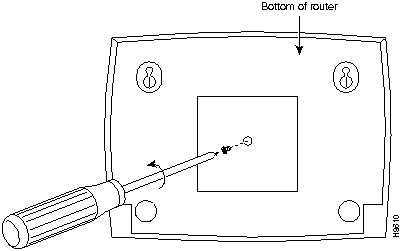
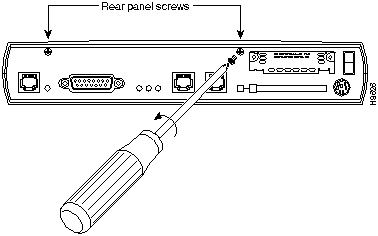
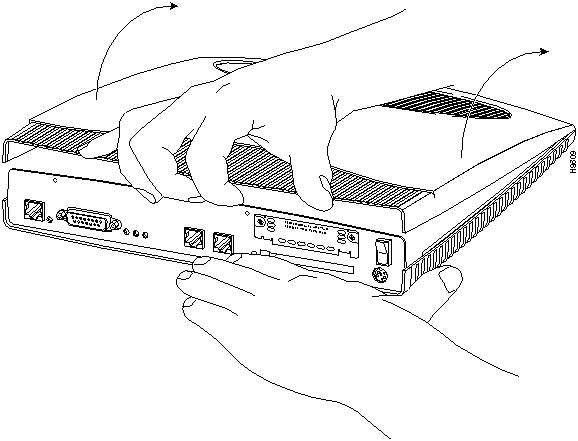
Take the following steps to remove the router cover:
Figure 1 : Removing the Screw from the Bottom of the Router
Figure 2 : Removing the Screws from the Rear Panel Figure 3 : Removing the Router Cover
Proceed with the next section, "Installing or Replacing the DRAM SIMM."
Installing or Replacing the DRAM SIMM
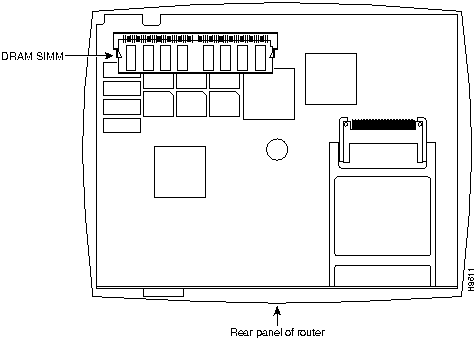
Take the following steps to install or replace the DRAM SIMM:
Figure 4 : DRAM SIMM Location---Cisco 1600 Series Routers
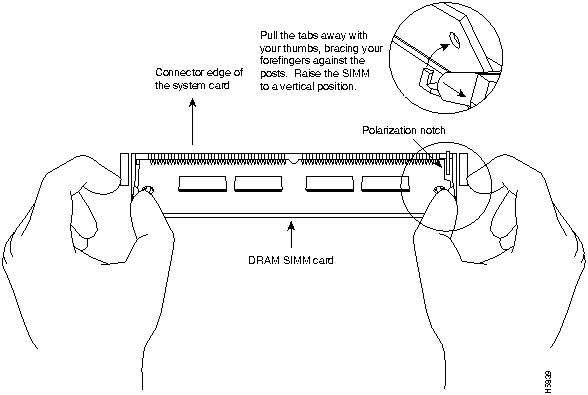
Figure 5 : Replacing the DRAM SIMM
Proceed with the next section "Replacing the Router Cover."
Take the following steps to replace the router cover:
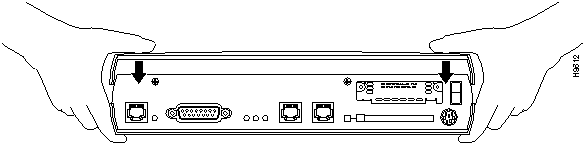
Figure 6 : Replacing the Cover
Proceed with the next section, "Checking the DRAM SIMM Installation."
Checking the DRAM SIMM Installation
After installing the DRAM SIMM, you should verify the installation by reading the messages the router displays when you power it on:
If the DRAM SIMM is installed correctly, a message similar to the following will be displayed:
Notice that the display shown in bold text indicates how much main memory is installed in the router. In this example, the router has 10 MB of main memory---the memory stored in the DRAM SIMM (8 MB) plus the memory stored in the fixed memory chips (2 MB).
If the DRAM SIMM in not installed correctly or is defective, the memory amount stored in the DRAM SIMM is not reflected in the message display. In the following display, an 8 MB DRAM SIMM has been installed incorrectly in the router:
Notice that the line listing the main memory (shown in bold) shows only the 2 MB of memory that is stored in the fixed memory chips.
If the DRAM SIMM memory is not reflected in the display, repeat the DRAM SIMM upgrade procedure to reinstall the DRAM SIMM. Make sure the DRAM SIMM is completely seated in the SIMM socket. If display still does not reflect the additional memory stored in the DRAM SIMM, the DRAM SIMM might be defective.
For service and support for a product purchased from a reseller, contact the reseller. Resellers offer a wide variety of Cisco service and support programs, which are described in the section "Service and Support" in the information packet that shipped with your chassis.
For service and support for a product purchased directly from Cisco, use CCO.
CCO is Cisco Systems' primary, real-time support channel. SMARTnet customers and partners can self-register on CCO to obtain additional content and services.
Available 24 hours a day, 7 days a week, CCO provides a wealth of standard and value-added services to Cisco's customers and business partners. CCO services include product information, software updates, release notes, technical tips, the Bug Navigator, configuration notes, brochures, descriptions of service offerings, and download access to public and authorized files.
CCO serves a wide variety of users through two interfaces that are updated and enhanced simultaneously---a character-based version and a multimedia version that resides on the World Wide Web (WWW). The character-based CCO supports Zmodem, Kermit, Xmodem, FTP, and Internet e-mail, and is excellent for quick access to information over lower bandwidths. The WWW version of CCO provides richly formatted documents with photographs, figures, graphics, and video, as well as hyperlinks to related information.
You can access CCO in the following ways:
For a copy of CCO's Frequently Asked Questions (FAQ), contact ccohelp@cisco.com. For additional information, contact ccoteam@cisco.com.
Please use CCO to obtain general information about Cisco Systems, Cisco products, or upgrades. If CCO is not accessible, contact 800 553-6387, 408 526-7208, or csrep@cisco.com.
Copyright 1988-1996 © Cisco Systems Inc.


Cisco Internetwork Operating System Software
IOS (tm) 1600 Software (C1600-Y-L), Version 11.1(16539)
Copyright (c) 1986-1996 by cisco Systems, Inc.
Compiled Tue 29-Oct-96 21:30 by xxxxx
Image text-base: 0x08019CB4, data-base: 0x02005000

cisco 1600 (68360) processor (revision C) with 9728K/512K bytes of memory.
Processor board ID 01335537
Bridging software.
X.25 software, Version 2.0, NET2, BFE and GOSIP compliant.
Basic Rate ISDN software, Version 1.0.
Cisco Internetwork Operating System Software
IOS (tm) 1600 Software (C1600-Y-L), Version 11.1(16539)
Copyright (c) 1986-1996 by cisco Systems, Inc.
Compiled Tue 29-Oct-96 21:30 by xxxxx
Image text-base: 0x08019CB4, data-base: 0x02005000

cisco 1600 (68360) processor (revision C) with 1536K/512K bytes of memory.
Processor board ID 01335537
Bridging software.
X.25 software, Version 2.0, NET2, BFE and GOSIP compliant.
Basic Rate ISDN software, Version 1.0.

