|
|

Installing the ISDN BRI S/T WAN Interface Card in a Cisco 1600 Series Router
Cisco Product Numbers: WIC-1B-S/T=, CPA-WIC-1ST=
Text Part Number: 78-3805-01
The Cisco Integrated Services Digital Network (ISDN) Basic Rate Interface (BRI) S/T WAN interface card can be installed in a Cisco 1601 or Cisco 1602 and provides one additional WAN port on the router. This configuration note describes the ISDN BRI S/T WAN interface card and how to install the card in the router.
This document contains the following sections:
Table 1 lists the ISDN BRI S/T WAN interface card's features.
Table 1 : ISDN BRI S/T WAN Interface Card Features
| Feature | Description |
|---|---|
| ISDN BRI port type | RJ-45 |
| Interfaces supported | ISDN BRI (two 64-kbps B channels, one 16-kbps D channel) |
| LED |
|
| NT11 | Requires external NT1 for connection to an ISDN BRI line in North America |
Figure 1 shows the front panel of the ISDN BRI S/T WAN interface card.
Figure 1 : ISDN BRI S/T WAN Interface Card---Front Panel
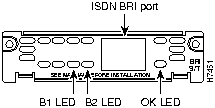
This section lists safety warnings that you should be aware of before installing a WAN interface card in the router.
Installing the WAN Interface Card in the Router
The procedure in the chapter is an example of how to install the ISDN S/T WAN interface card in a Cisco 1601 or Cisco 1602 router. In the example, the card is installed in a Cisco 1601 router; however, the same procedure is used to install the card in a Cisco 1602 router.
In addition to the WAN interface card and the router, you will need the following tools and parts to install an ISDN S/T WAN interface card in a Cisco 1601 or Cisco 1602 router and to connect the card to the ISDN network:
Installing the Card in the Router
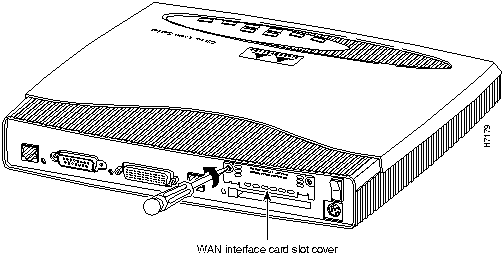
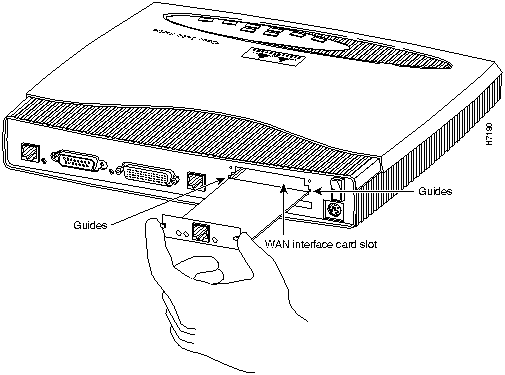
Take the following steps to install the card in the router:
Figure 2 : Removing the Slot Cover
Figure 3 : Installing the Card in the Router
Making WAN Interface Card Network Connections
After you install the WAN interface card in the router, you need to connect the card to the ISDN network. This section describes how to connect the ISDN cables.
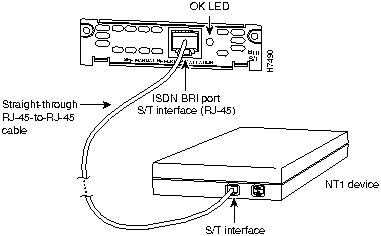
Take the following steps to connect the ISDN cables:
Figure 4 : ISDN BRI S/T WAN Interface Card to NT-1 Connection
Configuring WAN Interface Card Interfaces
After you connect the ISDN cable, you can configure the ISDN interface. Refer to the following documents for information on how to configure the card's ISDN interface:
Cisco documentation and additional literature are available in printed form and on the Cisco Connection Documentation CD-ROMs. You can also access product documentation on the World Wide Web at http://www.cisco.com.
For service and support for a product purchased from a reseller, contact the reseller. Resellers offer a wide variety of Cisco service and support programs, which are described in the section "Service and Support" in the information packet that shipped with your chassis.
For service and support for a product purchased directly from Cisco, use CCO.
CCO is Cisco Systems' primary, real-time support channel. SMARTnet customers and partners can self-register on CCO to obtain additional content and services.
Available 24 hours a day, 7 days a week, CCO provides a wealth of standard and value-added services to Cisco's customers and business partners. CCO services include product information, software updates, release notes, technical tips, the Bug Navigator, configuration notes, brochures, descriptions of service offerings, and download access to public and authorized files.
CCO serves a wide variety of users through two interfaces that are updated and enhanced simultaneously---a character-based version and a multimedia version that resides on the World Wide Web (WWW). The character-based CCO supports Zmodem, Kermit, Xmodem, FTP, and Internet e-mail, and is excellent for quick access to information over lower bandwidths. The WWW version of CCO provides richly formatted documents with photographs, figures, graphics, and video, as well as hyperlinks to related information.
You can access CCO in the following ways:
For a copy of CCO's Frequently Asked Questions (FAQ), contact ccohelp@cisco.com. For additional information, contact ccoteam@cisco.com.
Please use CCO to obtain general information about Cisco Systems, Cisco products, or upgrades. If CCO is not accessible, contact 800 553-6387, 408 526-7208, or csrep@cisco.com.
Copyright 1988-1996 © Cisco Systems Inc.