


|
|

Cisco 1003 and Cisco 1004 User Guide
This publication provides procedures for installing and configuring the Cisco 1003 and Cisco 1004 routers.
Throughout the text, "the router" means both the Cisco 1003 and Cisco 1004 routers, unless indicated otherwise.
The Cisco 1003 and Cisco 1004 routers provide Integrated Services Digital Network (ISDN) capability in a small, desktop router. The routers connect small, remote sites with Ethernet LANs to WANs.
The main difference between the two routers is that the Cisco 1004 router includes an integrated network termination 1 (NT1) device and the Cisco 1003 router does not. The ISDN service provider supplies the NT1 connection worldwide, except in North America, where the NT1 device is supplied by the customer. Therefore, the Cisco 1004 router is for use in North America, and the Cisco 1003 router is ideally suited for use elsewhere.
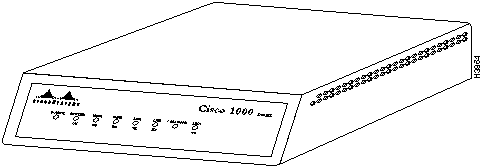
From the front, the outward appearance of the routers is the same.
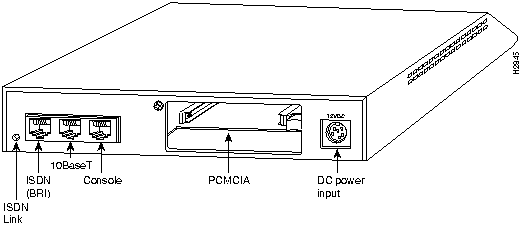
From the back, the routers are the same with the following exceptions:
Both routers include the following connectors:
Following are the specifications for the routers:
| Description | Specification |
|---|---|
| Dimensions (H x W x D) | 1.75 x 8.0 x 8.3" (4.4 x 20.3 x 21.1 cm) |
| Weight | 2.6 lb (1.2 kg) |
| Input voltage, frequency, and power dissipation | 12 VDC output, minimum 0.5 A Desktop external power supply: 100 to 240 VAC at 50 to 60 Hz, 1.0A input Wall-mount external power supply: 120 VAC at 60 Hz input |
| Memory | 4 MB DRAM (SIMM) 1 MB boot PROM 8 KB NVRAM(1) |
| WAN interface | 1 ISDN BRI (RJ-45)(2) |
| Ethernet interface | 1 10BaseT (RJ-45) |
| PCMCIA slot | 1 Flash memory card (Type 2) |
| Console interface | 1 asynchronous serial (RJ-45) |
| Operating environment | 32 to 104°F (0 to 40°C) |
| Operating humidity | 10 to 90%, noncondensing |
| EMI compliance | Cisco 1003 router: FCC Class B, VDE Class B, Canadian DOC Class B, EN55022 Class B (CISPR22 B), VCCI Class 2 Cisco 1004 router: FCC Class B, Canadian DOC Class B |
| Safety compliance | Cisco 1003 router: UL 1950, CSA 22.2 No. 950, EN60950:1992 Cisco 1004 router: UL 1950, CSA 22.2 No. 950 |
The Canadian Department of Communications label identifies certified equipment. This certification means that the equipment meets certain telecommunications network protective operational and safety requirements. The Department does not guarantee the equipment will operate to the user's satisfaction.
Before installing the equipment, users should ensure that it is permissible to be connected to the facilities of the local telecommunications company. The equipment must also be installed using an acceptable method of connection. In some cases, the company's inside wiring associated with a single line individual service may be extended by means of a certified connector assembly (telephone extension cord). The customer should be aware that compliance with the above conditions may not prevent degradation of service in some situations.
Repairs to certified equipment should be made by an authorized Canadian maintenance facility designated by the supplier. Any repairs or alterations made by the user to this equipment, or equipment malfunctions, may give the telecommunications company cause to request the user to disconnect the equipment.
Users should ensure for their own protection that the electrical ground connections of the power utility, telephone lines and internal metallic water pipe system, if present, are connected together. This precaution may be particularly important in rural areas.

It takes just a few simple steps to install your router. But before you install your router, please read the safety information in this section.

Because any device that uses electricity must be treated with respect, follow these guidelines to ensure general safety:

Keep the router in the shipping container to prevent accidental damage until you have determined where you want to install it; then proceed with unpacking it. Check the packing list to ensure that you received the following items:
Depending on the options you selected, your order might also include the following items:
Inspect all items for shipping damage. If anything appears to be damaged or missing, contact your system administrator or customer service representative.
Installing the router is quick and simple.
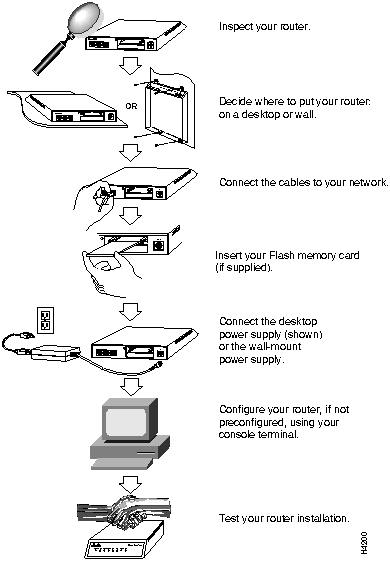
Following are the tools and parts required to install your router:
The ISDN service provider provides the NT1 connection worldwide, except in North America, where the NT1 device is supplied by the customer. The Cisco 1004 router contains an integrated NT1 device. If you have a Cisco 1003 router, a separate NT1 device is required.
The router can be placed on any flat surface or installed in any orientation, such as upside down or on a vertical surface. The router is designed to allow trouble-free operation without cooling fans, special equipment closets, or racks.
To avoid the possibility of the cables becoming disconnected, install your router in a manner that minimizes strain on the cables.

To place your router on a desktop, shelf, or other flat, secure surface, perform the following steps:
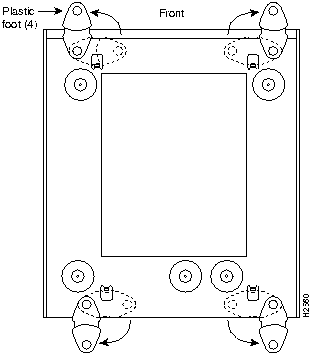
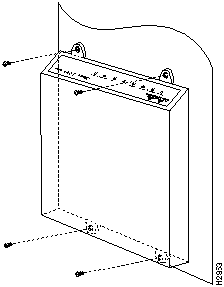
To mount your router on a wall or other flat surface, perform the following steps:

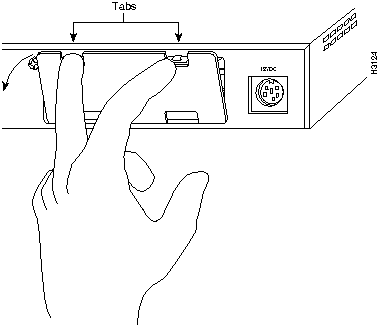
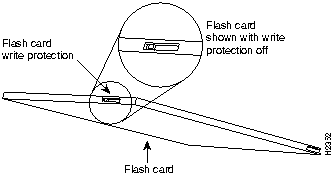
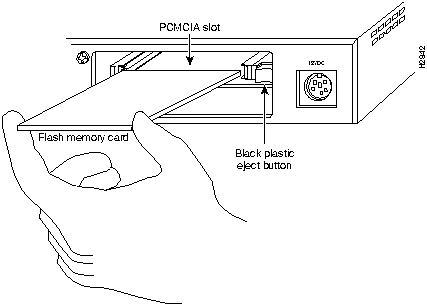
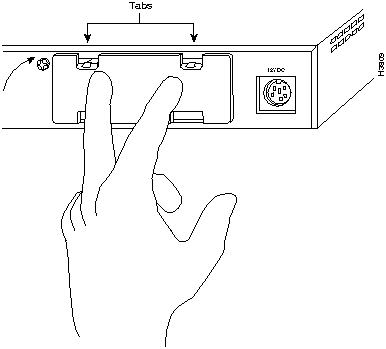
This section explains how to install an optional PCMCIA Flash memory card. If a Flash memory card did not come with your order, ignore this section and proceed with the next section, "Making Network Connections."
To install the optional Flash memory (PCMCIA) card, perform the following steps:
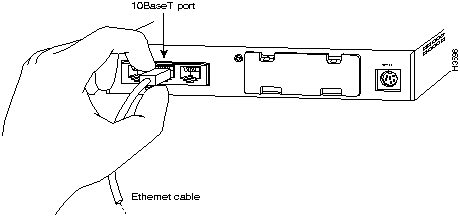
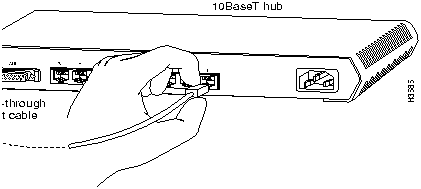
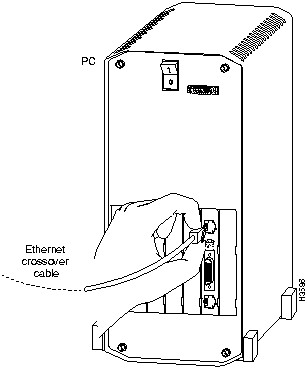
You must provide interface cables to connect the router to the Ethernet and WAN lines.

To connect the cables to the router, perform the following steps:
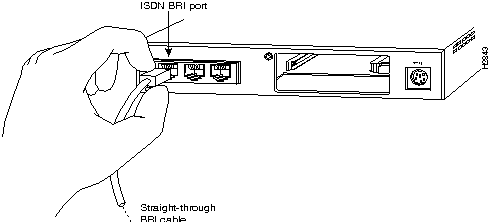

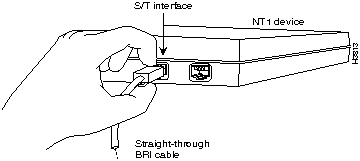

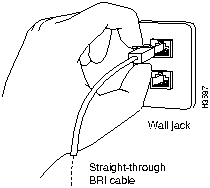
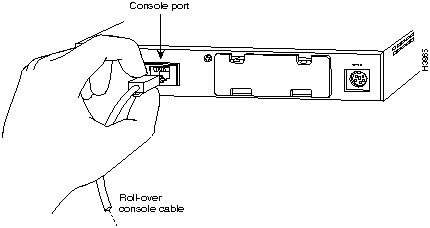
If your router is not already configured, use the console cable provided with your router to connect a console (an ASCII terminal or PC running terminal emulation software). To connect a console, follow these steps:
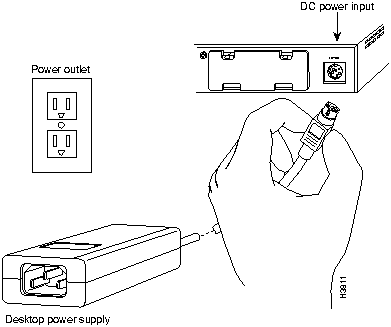
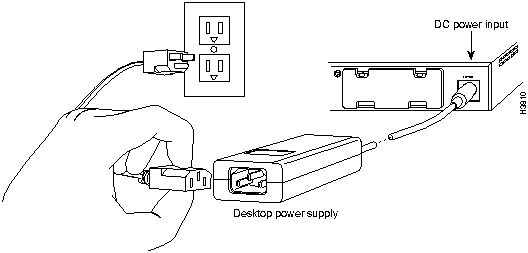
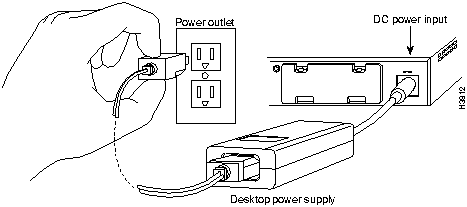
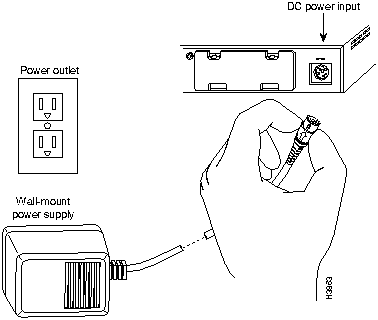
Your router ships with either a desktop or wall-mount power supply. This section explains how to connect both types of power supplies. The desktop power supply is approved for use with both routers, but the wall-mount power supply is approved for use with the Cisco 1004 router only.
To connect the desktop power supply, follow these steps:
To connect the wall-mount power supply, follow these steps:
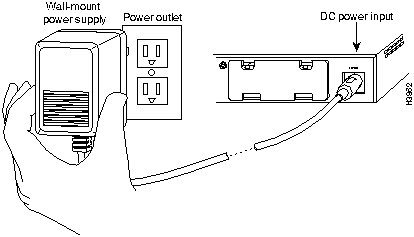
After you finish installing your router, attempt to send data and check the LEDs on the front panel to verify that everything is working properly.
To verify that your router is working properly, follow these steps:
If you do not see the correct LED signals, or if they blink once or twice per second instead of flicker (not including the SYSTEM OK LED, which may blink depending on the monitor or boot state), refer to the section "Troubleshooting the Cisco 1003 or Cisco 1004 Router" later in this publication for more information about the LEDs.
This section explains basic configuration for your router. This section contains the following procedures:
The router can obtain its configuration from the following: NVRAM, Flash memory, TFTP server, or manual configuration. The boot sequence is as follows:
If a configuration file is not available for your router, you must enter the interface addresses and global parameters using the setup program. Obtain the IP address and the number of bits in the subnet field of the Ethernet and BRI port from your system administrator before proceeding with the procedure described in this section.
The following procedure explains how to manually configure the router:
Copyright (c) 1994-1995 by cisco Systems, Inc.
C1000 processor with 4096 Kbytes of main memory
program load complete, entry point: 0xXXXXX, size: 0xXXXXX
Notice: NVRAM invalid, possibly due to write erase.
program load complete, entry point: 0xXXXXXXX, size: 0xXXX
Uncompressing file:
###################################################################
###################################################################
###################################################################
###################################################################
###################################################################
################
program load complete, entry point: 0xXXXXXXX, size: 0xXXXXXX
              Restricted Rights Legend
Use, duplication, or disclosure by the Government is
subject to restrictions as set forth in subparagraph

(c) of the Commercial Computer Software - Restricted
Rights clause at FAR sec. 52.227-19 and subparagraph
(c) (1) (ii) of the Rights in Technical Data and Computer
Software clause at DFARS sec. 252.227-7013.
           cisco Systems, Inc.
           170 West Tasman Drive
           San Jose, California 95134-1706
Cisco Internetwork Operating System Software
Cisco IOS (tm) 1000 Software (C1000-H-M), Version 10.3(15626) [enf
226]
Copyright (c) 1986-1995 by cisco Systems, Inc.
Compiled Mon 05-Jun-95 15:40 by enf
Image text-base: 0x02004000, data-base: 0x022568F8
cisco 1000 (68360) processor (revision 0x00) with 3584K/512K bytes
of memory.
Processor board serial number 01335805
Bridging software.
Basic Rate ISDN software, Version 1.0.
1 Ethernet/IEEE 802.3 interface.
1 ISDN Basic Rate interface.
Integrated NT1 for ISDN Basic Rate interface
8K bytes of non-volatile configuration memory.
2048K bytes of processor board PCMCIA flash (Read/Write)
Notice: NVRAM invalid, possibly due to write erase.
         --- System Configuration Dialog ---
At any point you may enter a question mark '?' for help.
Refer to the 'Getting Started' Guide for additional help.
Use ctrl-c to abort configuration dialog at any prompt.
Default settings are in square brackets '[]'.
Would you like to enter the initial configuration dialog? [yes]:yes
First, would you like to see the current interface summary? [yes]: yes
Any interface listed with OK? value "NO" does not have a valid
configuration

Interface     IP-Address      OK?  Method     Status        Protocol
Ethernet0     unassigned      NO   not set    up                     up
BRI0          unassigned      NO   not set    up                     up
Integrated NT1 for ISDN Basic Rate Interface
Configuring global parameters:
  Enter host name [Router]: router1
Enter enable secret: helen
  Enter enable password: ron
  Enter virtual terminal password: karen
  Configure SNMP Network Management? [yes]:
    Community string [public]:
  Configure IP? [yes]:
    Configure IGRP routing? [yes]:
      Your IGRP autonomous system number [1]:
  Configure AppleTalk? [no]:
  Configure IPX? [no]:
  Enter ISDN BRI Switch Type [none]: basic-NI1
| ISDN Switch Type | Description |
|---|---|
| none | Switch type not defined |
| Australia | |
| basic-ts013 | Australian TS013 switches |
| Europe | |
| basic-1tr6 | German 1TR6 ISDN switches |
| basic-nwnet3 | Norway NET3 ISDN switches (phase 1) |
| basic-net3 | NET3 ISDN switches (UK and others) |
| vn2 | French VN2 ISDN switches |
| vn3 | French VN3 ISDN switches |
| Japan | |
| ntt | Japanese NTT ISDN switches |
| North America | |
| basic-5ess | AT&T basic rate switches |
| basic-dms100 | NT DMS-100 basic rate switches |
| basic-ni1 | National ISDN-1 switches |
| New Zealand | |
| basic-nznet3 | New Zealand NET3 switches |
Configuring interface parameters:
Configuring interface Ethernet0:
 Is this interface in use? [yes]:
  IP address for this interface: 172.16.20.11
  Number of bits in subnet field [0]:
  Class B network is 172.16.0.0, 8 subnet bits; mask is 255.255.255.0
Configuring interface BRI0:
  Is this interface in use? [yes]:
  Configure IP on this interface? [yes]:
    IP address for this interface: 172.16.21.15
    Number of bits in subnet field [0]:
    Class B network is 172.16.0.0, 8subnet bits; mask is 255.255.255.0
The following configuration command script was created:
hostname router1
enable secret 5 $1$KL/H$AC/fCdkgU.WOBybZnUqPe/
enable password ron
line vty 0 4
password karen
snmp-server community public
!
ip routing
no appletalk routing
no ipx routing
isdn switch-type none
!
interface Ethernet0
ip address 172.16.20.11 255.255.255.0
!
interface BRI0
ip address 172.16.21.15 255.255.255.0
!
router igrp 1
network 172.16.0.0
!
end
Use this configuration? [yes/no]: yes
####

use the enabled mode `configure' command to modify this
configuration.
You have now completed the initial configuration.
After you have completed the initial router configuration, configure the BRI port for ISDN. This section explains typical ISDN configurations for a single B channel or two B channels. In the examples that follow, the BRI port is configured for IP routing, Challenge Handshake Authentication Protocol (CHAP), and point-to-point protocol (PPP) encapsulation.
Configure the router for a basic ISDN PPP connection on a single B channel or two B channels by following the steps below, substituting the correct addresses and host names in the appropriate locations:
router> enable
password: enablepassword
router# config term
router (config)# username targetrouter password abc
router (config)# isdn switch-type switch-type
router (config)# interface bri port_number
router (config-if)# encapsulation ppp
router (config-if)# ppp authentication chap
router (config-if)# dialer map ip targetrouter_ipaddress name
targetrouter phonenumber
router (config-if)# dialer-group groupnumber
router (config-if)# isdn spid1 SPID_no phone_no
router (config-if)# isdn spid2 SPID_no phone_no
router (config-if)# dialer load-threshold 128
router (config-if)# access-list access-list-number permit ip sourcerouter-ipnetwork
sourcerouter-subnetmask targetrouter-ipnetwork targetrouter-subnetmask
router (config)# dialer-list groupnumber list access-list-number
router (config)# ip route targetrouter_ipnetwork subnetmask
targetBRIport_ipaddress
You can enter multiple boot commands in the configuration in NVRAM to provide backup methods for loading a system image onto the router. There are two ways to load a system image---from Flash memory or from a network server:
Router> enable
password: enablepassword
Router# configure terminal
Router (config)# boot system flash filename
Router (config)# Ctrl-Z
Router# copy running-config startup-config
Router> enable
password: enablepassword
Router# configure terminal
Router (config)# boot system tftp filename ipaddress
Router (config)# Ctrl-Z
Router# copy running-config startup-config
If you enter multiple boot commands, the router executes them in the order they are entered. The router boots using the first boot command that succeeds.
For more information about the configure terminal command, refer to the Router Products Command Summary publication.
Use the show version command to check the software version and configuration register setting:
Router# show version
Cisco Internetwork Operating System Software
Cisco IOS (tm) 1000 Software (C1000-H-M), Version 10.3(5)
Copyright (c) 1986-1995 by cisco Systems, Inc.
Compiled Fri 28-Apr-95 10:45 by [enf]
Image text-base: 0x02004000, data-base: 0x0224E4A4
ROM: System Bootstrap, Version 5.3 (15664) [enf 107]
ROM: 1000 Bootstrap Software (C1000-RBOOT-R), Version 10.3 (15626) [enf
100]
Router uptime is 36 minutes
System restarted by reload
System image file is "flash:[enf]/c1000-h-m.103.Z", booted via flash
cisco 1000 (68360) processor (revision C) with 3584K/512K bytes of memory.
Processor board serial number 01234567

Bridging software.
Basic Rate ISDN software, Version 1.0.
1 Ethernet/IEEE 802.3 interface.
1 ISDN Basic Rate interface.
Integrated NT1 for ISDN Basic Rate Interface
8K bytes of non-volatile configuration memory.
2048K bytes of processor board PCMCIA flash (Read/Write)
Configuration register is 0x2102
Integrated NT1 for ISDN Basic Rate Interface
For more information on router software configuration, refer to the following publications in print or on Cisco Connection Documentation CD-ROM:
Configuration Builder Getting Started Guide
Router Products Getting Started Guide
Router Products Configuration Guide
Router Products Command Reference
Troubleshooting Internetworking Systems (as needed)
For a complete list of Cisco documentation, refer to the publication Ordering Cisco Documentation in your warranty package.
This section describes how to troubleshoot the router by using the LEDs on the front panel.

The following table describes the LEDs.
| LED | State | Description |
|---|---|---|
| Power | On steadily | 12 VDC is being supplied to the router and the internal DC-to-DC converter is operational. |
| Off | Power is not reaching the router. Verify that the power supply is plugged into the wall receptacle, and that the cable from the power supply to the router is connected. If the power supply is working properly, the router might be defective. | |
| System OK | On steadily | The router has passed the power-on diagnostic tests and is working properly. |
| Blinking once per second | The system LED blinks once per second when running startup diagnostics or decompressing the software image. If the system LED continues to blink after the startup sequence, the router is in ROM monitor mode. | |
| Blinking six times per second | The system LED blinks six times per second when loading the software image from Flash memory or a TFTP server. | |
| Off | An error condition has occurred. Disconnect the power cord; then reconnect it to re-establish power to your router. If the LED remains off, contact your system administrator. | |
| ISDN B1 | On steadily | The call on the BRI B channel 1 line is connected. |
| ISDN B2 | On steadily | The call on the BRI B channel 2 line is connected. |
| LAN TX and LAN RX | Flickering | The Ethernet LAN connection is transmitting and receiving data normally. |
| Collision (Ethernet) | On | Data collisions are being detected. Occasional collisions are normal. If they happen often, contact your system administrator. |
| Link OK (Ethernet) | On | The router senses the Ethernet link integrity signal, indicating normal operation. |
For more complete network troubleshooting information, refer to the Troubleshooting Internetworking Systems printed publication or Cisco Connection Documentation CD-ROM.
The following tables list the pinouts for the cables that can be used with the router. The pinouts apply to both the Cisco 1003 and Cisco 1004 routers, unless specified otherwise.
| 10BaseT Ethernet Port (RJ-45) Pinouts | |
|---|---|
| Pin(1) | Description |
| 1 | TX+ |
| 2 | TX-- |
| 3 | RX+ |
| 4 | -- |
| 5 | -- |
| 6 | RX-- |
| 7 | -- |
| 8 | -- |
| RJ-45-to-RJ-45 Straight-Through Ethernet Cable Pinouts | |||
|---|---|---|---|
| RJ-45Pin | Signal | Direction | RJ-45Pin |
| 1 | TX+ | --> | 1 |
| 2 | TX-- | --> | 2 |
| 3 | RX+ | <-- | 3 |
| 4 | -- | -- | 4 |
| 5 | -- | -- | 5 |
| 6 | RX-- | <-- | 6 |
| 7 | -- | -- | 7 |
| 8 | -- | -- | 8 |
| RJ-45-to-RJ-45 Crossover Ethernet Cable Pinouts | ||||
|---|---|---|---|---|
| RJ-45Pin | Signal | Direction | RJ-45Pin | Signal |
| 1 | TX+ | --> | 3 | RX+ |
| 2 | TX-- | --> | 6 | RX-- |
| 3 | RX+ | <-- | 1 | TX+ |
| 4 | -- | -- | 4 | -- |
| 5 | -- | -- | 5 | -- |
| 6 | RX-- | <-- | 2 | TX-- |
| 7 | -- | -- | 7 | -- |
| 8 | -- | -- | 8 | -- |
| BRI Port (RJ-45) Pinouts for the Cisco 1003 Router | |||
|---|---|---|---|
| 8 Pin(1) | TE(2) | NT(3) | Polarity |
| 3 | Transmit | Receive | + |
| 4 | Receive | Transmit | + |
| 5 | Receive | Transmit | -- |
| 6 | Transmit | Receive | -- |
| BRI Cable (RJ-45-to-RJ-45) Pinouts for the Cisco 1004 Router | ||
|---|---|---|
| NT(1)RJ-458 Pin(2) | Wire | LT(3)RJ-458 Pin |
| 4 | Tip | 4 |
| 5 | Ring | 5 |
| BRI Cable Specifications | ||
|---|---|---|
| Specification | High-Capacitance Cable | Low-Capacitance Cable |
| Resistance (@ 96 kHz(1)) | 160 ohms/km | 160 ohms/km |
| Capacitance (@ 1 kHz) | 120 nF(2)/km | 30 nF/km |
| Impedance (@ 96 kHz) | 75 ohms | 150 ohms |
| Wire diameter | 0.024" (0.6 mm) | 0.024" (0.6 mm) |
| Distance limitation | 32.8' (10 m) | 32.8' (10 m) |
The console port is configured as data terminal equipment (DTE) and uses an RJ-45 connector. An RJ-45-to-DB-25 adapter is provided with the router for connection to terminals or other external communications equipment, such as modems. The console port is an asynchronous serial port.
| Console Port Pinouts | ||
|---|---|---|
| Pin(1) | Signal | Definition |
| 1 | -- | -- |
| 2 | DTR | Output |
| 3 | TxD | Output |
| 4 | GND | -- |
| 5 | GND | -- |
| 6 | RxD | Input |
| 7 | DSR | Input |
| 8 | -- | -- |
| RJ-45-to-RJ-45 Rollover Cable Pinouts | |||
|---|---|---|---|
| RJ-45Pin | Signal | RJ-45Pin | Signal |
| 1 | -- | 8 | -- |
| 2 | DTR | 7 | DSR |
| 3 | TxD | 6 | RxD |
| 4 | GND | 5 | GND |
| 5 | GND | 4 | GND |
| 6 | RxD | 3 | TxD |
| 7 | DSR | 2 | DTR |
| 8 | -- | 1 | -- |
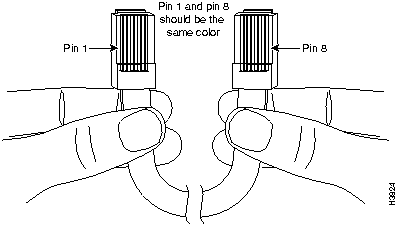
You can identify a rollover cable by comparing the two modular ends of the cable. Holding the cables in your hand, side-by-side, with the tab at the back, the wire connected to the pin on the outside of the left plug should be the same color as the pin on the outside of the right plug. On Cisco cables, pin 1 is white on one connector, and pin 8 is white on the other connector (a rollover cable reverses pins 1 and 8, 2 and 7, 3 and 6, and 4 and 5).
| RJ-45-to-DB-25 Adapter Pinouts(1) | |
|---|---|
| AdapterRJ-45 Pins | DTE M/F PinsDB-25 Pins(2) |
| 1 | 4 |
| 2 | 20 |
| 3 | 2 |
| 4 | 7 |
| 5 | 7 |
| 6 | 3 |
| 7 | 6 |
| 8 | 5 |
If you need additional assistance, refer to the service and support information that is included in the warranty package that shipped with your order.
This section repeats in multiple languages the warnings in this publication.
Warning This warning symbol means danger. You are in a situation that could cause bodily injury. Before you work on any equipment, be aware of the hazards involved with electrical circuitry and be familiar with standard practices for preventing accidents.

Waarschuwing Dit waarschuwingssymbool betekent gevaar. U verkeert in een situatie die lichamelijk letsel kan veroorzaken. Voordat u aan enige apparatuur gaat werken, dient u zich bewust te zijn van de bij elektrische schakelingen betrokken risico's en dient u op de hoogte te zijn van standaard maatregelen om ongelukken te voorkomen.
Varoitus Tämä varoitusmerkki merkitsee vaaraa. Olet tilanteessa, joka voi johtaa ruumiinvammaan. Ennen kuin työskentelet minkään laitteiston parissa, ota selvää sähkökytkentöihin liittyvistä vaaroista ja tavanomaisista onnettomuuksien ehkäisykeinoista.
Attention Ce symbole d'avertissement indique un danger. Vous vous trouvez dans une situation pouvant causer des blessures ou des dommages corporels. Avant de travailler sur un équipement, soyez conscient des dangers posés par les circuits électriques et familiarisez-vous avec les procédures couramment utilisées pour éviter les accidents.
Warnung Dieses Warnsymbol bedeutet Gefahr. Sie befinden sich in einer Situation, die zu einer Körperverletzung führen könnte. Bevor Sie mit der Arbeit an irgendeinem Gerät beginnen, seien Sie sich der mit elektrischen Stromkreisen verbundenen Gefahren und der Standardpraktiken zur Vermeidung von Unfällen bewußt.
Avvertenza Questo simbolo di avvertenza indica un pericolo. La situazione potrebbe causare infortuni alle persone. Prima di lavorare su qualsiasi apparecchiatura, occorre conoscere i pericoli relativi ai circuiti elettrici ed essere al corrente delle pratiche standard per la prevenzione di incidenti.
Advarsel Dette varselsymbolet betyr fare. Du befinner deg i en situasjon som kan føre til personskade. Før du utfører arbeid på utstyr, må du vare oppmerksom på de faremomentene som elektriske kretser innebærer, samt gjøre deg kjent med vanlig praksis når det gjelder å unngå ulykker.
Aviso Este símbolo de aviso indica perigo. Encontra-se numa situação que lhe poderá causar danos físicos. Antes de começar a trabalhar com qualquer equipamento, familiarize-se com os perigos relacionados com circuitos eléctricos, e com quaisquer práticas comuns que possam prevenir possíveis acidentes.
¡Advertencia! Este símbolo de aviso significa peligro. Existe riesgo para su integridad física. Antes de manipular cualquier equipo, considerar los riesgos que entraña la corriente eléctrica y familiarizarse con los procedimientos estándar de prevención de accidentes.
Varning! Denna varningssymbol signalerar fara. Du befinner dig i en situation som kan leda till personskada. Innan du utför arbete på någon utrustning måste du vara medveten om farorna med elkretsar och känna till vanligt förfarande för att förebygga skador.
Warning Before working on equipment that is connected to power lines, remove jewelry (including rings, necklaces, and watches). Metal objects will heat up when connected to power and ground and can cause serious burns or weld the metal object to the terminals.

Waarschuwing Alvorens aan apparatuur te werken die met elektrische leidingen is verbonden, sieraden (inclusief ringen, kettingen en horloges) verwijderen. Metalen voorwerpen worden warm wanneer ze met stroom en aarde zijn verbonden, en kunnen ernstige brandwonden veroorzaken of het metalen voorwerp aan de aansluitklemmen lassen.
Varoitus Ennen kuin työskentelet voimavirtajohtoihin kytkettyjen laitteiden parissa, ota pois kaikki korut (sormukset, kaulakorut ja kellot mukaan lukien). Metalliesineet kuumenevat, kun ne ovat yhteydessä sähkövirran ja maan kanssa, ja ne voivat aiheuttaa vakavia palovammoja tai hitsata metalliesineet kiinni liitäntänapoihin.
Attention Avant d'accéder à cet équipement connecté aux lignes électriques, ôter tout bijou (anneaux, colliers et montres compris). Lorsqu'ils sont branchés à l'alimentation et reliés à la terre, les objets métalliques chauffent, ce qui peut provoquer des blessures graves ou souder l'objet métallique aux bornes.
Warnung Vor der Arbeit an Geräten, die an das Netz angeschlossen sind, jeglichen Schmuck (einschließlich Ringe, Ketten und Uhren) abnehmen. Metallgegenstände erhitzen sich, wenn sie an das Netz und die Erde angeschlossen werden, und können schwere Verbrennungen verursachen oder an die Anschlußklemmen angeschweißt werden.
Avvertenza Prima di intervenire su apparecchiature collegate alle linee di alimentazione, togliersi qualsiasi monile (inclusi anelli, collane, braccialetti ed orologi). Gli oggetti metallici si riscaldano quando sono collegati tra punti di alimentazione e massa: possono causare ustioni gravi oppure il metallo può saldarsi ai terminali.
Advarsel Fjern alle smykker (inkludert ringer, halskjeder og klokker) før du skal arbeide på utstyr som er koblet til kraftledninger. Metallgjenstander som er koblet til kraftledninger og jord blir svært varme og kan forårsake alvorlige brannskader eller smelte fast til polene.
Aviso Antes de trabalhar em equipamento que esteja ligado a linhas de corrente, retire todas as jóias que estiver a usar (incluindo anéis, fios e relógios). Os objectos metálicos aquecerão em contacto com a corrente e em contacto com a ligação à terra, podendo causar queimaduras graves ou ficarem soldados aos terminais.
¡Advertencia! Antes de operar sobre equipos conectados a líneas de alimentación, quitarse las joyas (incluidos anillos, collares y relojes). Los objetos de metal se calientan cuando se conectan a la alimentación y a tierra, lo que puede ocasionar quemaduras graves o que los objetos metálicos queden soldados a los bornes.
Varning! Tag av alla smycken (inklusive ringar, halsband och armbandsur) innan du arbetar på utrustning som är kopplad till kraftledningar. Metallobjekt hettas upp när de kopplas ihop med ström och jord och kan förorsaka allvarliga brännskador; metallobjekt kan också sammansvetsas med kontakterna.
Warning Do not work on the system or connect or disconnect cables during periods of lightning activity.

Waarschuwing Tijdens onweer dat gepaard gaat met bliksem, dient u niet aan het systeem te werken of kabels aan te sluiten of te ontkoppelen.
Varoitus Älä työskentele järjestelmän parissa äläkä yhdistä tai irrota kaapeleita ukkosilmalla.
Attention Ne pas travailler sur le système ni brancher ou débrancher les câbles pendant un orage.
Warnung Arbeiten Sie nicht am System und schließen Sie keine Kabel an bzw. trennen Sie keine ab, wenn es gewittert.
Avvertenza Non lavorare sul sistema o collegare oppure scollegare i cavi durante un temporale con fulmini.
Advarsel Utfør aldri arbeid på systemet, eller koble kabler til eller fra systemet når det tordner eller lyner.
Aviso Não trabalhe no sistema ou ligue e desligue cabos durante períodos de mau tempo (trovoada).
¡Advertencia! No operar el sistema ni conectar o desconectar cables durante el transcurso de descargas eléctricas en la atmósfera.
Varning! Vid åska skall du aldrig utföra arbete på systemet eller ansluta eller koppla loss kablar.
Warning The ISDN connection is regarded as a source of voltage that should be inaccessible to user contact. Users should not attempt to tamper with or open any public telephone operator (PTO)--provided equipment or connection hardware. Any hardwired connection (other than by nonremovable, connect-one-time-only lug) must be made only by PTO staff or suitably trained engineers.

Waarschuwing De verbinding met ISDN (Integrated Services Digital Network = Digitaal netwerk met geïntegreerde faciliteiten) wordt beschouwd als een spanningsbron die ontoegankelijk dient te zijn voor gebruikers. Gebruikers dienen geen poging te doen om door de openbare telefoondienst (PTT) verstrekte apparatuur of aansluitingshardware te openen of ermee te knoeien. Alle vastbedrade verbindingen (behalve die verbindingen die gemaakt zijn door niet-verwijderbare, slechts eenmaal te verbinden aansluitpunten) dienen slechts door PTT-personeel of door daartoe opgeleide ingenieurs gemaakt te worden.
Varoitus ISDN-liitäntää pidetään jännitelähteenä, jonka kanssa käyttäjän ei tulisi päästä kosketuksiin. Käyttäjien ei tulisi yrittää peukaloida tai avata laitteita tai liittimiä, jotka kuuluvat yleiselle puhelinlaitokselle (PTO). Ainoastaan yleisen puhelinlaitoksen henkilökunnan tai ammattitaitoisten teknikoiden tulee tehdä kaapeliliitännät (lukuun ottamatta kiinteitä kiinnityskorvia, jotka yhdistetään ainoastaan yhden kerran).
Attention La connexion du réseau numérique intégré (Integrated Services Digital Network ou ISDN) constitue une source de tension qui ne doit pas être accessible à l'utilisateur. Les utilisateurs ne doivent jamais tenter de modifier ni même d'ouvrir un matériel fourni par une compagnie de téléphone public, ou le matériel de connexion. Toute connexion câblée (autre que celles établies par cosse non démontable àconnexion unique) ne doit être effectuée que par le personnel de la compagnie du téléphone ou par des techniciens proprement formés.
Warnung Die ISDN-Verbindung (Integrated Services Digital Network = diensteintegrierendes Digitalnetz) gilt als eine Spannungsquelle, die dem Anwender unzugänglich sein sollte. Anwender sollten nicht versuchen, sich an der von den Anbietern öffentlicher TK-Dienste gelieferten Ausstattung oder Verbindungs-Hardware zu schaffen zu machen oder sie zu öffnen. Alle festverdrahteten Verbindungen (mit Ausnahme der mit nicht entfernbaren, einmal anzuschließenden Kabelschuhen hergestellten) sind von Mitarbeitern des TK-Anbieters oder von entsprechend ausgebildeten Technikern herzustellen.
Avvertenza Il collegamento ISDN (Integrated Services Digital Network -Rete digitale a servizi integrati) viene considerato come una fonte di tensione che dovrebbe essere inaccessibile al contatto dell'utente. Gli utenti non devono manomettere o provare ad aprire le apparecchiature o i componenti di collegamento forniti dalla società telefonica. Qualsiasi collegamento cablato (ad eccezione di un conettore non rimovibile, da installare una sola volta) deve essere eseguito esclusivamente da un dipendente della società telefonica o da tecnici specializzati.
Advarsel ISDN-koblingen betraktes som en spenningskilde som bør være utilgjengelig for brukeren. Brukere bør ikke klusse med eller åpne utstyr eller tilkoblingsmateriale som er utstyrt av Telenor. Eventuelle faste installasjoner (bortsett fra koblinger som er foretatt med kabelsko for engangsbruk og som ikke kan fjernes) må kun utføres av Telenor-montører.
Aviso A conexão RDIS (Rede Digital com Integração de Serviços) é interpretada como uma fonte de tensão que deverá ser inacessível ao utilizador. Os utilizadores não deverão tentar violar qualquer equipamento ou conexão de serviço telefónico público. Qualquer conexão de rede de fios (para além da estabelecida por terminais não-removíveis de ligação única), deverá apenas ser efectuada por pessoal dos serviços telefónicos ou engenheiros devidamente treinados.
¡Advertencia! La conexión al circuito RDSI (Red Digital de Servicios Integrados) se considera como una fuente de voltaje con la cual el usuario no debe entrar en contacto. Los usuarios deberán evitar manipular indebidamente, o abrir, los equipos o hardware de conexión proporcionados por cualquier compañía operadora de la red pública de telefonía. Las conexiones de cable rígido que sean necesarias (excepto las de lengüeta no desmontable de un solo uso) deberán ser realizadas exclusivamente por personal de la entidad operadora de la red pública de telefonía, o por personal técnico adecuadamente capacitado.
Varning! ISDN-anslutningen betraktas som en spänningskälla och bör inte vara åtkomlig för användaren (ISDN: Integrated Services Digital Network = digitalt flertjänstnät). Användare får inte manipulera eller söka öppna utrustning eller anslutningsdon som tillhandahållits av telefonbolag (PTO-produkter). Anslutning av ledningar (med undantag av icke löstagbara kabelskor för engångsanslutning) får endast utföras av PTO-anställda eller lämpligt utbildade tekniker.
Warning Network hazardous voltages are present in the BRI cable. If you detach the BRI cable, detach the end away from the router first to avoid possible electric shock. Network hazardous voltages also are present on the system card in the area of the BRI port (RJ-45 connector), regardless of when power is turned off.

Waarschuwing Gevaarlijke netwerkspanning is aanwezig in de BRI-kabel. Als u de BRI-kabel losmaakt, maak dan eerst het einde dat bij de routeereenheid vandaan is, los om een mogelijke elektrische schok te voorkomen. Gevaarlijke netwerkspanning is ook aanwezig op de systeemkaart in de buurt van de BRI-poort (RJ-454 connector), zelfs als de stroom uit staat.
Varoitus BRI-kaapelissa on vaarallinen verkkojännite. Jos irrotat BRI-kaapelin, irrota ensiksi reittiohjaimesta kauempana oleva pää mahdollisen sähköiskun välttämiseksi. Vaarallisia verkkojännitteitä esiintyy myös järjestelmäkortissa BRI-portin (RJ-45 -liitin) alueella, vaikka virta olisi katkaistu.
Attention Le réseau comporte des tensions dangereuses au câble BRI. Pour déconnecter ce câble, débrancher d'abord l'extrémité éloignée du routeur pour éviter tout risque d'électrocution. Des tensions dangereuses existent également sur la carte système dans la zone du port BRI (connecteur RJ-45), même si le réseau est hors tension.
Warnung Das BRI-Kabel führt gefährliche Netzspannungen. Um einen elektrischen Schlag beim Entfernen des BRI-Kabels zu vermeiden, zuerst das vom Router am weitesten entfernt befindliche Kabelende entfernen. Der Bereich des BRI-Anschlusses (RJ-45-Anschluß) auf der Systemkarte steht ebenfalls unter gefährlicher Netzspannung, unabhängig davon, wann der Strom ausgeschaltet wird.
Avvertenza Nel cavo BRI sono presenti tensioni di rete pericolose. Se si deve scollegare il cavo BRI, scollegarne innanzitutto il terminale dal router per evitare scosse elettriche. Tensioni di rete pericolose sono anche presenti sulla scheda di sistema nell'area della porta BRI (connettore RJ-45), indipendentemente dal momento di scollegamento dell'alimentazione.
Advarsel Det er livsfarlig nettverksspenning i BRI-kabelen. Hvis du løsner BRI-kabelen, må du først løsne den enden som er lengst borte fra fordelingsenheten for å unngå elektrisk støt. Det er også livsfarlig spenning på systemkortet i området rundt BRI-utgangen (RJ-45-kontakten), uavhengig av når strømmen slås av.
Aviso Existem tensões de rede perigosas no cabo BRI (Interface de Ritmo Básico). Se desligar o cabo BRI, desligue primeiro a extremidade do distribuidor para evitar possíveis choques eléctricos. Existem também tensões de rede perigosas na placa do sistema, nomeadamente, na área da porta BRI (conector RJ-45), independentemente do facto da corrente estar ou não ligada.
¡Advertencia! Hay tensiones de red peligrosas en el cable BRI. Si desconecta el cable BRI, desconecte primero el extremo que va al "router" para evitar la posible sacudida eléctrica. Estas peligrosas tensiones de red se encuentran presentes también en la tarjeta del sistema en el área del puerto BRI (conector RJ-45), sin importar cuándo se desconecte la alimentación.
Varning! BRI-kabeln är under farlig nätspänning. Om du kopplar ifrån BRI-kabeln, koppla först ifrån änden som är längst bort från routern för att undvika eventuell elektrisk stöt. Farlig nätspänning finns också på systemkortet intill BRI-porten (kontaktdon RJ-45) oavsett när strömmen slogs av.
Warning Before opening the chassis, disconnect the telephone-network cables to avoid contact with telephone-network voltages.

Waarschuwing Voordat u het frame opent, dient u de verbinding met het telefoonnetwerk te verbreken door de kabels te ontkoppelen om zo contact met telefoonnetwerk-spanningen te vermijden.
Varoitus Vältä joutumista kosketuksiin puhelinverkostojännitteiden kanssa irrottamalla puhelinverkoston kaapelit ennen asennuspohjan aukaisemista.
Attention Avant d'ouvrir le châssis, débrancher les câbles du réseau téléphonique afin d'éviter tout contact avec les tensions d'alimentation du réseau téléphonique.
Warnung Bevor Sie das Chassis öffnen, ziehen Sie die Telefonnetzkabel aus der Verbindung, um Kontakt mit Telefonnetzspannungen zu vermeiden.
Avvertenza Prima di aprire il telaio, scollegare i cavi della rete telefonica per evitare di entrare in contatto con la tensione di rete.
Advarsel Før kabinettet åpnes, skal kablene for telenettet kobles fra for å unngå å komme i kontakt med spenningen i telenettet.
Aviso Antes de abrir o chassis, desligue os cabos da rede telefónica para evitar contacto com a tensão da respectiva rede.
¡Advertencia! Antes de abrir el chasis, desconectar el cableado dirigido a la red telefónica para evitar contacto con voltajes de la propia red.
Varning! Koppla loss ledningarna till telefonnätet innan du öppnar chassit så att kontakten med telefonnätsspänningen bryts.
Warning The device is designed to work with TN power systems.

Waarschuwing Het apparaat is ontworpen om te functioneren met TN energiesystemen.
Varoitus Koje on suunniteltu toimimaan TN-sähkövoimajärjestelmien yhteydessä.
Attention Ce dispositif a été conçu pour fonctionner avec des systèmes d'alimentation TN.
Warnung Das Gerät ist für die Verwendung mit TN-Stromsystemen ausgelegt.
Avvertenza Il dispositivo è stato progettato per l'uso con sistemi di alimentazione TN.
Advarsel Utstyret er utfomet til bruk med TN-strømsystemer.
Aviso O dispositivo foi criado para operar com sistemas de corrente TN.
¡Advertencia! El equipo está diseñado para trabajar con sistemas de alimentación tipo TN.
Varning! Enheten är konstruerad för användning tillsammans med elkraftssystem av TN-typ.
Warning Before you work on a system that does not have an on/off switch, unplug the power cord.

Waarschuwing Voordat u aan een systeem werkt dat geen aan/uit schakelaar heeft, dient u de stekker van het netsnoer uit het stopcontact te halen.
Varoitus Ennen kuin teet mitään sellaiselle järjestelmälle, jossa ei ole kaksiasentokytkintä, kytke irti virtajohto.
Attention Avant de travailler sur un système non équipé d'un commutateur marche-arrêt, débrancher le cordon d'alimentation.
Warnung Bevor Sie an einem System ohne Ein/Aus-Schalter arbeiten, ziehen Sie das Netzkabel heraus.
Avvertenza Prima di lavorare su un sistema che non è dotato di un interruttore on/off, scollegare il cavo di alimentazione.
Advarsel Før det skal utføres arbeid på et system som ikke har en av/på-bryter, skal strømledningen trekkes ut.
Aviso Antes de começar a trabalhar num sistema que não possua um interruptor ON/OFF, desligue o cabo de alimentação.
¡Advertencia! Antes de trabajar sobre cualquier sistema que carezca de interruptor de Encendido/Apagado (ON/OFF), desenchufar el cable de alimentación.
Varning! Dra ur nätsladden innan du utför arbete på ett system utan strömbrytare.
Warning This product relies on the building's installation for short-circuit (overcurrent) protection. Ensure that a fuse or circuit breaker no larger than 120 VAC, 30A U.S. (240 VAC, 20A international) is used on the phase conductors (all current-carrying conductors).

Waarschuwing Dit produkt is afhankelijk van de installatie van het gebouw voor kortsluit- (overstroom)beveiliging. Controleer of er een zekering of stroomverbreker van niet meer dan 120 Volt wisselstroom, 30 A voor de V.S. (240 Volt wisselstroom, 20 A internationaal) gebruikt wordt op de fasegeleiders (alle geleiders die stroom voeren).
Varoitus Tämä tuote on riippuvainen rakennukseen asennetusta oikosulkusuojauksesta (ylivirtasuojauksesta). Varmista, että vaihevirtajohtimissa (kaikissa virroitetuissa johtimissa) käytetään Yhdysvalloissa alle 120 voltin, 30 ampeerin ja monissa muissa maissa 240 voltin, 20 ampeerin sulaketta tai suojakytkintä.
Attention Pour ce qui est de la protection contre les courts-circuits (surtension), ce produit dépend de l'installation électrique du local. Vérifier qu'un fusible ou qu'un disjoncteur de 120 V alt., 30 A U.S. maximum (240 V alt., 20 A international) est utilisé sur les conducteurs de phase (conducteurs de charge).
Warnung Dieses Produkt ist darauf angewiesen, daß im Gebäude ein Kurzschluß- bzw. Überstromschutz installiert ist. Stellen Sie sicher, daß eine Sicherung oder ein Unterbrecher von nicht mehr als 240 V Wechselstrom, 20 A (bzw. in den USA 120 V Wechselstrom, 30 A) an den Phasenleitern (allen stromführenden Leitern) verwendet wird.
Avvertenza Questo prodotto dipende dall'installazione dell'edificio per quanto riguarda la protezione contro cortocircuiti (sovracorrente). Verificare che un fusibile o interruttore automatico, non superiore a 120 VCA, 30 A U.S. (240 VCA, 20 A internazionale) sia stato usato nei fili di fase (tutti i conduttori portatori di corrente).
Advarsel Dette produktet er avhengig av bygningens installasjoner av kortslutningsbeskyttelse (overstrøm). Kontroller at det brukes en sikring eller strømbryter som ikke er større enn 120 VAC, 30 A (USA) (240 VAC, 20 A internasjonalt) på faselederne (alle strømførende ledere).
Aviso Este produto depende das instalações existentes de protecção contra curto-circuito (sobrecarga). Assegure-se de que um fusível ou disjuntor não superior a 240 VAC, 20A é utilizado nos condutores de fase (todos os condutores de transporte de corrente).
¡Advertencia! Este equipo utiliza el sistema de protección contra cortocircuitos (o sobrecorrientes) del propio edificio. Asegurarse de que se utiliza un fusible o interruptor automático de no más de 240 voltios en corriente alterna (VAC), 20 amperios del estándar internacional (120 VAC, 30 amperios del estándar USA) en los hilos de fase (todos aquéllos portadores de corriente).
Varning! Denna produkt är beroende av i byggnaden installerat kortslutningsskydd (överströmsskydd). Kontrollera att säkring eller överspänningsskydd används på fasledarna (samtliga strömförande ledare) för internationellt bruk max. 240 V växelström, 20 A (i USA max. 120 V växelström, 30 A).
Warning The ports labeled "10BaseT", "Console", and "PCMCIA" are safety extra-low voltage (SELV) circuits. SELV circuits should only be connected to other SELV circuits. Because the BRI circuits are treated like telephone-network voltage, avoid connecting the SELV circuit to the telephone network voltage (TNV) circuits.

Waarschuwing De poorten die "10BaseT", "Console" en "PCMCIA" zijn gelabeld, zijn veiligheidscircuits met extra lage spanning (genaamd SELV = Safety Extra-Low Voltage). SELV-circuits mogen alleen met andere SELV-circuits verbonden worden. Omdat de BRI-circuits op dezelfde manier als telefoonnetwerkspanning behandeld worden, mag het SELV-circuit niet met de telefoonnetwerkspanning (TNV) circuits verbonden worden.
Varoitus Portit, joissa on nimet "10BaseT", "Console" ja "PCMCIA", ovat erityisen pienen jännitteen omaavia turvallisuuspiirejä (SELV-piirejä). Tällaiset SELV-piirit tulee yhdistää ainoastaan muihin SELV-piireihin. Koska perusluokan liitäntöjen (Basic Rate Interface- eli BRI-liitännät) jännite vastaa puhelinverkoston jännitettä, vältä SELV-piirin yhdistämistä puhelinverkoston jännitepiireihin (TNV-piireihin).
Attention Les ports étiquetés « 10BaseT », « Console » et « PCMIA » sont des circuits de sécurité basse tension (Safety Extra-Low Voltage ou SELV). Comme les circuits BRI sont considérés comme des sources de tension de réseau téléphonique, éviter de connecter un circuit SELV à un circuit de tension de réseau téléphonique (telephone network voltage ou TNV).
Warnung Die mit "10BaseT", "Console" und "PCMCIA" beschrifteten Buchsen sind Sicherheitskreise mit Sicherheitskleinspannung (Safety Extra-Low Voltage = SELV). SELV-Kreise sollten ausschließlich an andere SELV-Kreise angeschlossen werden. Da BRI-Kreise wie Telefonnetzspannungen behandelt werden, ist der SELV-Kreis nicht an Telefonnetzspannungskreise (TNV) anzuschließen.
Avvertenza Le porte contrassegnate da "10BaseT", "Console" e "PCMCIA" sono circuiti di sicurezza con tensione molto bassa (SELV). I circuiti SELV devono essere collegati solo ad altri circuiti SELV. Dato che i circuiti BRI vengono trattati come circuiti a tensione di rete telefonica, evitare di collegare il circuito SELV ai circuiti in cui è presente la tensione di rete telefonica (TNV).
Advarsel Utgangene merket "10BaseT", "Console" og "PCMCIA" er lavspentkretser (SELV) for ekstra sikkerhet. SELV-kretser skal kun kobles til andre SELV-kretser. Da BRI-kretsene håndteres som telenettspenning, bør du unngå å koble SELV-kretsen til kretser for telenettspenning (TNV).
Aviso As portas com as etiquetas "10BaseT", "Console" e "PCMCIA", são circuitos de segurança de baixa tensão (SELV). Estes circuitos deverão ser ligados apenas a outros circuitos SELV. Devido ao facto dos circuitos BRI (Interface de Ritmo Básico) serem tratados como sendo de tensão equivalente à da rede telefónica, evite ligar o circuito SELV aos circuitos TNV (tensão de rede telefónica).
¡Advertencia! Los puertos "10BaseT", "Console" y "PCMCIA" son circuitos de muy baja señal que garantizan ausencia de peligro (Safety Extra-Low Voltage = SELV). Estos circuitos SELV deben ser conectados exclusivamente con otros también de tipo SELV. Puesto que los circuitos tipo BRI se comportan como aquéllos con voltajes de red telefónica, debe evitarse conectar circuitos SELV con circuitos de voltaje de red telefónica (TNV).
Varning! De portar som är märkta "10BaseT", "Console" och "PCMCIA" är SELV-kretsar, d.v.s. skyddskretsar med extra låg spänning (SELV: Safety Extra-Low Voltage = skyddsklenspänning). SELV-kretsar får endast anslutas till andra SELV-kretsar. Eftersom BRI-kretsar behandlas liksom telefonnätsspänning bör SELV-kretsen inte anslutas till telefonnätsspänningskretsar (TNV-kretsar).
This statement applies only to Norway and Sweden. This statement is listed in the following order:
Advarsel Apparatet skal kobles til en jordet stikkontakt.
Varning! Apparaten skall anslutas till jordat nätuttag.
Warning Ultimate disposal of this product should be handled according to all national laws and regulations.

Waarschuwing Dit produkt dient volgens alle landelijke wetten en voorschriften te worden afgedankt.
Varoitus Tämän tuotteen lopullisesta hävittämisestä tulee huolehtia kaikkia valtakunnallisia lakeja ja säännöksiä noudattaen.
Attention La mise au rebut définitive de ce produit doit être effectuée conformément à toutes les lois et réglementations en vigueur.
Warnung Dieses Produkt muß den geltenden Gesetzen und Vorschriften entsprechend entsorgt werden.
Avvertenza L'eliminazione finale di questo prodotto deve essere eseguita osservando le normative italiane vigenti in materia.
Advarsel Endelig disponering av dette produktet må skje i henhold til nasjonale lover og forskrifter.
Aviso A descartagem final deste produto deverá ser efectuada de acordo com os regulamentos e a legislação nacional.
¡Advertencia! El desecho final de este producto debe realizarse según todas las leyes y regulaciones nacionales.
Varning! Slutlig kassering av denna produkt bör skötas i enlighet med landets alla lagar och föreskrifter.

|
Copyright 1988-1996 © Cisco Systems Inc.