


|
|

Cisco 200/CiscoPro CPA200 Public Network Certification
This publication provides international regulatory and safety compliance information for the Cisco 200/CiscoPro CPA200. Use this publication with the Cisco 200 ISDN Adapter Hardware Installation and Configuration Guide and the CiscoPro CPA200 ISDN Adapter Hardware Installation and Configuration Guide.
Safety Information for the Cisco 200/CiscoPro CPA200
The following statements are general warnings or safety guidelines that apply to all countries. A warning means danger. You are in a situation that could cause bodily injury. Before working on equipment, be aware of the hazards involved with electrical circuitry and standard safety practices to prevent accidents.
Operating Conditions for Canada
All warnings and safety guidelines listed in "Safety Information for the Cisco 200/CiscoPro CPA200" apply to Cisco 200/CiscoPro CPA200 models used in Canada. In addition, the following warnings apply only to Cisco 200/CiscoPro CPA200 products used in Canada:

Operating Conditions for the United Kingdom
In addition to the warnings and safety guidelines listed in "Safety Information for the Cisco 200/CiscoPro CPA200," the following warnings apply to Cisco 200/CiscoPro CPA200 models used in the United Kingdom:
Maintaining Safe Installation Distances
In order to maintain the independent approval of this card, it is essential that, when other option cards are installed that use or generate a hazardous voltage, the minimum creepage and clearance specified in Table 1, Creepage and Clearance Distances Based on Voltage, are maintained. A hazardous voltage is one that exceeds 42.4 volts peak AC or 60 volts DC. If you have any doubt, seek advice from a competent engineer before installing other adapter cards in the PC.
The equipment must be installed such that, with the exception of the connections to the PC, creepage and clearance distances shown in Table 1, Creepage and Clearance Distances Based on Voltage, are maintained between the card and any other assemblies that use or generate a voltage shown in Table 1, Creepage and Clearance Distances Based on Voltage. The larger distance shown in parentheses applies where the local environment within the PC is subject to conductive pollution or dry non-conductive pollution that could become conductive due to condensation. Failure to maintain these minimum distances would invalidate the approval.
Except at the edge connector that plugs into the PC expansion slot, creepage and clearance distances of X millimeters (mm) and Y mm as listed in Table 1 must be maintained between the cards and other parts of the PC including any other expansion cards fitted.
Note that in Table 1 the following definitions apply:
Table 1 : Creepage and Clearance Distances Based on Voltage
| Voltage Used or Generated by Other Parts of the PC or Expansion Card (Vrms1 or VDC2) | Creepage (Y mm)3 | Clearance (X mm) |
|---|---|---|
| Up to 50 | 2.4 (3.8) | 2.0 |
| Up to 125 | 3.0 (4.8) | 2.6 |
| Up to 250 | 5.0 (8.0) | 4.0 |
| Up to 3004 | 6.4 (10.0) | 4.0 |
Creepage and clearance distances are measured between adjacent parts as shown in Figure 1.
Figure 1 : Creepage and Clearance Distances between BRI Module and Components
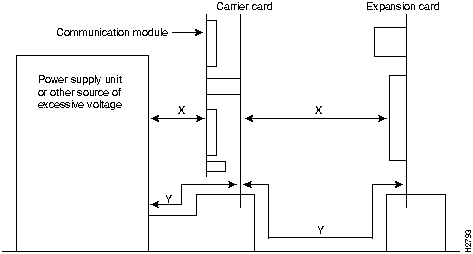
Note that in Figure 1, X indicates the clearance distances between cards and between adjacent cards and components, and Y shows the creepage path across the surface of an insulator and between the two points indicated by X.
The CE-0167-X mark signifies that the equipment complies with the following European Directives: 91/263/EEC (public telecommunications network compatibility), 89/336/EEC (electromagnetic compatibility), 73/23/EEC (low voltage), and 92/59/EEC (general product safety).
For service and support for a product purchased from a reseller, contact the reseller. Resellers offer a wide variety of Cisco service and support programs, which are described in the section "Service and Support" in the information packet that shipped with your chassis.
For service and support for a product purchased directly from Cisco, use CCO.
CCO is Cisco Systems' primary, real-time support channel. SMARTnet customers and partners can self-register on CCO to obtain additional content and services.
Available 24 hours a day, 7 days a week, CCO provides a wealth of standard and value-added services to Cisco's customers and business partners. CCO services include product information, software updates, release notes, technical tips, the Bug Navigator, configuration notes, brochures, descriptions of service offerings, and download access to public and authorized files.
CCO serves a wide variety of users through two interfaces that are updated and enhanced simultaneously---a character-based version and a multimedia version that resides on the World Wide Web (WWW). The character-based CCO supports Zmodem, Kermit, Xmodem, FTP, and Internet e-mail, and is excellent for quick access to information over lower bandwidths. The WWW version of CCO provides richly formatted documents with photographs, figures, graphics, and video, as well as hyperlinks to related information.
You can access CCO in the following ways:
For a copy of CCO's Frequently Asked Questions (FAQ), contact ccohelp@cisco.com. For additional information, contact ccoteam@cisco.com.
Please use CCO to obtain general information about Cisco Systems, Cisco products, or upgrades. If CCO is not accessible, contact 800 553-6387, 408 526-7208, or csrep@cisco.com.

|
Copyright 1988-1996 © Cisco Systems Inc.