|
|

This chapter describes preparatory information for installing and configuring CiscoWorks. Included are worksheets to help you gather the necessary information.
Before you install the CiscoWorks network management software, confirm that your computer system meets the related hardware and software-version requirements. In addition, you should note any special requirements about how you want CiscoWorks installed. For example, CiscoWorks prompts you during installation to supply information such as where you want CiscoWorks installed and whether you are performing an upgrade or new installation.
 | Time Saver If you do not have any special requirements, you can press Return to accept a default selection. |
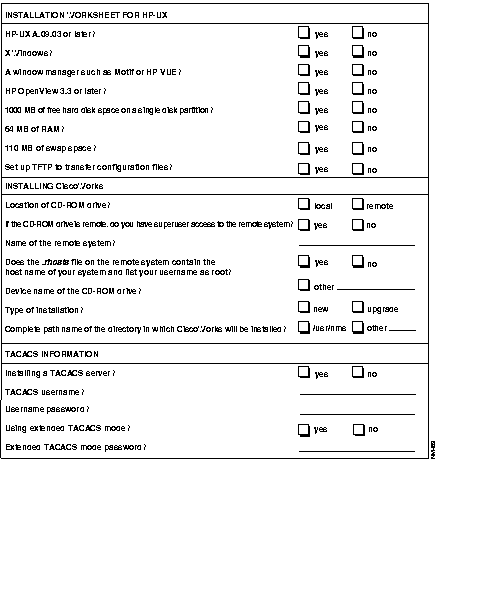
To gather all the information you need to install CiscoWorks, first complete the Installation Worksheet on page 3-9. You can then refer to the worksheet, if necessary, as you proceed with the installation.
Follow these basic steps to prepare to upgrade from a previous release of CiscoWorks, or to install and configure CiscoWorks for the first time.
If you are using an HP system, upgrade your HP-UX to Version A.09.03, A.09.04, or A.09.05. (Refer to the "Verifying Your System Requirements" section later in this chapter.)
You are now ready to install and configure CiscoWorks on your system.
The following upgrade paths are supported for this release:
You must back up the directory and files /usr/nms, /etc/passwd, /etc/tacpasswd, /etc/group, and /var/log/nmslog using UNIX backup commands. Other files you may want to back up include any of the following types of files you created to support CiscoWorks: cron files, specific UNIX commands, scheduled UNIX commands. If these files are not backed up, they will automatically be lost during the upgrade. You can reinstall these files from your backup disk after installation.
Table 3-1 lists the hardware and software requirements for your system. You need one of the following systems to run CiscoWorks:
Operating System | Free Hard Disk Space | RAM | Swap Space | Free Root Partition |
|---|---|---|---|---|
| Sun OS 4.1.3 (Solaris 1.X) or 4.1.4 | 1,000 MB | 64 MB | 110 MB (minimum)
128 MB (recommended) | 5 MB
|
| HP-UX A.09.03 or HP-UX A.09.04 or HP-UX A.09.05 | 1,000 MB | 64 MB | 110 MB (minimum)
128 MB (recommended) | 5 MB
|
The minimum swap space requirement (110 MB) is suitable for managing small networks. For managing more than 75 to 100 devices, Cisco recommends at least 128 MB of swap space.
The memory and swap space requirements depend on such factors as which applications you run, the number of applications you run concurrently, and the number of network devices that you manage with CiscoWorks. You may need to increase the swap space beyond the general minimum requirements, depending on your particular network management needs.
Table 3-2 provides additional information on your system requirements for CiscoWorks and other software.
Software | Minimum Hard Disk Space Requirements |
|---|---|
| CiscoWorks, Version 3.0 | 150 MB |
| Sybase (provided with CiscoWorks), Version 10.0.1 | 37 MB for Sun 56 MB for HP-UX |
| SunNet Manager, Version 2.2.2 | 10 MB |
| HP OpenView, Version 3.3 or later | 15 MB |
| Sybase tables storage | 85 MB (nmsdb, 25 MB total; polldb, 60 MB) |
| Total disk space (values are rounded up for improved performance) | 250 MB1 (minimum)
300 MB (recommended) |
Table 3-3 lists the random access memory (RAM) requirements for your system.
| CiscoWorks Software and Applications | RAM Requirements |
|---|---|
| CiscoWorks1 software | 18 MB |
| CiscoWorks applications2 | 14 MB |
| Total RAM for CiscoWorks software and all CiscoWorks applications | 32 MB (minimum)
64 MB (recommended) |
| Total swap space | 64 MB (minimum)
128 MB (recommended) |
In addition to the general system requirements, CiscoWorks requires the following hardware:
In addition to the general operating system requirements, CiscoWorks applications have specific Cisco Systems systems software requirements. Table 3-4 lists the CiscoWorks application requirements. For more up-to-date information, refer to the CiscoWorks Release Notes shipped with the product or on UniverCD.
| CiscoWorks Application | Hardware or Software Requirement | Cisco Devices Supported |
|---|---|---|
| AutoInstall Manager | Neighbor router running 8.3 or later
New router running Cisco IOS Release 9.1 (7) or later | Any Cisco device running Cisco IOS Release 9.1 (7) or later. |
| CiscoConnect | Sendmail daemon. For more information, refer to the section, "CiscoConnect Software Requirements." | |
| CiscoView | Cisco 4000/4500 with 9.21 or later Cisco 2505 and 2507 with 10.0(6) or later Cisco 25xx (2501, 2502, 2503, 2504, 2509, 2511, 2512, 2513, 2514, and 2515) with 10.2(1.3) or later Cisco 7000 and 7010 with 9.21 or later Cisco A100 Hyperswitch with 1.2(0) and later | Cisco 4000, 4500 Cisco 2505, 2507 Cisco 25xx Cisco 7000, 7010 Cisco A100 Hyperswitch |
| Configuration Management | Cisco IOS Release 8.2 through 10.0 | |
| Device Polling | Supports MIB I and II and Cisco MIB variables up through Cisco IOS Release 10.3 | |
| Environmental Monitor | Cisco IOSTM Release 9.0 and 10.0
Revision 4 ENVM card (Microcode version 2.0 or later) | Cisco 7000, AGS+ |
| Software Management suite (Software Library Manager, Software Inventory Manager, Device Software Manager) | Cisco 3000: Software Release 9.1(7.5) or later, or 9.1(8) or later
Cisco AGS+: Software Release 9.1(7.5) or later, or 9.1(8) or later Cisco 4000: Software Release 9.14(3.4) or later, or 9.14(4) or later Cisco 7000: Software Release 9.17(5.2) or later, or 9.17(6) or later All routers (collection of Cisco 3000, 4000, and 7000, or AGS+ routers Software Release 9.21(0.26) or later; 9.21(1) or later; or 9.1(8) or later | Device types with Flash memory: Cisco 3000, Cisco 4000, Cisco 7000, Cisco AGS+, and Cisco CGS and MGS
Device types with Run-from-Flash images: Cisco 2500 and Cisco 3000 |
CiscoConnect software requirements are described below. If you plan to use CiscoConnect, follow these instructions to configure it.
You may assign any mail alias or user name(s) to the cw-admin alias, but the other two aliases should not be changed. The installation script prompts you for a value for cw-admin. The default for cw-admin is postmaster. It is recommended that you change this value to specify the email address of the person responsible for administering CiscoConnect or e-mail.
If you are not running sendmail, it is likely that you do not have the configuration file for sendmail. If so, you need to create this file as described below. On HP-UX, this file is /usr/lib/sendmail.cf; on SunOS, it is /etc/sendmail.cf.
On HP-UX:
To enable the sendmail daemon, you need to use System Administration Manager (SAM). From the Networking/Communications menu, open the Services: Enable/Disable screen. Set the status of Sendmail to Enabled. This will enable the sendmail daemon and create the sendmail configuration files /usr/lib/sendmail.cf and /usr/lib/aliases.
Edit your /usr/lib/aliases file to make sure it contains the following two aliases:
MAILER-DAEMON: postmasterpostmaster: root
On SunOS:
The directory /usr/lib contains two sample sendmail.cf files called sendmail.main.cf and sendmail.subsidiary.cf. Generally, you will use sendmail.subsidiary.cf. Copy the file to /etc/sendmail.cf and edit it to change the word "mailhost" to the name of your site's mail server in the lines beginning with "DR" and "CR." For example, if your mail server is called "hubbub," change the lines:
DRmailhostCRmailhost
to:
DRhubbubCRhubbub
After setting up the configuration file for sendmail, you need to select the sendmail program to use. There are two binaries in /usr/lib called sendmail.mx and sendmail.nomx. If your site has a connection to the Internet, it is recommended you use sendmail.mx. Link the file to sendmail; it is likely that sendmail.mx may already be linked to sendmail. To identify the file you are using, enter the following command and compare the inode numbers:
ls -i /usr/lib/sendmail*
The file that has the same number as the sendmail file is the one currently installed. To change it (example from mx to nomx), enter the following commands:
cd /usr/librm sendmailln sendmail.nomx sendmail
To run the sendmail daemon, ensure that the following lines exist in the /etc/rc.local file:
if [ -f /usr/lib/sendmail -a -f /etc/sendmail.cf ]; then(cd /var/spool/mqueue; rm -f nf* lf*)/usr/lib/sendmail -bd -q1h; echo -n ' sendmail'fi
The next time you reboot your machine, the sendmail daemon should be running. To verify that the sendmail daemon is running, enter the following command:
ps -ax | grep sendmail
and look for a line that says /usr/lib/sendmail -bd -q1h. You can also start the sendmail daemon without rebooting your system by entering the following command:
/usr/lib/sendmail -bd -q1h
If you are running sendmail 8, the most common way of disabling this feature is by changing the following line in /etc/sendmail.cf:
# who I masquerade as (null for no masquerading)DMcompany.com
to:
# who I masquerade as (null for no masquerading)DM
If you are running sendmail 5, the original vendor supplied sendmail.cf file should have host hiding disabled by default.
For HP-UX, the vendor-supplied sendmail.cf file has a macro Y for host hiding. If you have a line that reads something like the following, comment it out to run CiscoConnect:
DYcompany.com
198.92.30.32 cisco cisco.com cisco.cisco.com
On SunOS:
mail.debug /var/log/syslog
On HP-UX:
mail.debug /usr/spool/mqueue/syslog
You can now monitor incoming and outgoing mail messages by running the following command:
tail -ffile
file is the filename as appropriate for your machine.
Before you install and configure CiscoWorks, complete the CiscoWorks Installation and Configuration Worksheets to identify installation requirements and gather the information required for running the installation and configuration scripts.
Refer to the worksheets when installing and configuring your CiscoWorks software.
Complete the Installation Worksheet. Refer to Table 3-5 for an explanation of the worksheet questions.
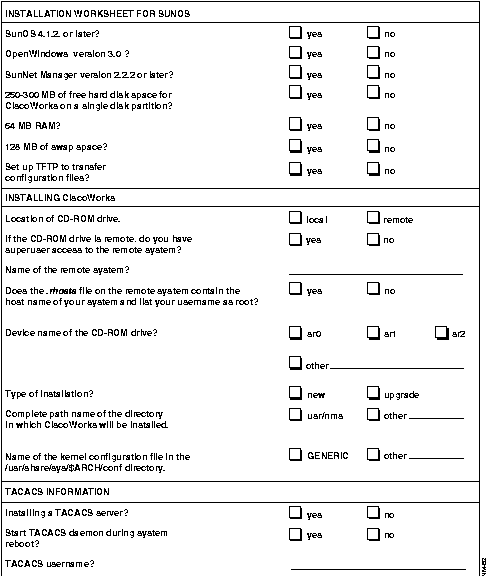
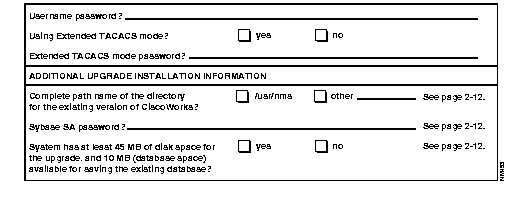
Table 3-5 explains each question on the Installation Worksheet. This information is required to install CiscoWorks. During installation, prompts appear requesting information on the items listed in the installation option column of the table. The order of the list is the sequence in which the installation script prompts you for an answer. To obtain and verify system information for some items on the worksheet, you must log in as the superuser. Logging in as the superuser is described in "Becoming the Superuser," in the "Installing and Configuring CiscoWorks" chapter.
| Installation Option | Sun Systems | HP Systems |
|---|---|---|
| System operating system | Use uname -r to display SunOS Version 4.1.3 or 4.1.3_U1 (Solaris 1.X) or 4.1.4. | Use uname -r to display HP-UX Version A.09.03 or later. |
| Windowing system | OpenWindows (Motif) OpenLook. | X Windows as well as Motif or HP Visual User Environment (VUE). |
| Network Management Station (NMS) platform software | Use $SNMHOME/bin/ snm_version to display the SunNet Manager version and usr/OV/bin/ovlicense to display the HP OpenView license information. | Use /usr/OV/bin/ovlicense to display the HP OpenView license information. |
| Hard disk space | Use df to display the amount of disk space available in each file system. | Use bdf to display the amount of disk space available in each file system. |
| Random-access memory (RAM) | As the superuser, use dmesg | grep mem to display available RAM on your system. | As the superuser, use /etc/dmesg | grep Kbytes to display available RAM on your system. |
| Swap space | As the superuser, use pstat -s to display system swap space. | As the superuser, use swapinfo to display system swap space. |
| Configuring Trivial File Transfer Protocol (TFTP) | Edit the /etc/inetd.conf file on your system as described in the section "Removing Log Files" in "Installing and Configuring CiscoWorks" chapter. You can perform this task either before or after CiscoWorks installation and configuration. | Answer yes to installation setup of TFTP. |
| Type of installation | If you are installing CiscoWorks for the first time, check "new" on your worksheet.
If you are moving from an installed version of CiscoWorks (Version 2.0 or later) to Version 3.0, check "upgrade." If you are upgrading, complete the additional "Upgrade Installation Information" section at the end of the worksheet. | If you are installing CiscoWorks for the first time, check "new" on your worksheet.
If you are moving from an installed version of CiscoWorks (Version 2.1 or later) to Version 3.0, check "upgrade." If you are upgrading, complete the additional "Upgrade Installation Information" section at the end of the worksheet. |
| Directory path name for CiscoWorks | Default directory path name is /usr/nms. | Default directory path name is /usr/nms. |
| Sybase 10.0 installation1 | Directory path and kernel modifications options. | Directory path. |
| CD-ROM drive location | Local or remote installation. | Local or remote installation. |
| Remote installation | Make sure you have superuser login account privileges (in other words, root) on the Sun system and that the complete host name of the remote system is listed in the /etc/hosts file on your system. | Make sure you have superuser login account privileges (in other words, root) on the HP system and that the complete host name of the remote system is listed in the /etc/hosts file on your system. |
| .rhosts file | If you install CiscoWorks from a remote CD-ROM drive, the .rhosts file on that system must contain the host name of your local system and your username specified as a superuser. To verify the local host name and your superuser privileges, view the .rhosts file with a text editor such as vi or vuepad. | If you install CiscoWorks from a remote CD-ROM drive, the .rhosts file on that system must contain the host name of your local system and your username specified as a superuser. To verify the local host name and your superuser privileges, view the .rhosts file with a text editor such as vi or vuepad. |
| CD-ROM device type and name | To display all the devices in the /dev directory, use ls /dev | more. CD-ROM drives usually have device names similar to sr0. | To display all the devices in the /etc/ioscan directory, use ls /dev/dsk | more. CD-ROM drives usually have device names similar to c201d1s0. |
| Sybase databases and log devices | Decide where to place your Sybase databases and log devices--on raw partition or UNIX file systems. | Decide where to place your Sybase databases and log devices--on raw partition or UNIX file systems. |
| Terminal Access Controller Access System (TACACS)2 | Select options for configuring a TACACS server and supplying username and password information for TACACS and extended TACACS modes. | Select options for configuring a TACACS server and supplying username and password information for TACACS and extended TACACS modes. |
| Upgrade Installation Options3 | ||
| Pathname for CiscoWorks directory | Specify /usr/nms or appropriate directory. | Specify /usr/nms or appropriate directory. |
| Sybase password | Enter current Sybase password during upgrade. | Enter current Sybase password during upgrade. |
| Disk space for saving existing Sybase database | Make sure you have 100 MB disk space for Sybase and 50MB free space for upgrade procedure. | Make sure you have 100 MB disk space for Sybase and 50 MB free space for upgrade procedure. |
Complete the Configuration Worksheet. The same worksheet applies to both SunOS and HP-UX installations. Refer to Table 3-6 for an explanation of the worksheet questions.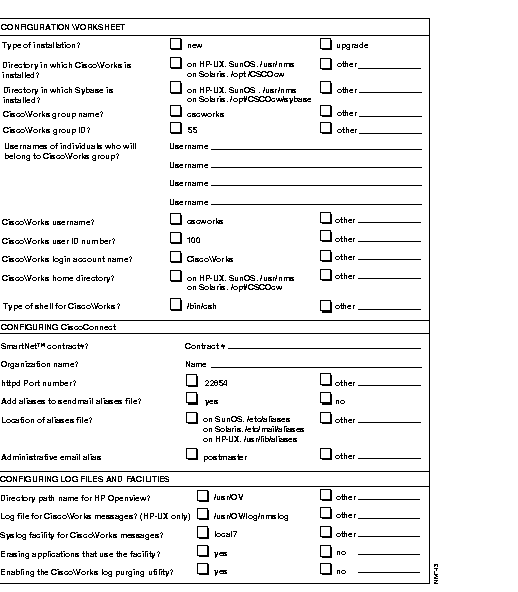
Table 3-6 explains each item on the Configuration Worksheet. This information is required to configure CiscoWorks. For detailed information on the /etc/passwd and /etc/group files, usernames, user IDs, group names, and group IDs, refer to the HP-UX system manuals.
| Configuration Option | Sun and HP Systems |
|---|---|
| Installation type | New or upgrade. |
| CiscoWorks directory | Select /usr/nms or other appropriate directory. |
| CiscoWorks group name1 | Adds CiscoWorks users to /etc/group and /etc/logingroup files during configuration. Default is cscworks. |
| CiscoWorks group ID2 | Select default ID of 55, or check the /etc/group file to ensure new ID number. |
| CiscoWorks group usernames | Make sure the users have a login account on the system and that you add the account information to the /etc/group and /etc/logingroup files. |
| CiscoWorks username | Use default name of cscworks. This name is added to the /etc/passwd and /etc/group files. |
| CiscoWorks user ID number | Use unique number default of 100. This number is added to the /etc/passwd file. |
| CiscoWorks login account name | Use the default name of CiscoWorks. This name is added to the /etc/passwd file. |
| CiscoWorks home directory | CiscoWorks is seen as a user on your system and has a default directory of /usr/nms. |
| MIB operations | Install new MIB files or use existing MIB files. |
| Sybase directory3 | Select /usr/nms, /usr/hpov/sybase, or other appropriate directory. The default Sybase directory is /usr/nms, also known as $SYBASE. |
| Sybase user name | Use default name of sybase. This name is added to the /etc/passwd and /etc/group files. |
| Sybase backup server name | Use the default name of CW_SYB_BACKUP. |
| Sybase SA password | The default password is sybasesa. You cannot change the default. |
| Sybase full name | Use the default name of Sybase. This name is added to the /etc/passwd file. |
| Master device path | Use the default of /usr/nms/$SYBASE/data. |
| Master device physical file name | Use the default of master.dat. |
| Sybase system procedures database location | Use the default sybsysproc in $SYBASE/data. You may also select a raw partition such as /dev/sr1 on Sun workstations, or /dev/rdsk/c201d5s2 on HP-UX systems. |
| CiscoWorks NMS database name | The default is nms. |
| CiscoWorks polling database name | The default is polldb. |
| CiscoWorks NMS database size | Use the default of 20 MB. This is where the Sybase database stores device inventory information. |
| CiscoWorks NMS log device size | Use the default of 5 MB. This is where the Sybase database stores transaction log space. |
| CiscoWorks polling database size | Use the default of 40 MB. This is where the Sybase database stores polling information. |
| CiscoWorks polling database log device size | Use the default of 20 MB. This is where the Sybase database stores polling messages. |
| TFTP configuration | |
| Directory path name for NMS | Default directories are /usr/snm for SNM, /usr/OV for HP OpenView. |
| SmartNet contract number | Enter your SmartNetTM contract number. |
| Organization name | Enter the name of your orgainzation or company. |
| Port number | The default is 22854. This is the TCP port used by CiscoConnect. |
| Sendmail aliases file | The default is to say Yes to add aliases to the file. |
| Location of aliases file | On Sun workstations, the default location is /etc/aliases. On HP-UX systems, the default location is /usr/lib/aliases. |
| Administrative email alias | The default is postmaster. It is recommended that you change the default to the name of the person who is responsible for administering CiscoConnect or email. This value is assigned to the "cw-admin" alias. |
| CiscoWorks message log file | Default centralized log files are /usr/nms/nmslog for SNM, /usr/OV/log/nmslog for HP OpenView. |
| System Log (syslog) facility for CiscoWorks messages | To log both CiscoWorks messages and Cisco device messages, use the default facility local7. Cisco devices use the local7 facility. If you specify a facility in the range of local0 through local6, only CiscoWorks messages are logged.
Information about the facility you choose is stored in the $NMSROOT/etc/nms.rc file. |
| Erasing applications that use the syslog facility | Check yes, if you want the CiscoWorks log utility to use the syslog facility to transfer or exchange information such as error messages or receive extraneous messages in the database message logger. |
| Modification of /etc/rc.local file | The Sybase dataserver and other CiscoWorks daemons must run as background processes for correct operation of CiscoWorks. This section of the configuration modifies /etc/rc.local needs to include nmstartup (which starts the Sybase dataserver and CiscoWorks daemons during system reboot). |
| Enabling the CiscoWorks log purging utility | Enables daily purging and backing up of the CiscoWorks centralized log, nmslog, via a UNIX scheduling daemon. |
|
|